

Available to buy here:
Welcome to Reviews inside tv, where we break down the tech that matters. Today, we’re taking a deep dive into the Lenovo ThinkPad T14s Gen 3. If you’re looking for a sleek business notebook, or a portable powerhouse, stick around to see if this machine has what it takes to handle your workload.
The Lenovo ThinkPad T14s Gen 3 is designed with professionals in mind. At the heart of this device is the Intel Core i7-1260P, a 12-core processor running at 2.10 GHz. This chip brings some serious power for multitasking and demanding applications. Whether you’re crunching numbers, running several apps simultaneously, or working with spreadsheets and documents, the i7 can handle it all without breaking a sweat. The 16 GB of RAM helps with that, providing smooth performance even when you’re juggling several tabs and programs at once. It’s enough to keep everything running without slowing down, ensuring a lag-free experience for day-to-day tasks.
For storage, you’ve got a 512 GB SSD, which is plenty of space for your work files, documents, and personal media. The SSD’s speed really enhances the experience, cutting down on loading times and speeding up data transfer, making it ideal for both work and play. The real-world difference between this SSD and an older SATA drive is noticeable—expect faster boot times, quicker file transfers, and smoother overall performance. And when it comes to storage upgrades, the ThinkPad T14s lets you easily expand if you ever need more room down the line.
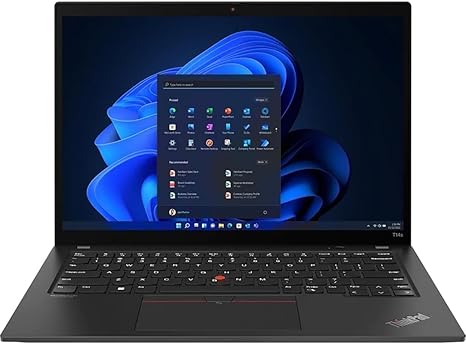
Moving on to the screen, this 14-inch WUXGA display offers a resolution of 1920 x 1200, which gives you an extra 120 pixels over the standard 1080p screen, making it a little sharper. The aspect ratio is great for productivity as well, allowing you to view more content on the screen without scrolling as much. It’s not an OLED or a mini-LED, but for a business laptop, it hits the sweet spot. The screen is bright enough for indoor use and provides good color accuracy for most tasks—whether you’re watching videos or working on presentations, it should suffice for most users. However, if you’re a content creator who needs near-perfect color reproduction or deep blacks, you may want to look for something with a higher-end display.
Battery life is always a concern with ultra-portables, but Lenovo’s 50Wh battery provides a solid performance. Under light use, you should expect anywhere from 7 to 9 hours, depending on your workload. If you’re running more demanding tasks or streaming video, that’ll likely dip closer to the 5-hour mark. While it’s not going to last you all day on a heavy workload, it should still handle a full workday if you’re doing lighter tasks. When it’s time to recharge, the 65W USB-C charging solution ensures you won’t be tethered to a wall for long. The charger is compact, making it easy to carry around without adding too much bulk.
In terms of thermals, the ThinkPad T14s keeps things fairly cool. The fan noise is low under light usage, but under heavier loads, such as during video exports or gaming, you might hear the fans kick in. Even then, the noise isn’t overwhelming. The chassis stays relatively cool, with minimal heat buildup on the keyboard deck and underside, so it’s comfortable to use on your lap for extended periods. That said, if you’re pushing the system hard for hours at a time, you may notice a slight rise in temperature.
When it comes to input devices, the keyboard on the T14s is definitely one of its standout features. Lenovo’s ThinkPad lineup is known for its excellent typing experience, and this one delivers. The key travel is just right, providing enough feedback for comfort during long typing sessions. The trackpad is responsive, with good palm rejection, and the click feel is satisfying. Overall, the typing and navigation experience here is top-tier, especially for users who do a lot of document work or need a reliable machine for note-taking.
Ports and connectivity are solid, with two USB-A 3.2 Gen 1 ports, two USB-C 3.2 Gen 2 ports (one with Power Delivery and DisplayPort 1.4), an HDMI 2.0, a headphone/microphone combo jack, and a microSD card reader. If you need to hook up to external monitors, projectors, or even use external peripherals, you’ve got you covered. Wi-Fi 6 ensures fast, reliable wireless connectivity, and Bluetooth 5.2 is perfect for connecting wireless peripherals like headphones or a mouse.
In terms of expandability, the RAM is soldered onto the board, which means you’re not going to be able to upgrade it down the road. The 16 GB it ships with should be plenty for most users, but if you ever need more memory for heavier workloads, you might be better off looking at a different laptop that offers upgradeable RAM. On the plus side, the SSD is replaceable, so you have the option to upgrade your storage later if needed.
When it comes to portability, the ThinkPad T14s is definitely up there. Weighing just around 2.5 pounds and measuring only 0.65 inches thick, it’s one of the more portable laptops in this class. It’s not the lightest ultrabook on the market, but it’s light enough to carry around all day without feeling weighed down. Whether you’re a student, a business traveler, or just someone who needs a portable machine for work, this laptop should be easy to take with you wherever you go.
So, what are the real-world pros and cons of this machine? On the plus side, you’re getting an impressive combination of power, reliability, and portability. The i7-1260P CPU handles most tasks effortlessly, the 16 GB of RAM ensures smooth multitasking, and the 512 GB SSD offers fast storage with plenty of room for your work files. The battery life is solid, and the keyboard is a dream for long typing sessions. It’s a laptop that can handle just about anything a professional needs, from web browsing to video calls to document creation.
On the downside, the display, while solid for most tasks, might not be vibrant enough for creators or anyone who needs color accuracy. The battery could be better for heavy users, and the fact that the RAM is soldered onto the motherboard limits future upgrades. There’s also the lack of a dedicated GPU—so if you’re into gaming or creative workloads that require serious graphics power, this won’t be the machine for you.
Now, when it comes to value for money, the ThinkPad T14s sits in a sweet spot for professionals. It’s not the cheapest laptop out there, but for the price, you’re getting a solid balance of performance, portability, and build quality. If you’re comparing it to other high-end business laptops, it’s certainly competitive, but if you need higher-end graphics for tasks like video editing or gaming, you might want to consider something else.
In conclusion, the Lenovo ThinkPad T14s Gen 3 is an excellent choice for professionals who need a reliable, portable, and powerful workhorse. Its sleek design, solid performance, and fantastic keyboard make it a great option for office work, business travelers, and students. However, it may not be the best pick for gamers or content creators who need more GPU power or a more vibrant display. If you’re looking for a solid all-around performer that’ll handle productivity tasks with ease, this laptop will do the job without question.
Thanks for watching today’s review. Be sure to check the comments box for more details on how to get your hands on the Lenovo ThinkPad T14s Gen 3. And don’t forget to like, subscribe, and hit that bell icon so you never miss our latest reviews. If you’ve already used this laptop, or have any questions, drop a comment below. See you in the next one—stay tech-savvy!
Available to buy here:


