

Available to buy here:
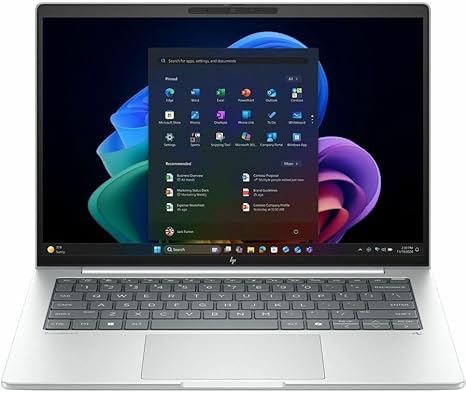
Welcome to “Reviews inside tv,” where we bring you in-depth insights into the latest tech products. Today, we’re looking at the HP EliteBook 8 G1i 16″ Touchscreen Notebook. This device positions itself as a sleek, premium business laptop that aims to combine performance with portability and style. But does it live up to those promises? Let’s break it down and see what this laptop is really offering.
The HP EliteBook 8 G1i features a 16-inch touchscreen display, with a resolution of 1920 x 1200 pixels, a slightly higher than standard WUXGA resolution. This puts it in a comfortable spot for both productivity and media consumption, especially with the touchscreen capabilities for those who prefer a more interactive experience. Under the hood, it’s powered by the Intel Core Ultra 5 226V processor, which comes with 8 cores. This octa-core configuration allows for robust multitasking, making it capable of handling not just office tasks but some more demanding applications as well. Whether you’re running multiple apps or working with large documents, this processor should keep things running smoothly. And while this is not a gaming processor, the Intel Arc GPU provides decent integrated graphics, making it suitable for light creative work and even casual gaming at lower settings.
With 16 GB of RAM, this laptop is designed for serious multitasking. That’s enough memory to keep several apps open at once, from word processors to browser tabs to media editing software. This capacity allows it to perform well in business environments where running a virtual meeting while editing a document or researching online is common. For storage, you get a 512 GB SSD. That solid-state drive offers fast read and write speeds, meaning quick boot-ups, fast file access, and overall snappy system performance. The SSD helps eliminate the sluggishness you often experience with older HDD-based storage, offering a much smoother experience, especially in day-to-day tasks.
When it comes to display, the 16-inch touchscreen is a standout feature. While not OLED or mini-LED, the WUXGA resolution delivers clear text and vibrant colors, ideal for media consumption and productivity. With a good level of brightness and an IPS panel for wide viewing angles, it provides solid performance for most environments, whether you’re working in a well-lit office or catching up on videos during a flight. That touchscreen, while not an absolute must for everyone, adds a layer of convenience for users who like to interact directly with their screen, particularly for tasks like drawing or navigating through presentations.
Now, let’s talk about real-world usage. The EliteBook 8 G1i performs well across everyday tasks, from web browsing and email to document editing and spreadsheets. The Intel Core Ultra 5 226V processor keeps everything responsive, and the 16 GB of RAM makes multitasking a breeze. Media consumption is enjoyable, too. Whether you’re streaming video or listening to music, the display holds its own, delivering clear visuals and good color accuracy. The speakers are decent for the size of the laptop, though nothing extraordinary. They’re serviceable for video calls or casual media but might not satisfy audiophiles or those looking for immersive sound.
If you’re into content creation, this laptop can handle light video editing or photo manipulation, but it’s not a machine for heavy-duty production work. The Intel Arc GPU can handle light video editing in apps like Premiere Pro, but the experience will be smoother with less demanding workflows. For casual gaming, you can expect playable frame rates at medium settings on titles like Fortnite or older games, though more graphically intense titles will push this laptop to its limits.
In terms of thermals and noise, the HP EliteBook 8 G1i does a reasonable job, especially under light to medium load. During office tasks or streaming, it remains quiet and cool, with minimal fan noise. Under more intensive tasks, like video rendering or playing games, the fans will ramp up, but they are not overly loud, keeping the noise to a reasonable level. That said, the bottom of the laptop does get noticeably warm during long tasks, so you might want to avoid placing it on your lap for extended periods if you’re working under load.
Battery life is another crucial area to consider. With a 50Wh battery, the EliteBook 8 G1i can last around 8-10 hours with moderate use, which includes tasks like web browsing, document work, and video streaming. For heavier workloads, like media editing or multitasking with multiple apps open, you can expect closer to 6-7 hours. The charging speed is reasonable, taking about 1.5 to 2 hours to fully charge, and the power brick is compact enough for travel. In terms of portability, the laptop weighs about 1.6 kg, which isn’t the lightest, but it’s still manageable for carrying around all day in a backpack.
The keyboard on this laptop is comfortable for typing over long sessions. The key travel is decent, with enough feedback for a satisfying experience. The layout includes full-sized arrow keys, a number pad, and well-placed function keys. The trackpad is responsive and accurate, with good palm rejection, making it easy to navigate without accidental clicks. If you prefer using the touchscreen, that’s also an option. The laptop includes a fingerprint reader for quick logins, which is a nice touch, especially for those on the go who want added security.
In terms of connectivity, the HP EliteBook 8 G1i doesn’t disappoint. It offers two USB-A ports, two USB-C ports, one of which supports Thunderbolt 4, an HDMI 2.0 port, and a microSD card reader. This range of ports covers the basics for docking, connecting external monitors, and using peripherals like a mouse or external storage. Wi-Fi 6 ensures fast internet speeds and reliability, and Bluetooth 5.3 gives you the latest in wireless device compatibility. This laptop also includes an Ethernet port, which is becoming a rare sight these days but still handy for wired internet connections.
Now, let’s talk about the pros and cons. On the plus side, the HP EliteBook 8 G1i shines in its versatility—offering solid performance for a range of tasks, a decent display, and excellent connectivity. The build quality is premium, with an aluminum body that feels sturdy and durable. The keyboard and trackpad are comfortable for long sessions, and the touchscreen adds some extra utility. On the downside, the battery life could be better, especially for more demanding tasks. The display, while good for most tasks, isn’t the best in terms of color accuracy or brightness when compared to higher-end models in the same price range. Additionally, while it can handle light content creation, it’s not built for heavy workloads, so creators with high demands might want to look elsewhere.
When it comes to value for money, the HP EliteBook 8 G1i is priced reasonably for its specifications, but it’s not necessarily a standout compared to some of the competition. Laptops in this range, like the Dell Latitude series or Lenovo ThinkPad X1 Carbon, offer similar performance but may come with slightly better displays, longer battery life, or more powerful graphics options, depending on the model.
In terms of build quality, the HP EliteBook 8 G1i feels solid. The aluminum chassis is durable, and the hinge feels strong and secure. HP has a reputation for building reliable business laptops, so this device should hold up well over time, assuming normal use.
For those interested in long-term support, HP offers a standard warranty with on-site repairs available for business users, which adds peace of mind for anyone relying on this laptop for work.
To wrap things up, the HP EliteBook 8 G1i is a solid choice for business professionals, students, and casual creators who need a reliable, portable machine with decent performance and battery life. It’s not perfect, but it delivers well on its promises and is priced fairly for the features it offers. If you’re looking for a laptop that balances power, portability, and practicality, this could be the one for you. However, if you need a machine for heavy creative tasks or gaming, you might want to consider alternatives with more GPU power.
Thanks for watching! The link to grab this laptop is in the comments box below. If you’ve used this laptop, let us know your thoughts or ask any questions you might have! Until next time, keep those tech decisions smart, and we’ll see you in the next one!
Available to buy here:


