

Available to buy here:
Welcome to Reviews inside tv! Today, we’re checking out the Acer Chromebook 511 C736, a compact 11.6-inch Chromebook that’s tailored for light productivity and media consumption. With its budget-friendly price, it promises a solid battery life and smooth performance for everyday tasks. But does it live up to the hype, or are there compromises that might make you think twice? Let’s break it all down.
First, let’s look at the specs. This Chromebook packs an Intel N100 quad-core processor, which might not be the latest high-end chip, but it’s efficient for everyday tasks like browsing, document work, and streaming videos. The quad-core design means it can handle multitasking without much struggle, though it’s not going to blow through heavy-duty apps like video editing software or high-end games. It’s paired with 8GB of RAM, which is more than enough for web browsing with multiple tabs open, office apps, and media consumption. You’ll be able to run several apps at once without noticing slowdowns, which is a real win in this price range.
For storage, you’ve got a 32GB SSD, which is fairly limited, but it’s expected for an entry-level Chromebook. It also features 32GB of flash memory, which helps with speed in boot-up times and file transfers. It’s not going to store a large media library, but for the cloud-based nature of most Chromebooks, that should be more than sufficient. You’ll want to rely on Google Drive or other cloud services to store your files.
The display on this model is an 11.6-inch HD screen with a resolution of 1366 x 768. While it’s not a full HD screen or higher, it should be just fine for most users. Watching movies or shows on the go is a smooth experience, though don’t expect pixel-perfect clarity. The screen brightness is decent, but it might struggle a bit in bright sunlight. If you’re watching videos or working indoors, the picture quality is sharp enough for day-to-day use.
When it comes to battery life, the Acer Chromebook 511 impresses with up to 12 hours of use on a single charge. This is a real highlight for those who need to be mobile throughout the day. Whether you’re working at a café, at school, or on a long flight, the Chromebook should last through your entire day. Charging is quick, and the lightweight design makes it easy to carry around without weighing you down.
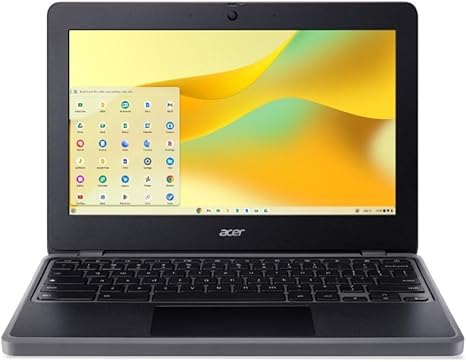
Speaking of the design, the Acer Chromebook 511 is pretty lightweight, coming in at just 1.1 kg (about 2.5 lbs). The 11.6-inch size means it’s ultra-portable, perfect for students or anyone who needs a laptop that can easily slip into a backpack or briefcase. The build quality feels solid for a budget Chromebook, though it’s made from plastic, so it lacks the premium feel of higher-end models. The black finish is simple and professional, but you might see some wear over time, especially if you’re frequently on the move.
As for performance, the Acer Chromebook 511 is suited for light, everyday tasks. You can easily jump between multiple Chrome tabs, use Google Docs, and watch your favorite shows or YouTube videos without issues. The Intel N100 chip does its job well for typical tasks, but don’t expect it to run demanding apps. For heavy multitasking, or if you plan to use software like Photoshop or play modern games, this Chromebook won’t be the right fit. However, if you stick to web-based apps, streaming, and productivity, it’s more than sufficient.
Thermal performance is something to note. Since the Chromebook is fanless, it’s silent, which is ideal for quiet environments. It also means there’s no fan noise to distract you. The device remains relatively cool during light use, and under heavy loads, it doesn’t get uncomfortably hot. The cooling system is passive, and there’s no noticeable thermal throttling in normal usage. However, when you’re running multiple apps at once or streaming for hours, you might notice the body getting warm, but it remains manageable for extended use.
Now, onto the keyboard and trackpad. The keyboard is decent for typing, with a comfortable layout and responsive keys. The key travel is shallow, which may not be to everyone’s liking, especially if you’re used to deeper keystrokes, but for casual typing and schoolwork, it gets the job done. The trackpad is similarly functional, with good accuracy, but it’s not as smooth as some higher-end models. It’s large enough for easy navigation and works well for the usual gestures like scrolling and clicking.
In terms of connectivity, the Acer Chromebook 511 offers a solid selection of ports. You get two USB Type-C ports, one USB Type-A port, a microSD card reader, and a headphone jack. This is a decent lineup for most basic users, though you may find yourself needing a dongle or two for extra connectivity, like an HDMI output or Ethernet port. For wireless connectivity, it includes Wi-Fi 6, which should offer faster speeds and better range if you’re using high-speed internet. Bluetooth 5.0 is also included, so you can easily connect wireless accessories.
One thing to note is that the 32GB of storage is not upgradeable, and while the RAM is not soldered, it’s only 8GB, so you won’t be able to add more RAM later if you find yourself needing more memory for more intensive tasks.
In terms of overall value, this Chromebook is excellent for basic tasks. If you’re someone who mostly uses web-based apps, does light office work, or enjoys media streaming, the Acer Chromebook 511 could be an excellent choice for its price. With a battery that lasts all day and a solid performance for general use, it delivers good value for those looking for a portable, budget-friendly laptop. However, if you’re someone who needs more storage, power for heavy workloads, or a higher-resolution display, you might want to look elsewhere.
For comparison, if you’re considering a similar laptop in this price range, you might look at the Lenovo Chromebook Duet or the HP Chromebook 11, which offer similar performance but have different screen sizes and features. The Acer Chromebook 511 wins on battery life, while others might edge out with slightly more storage or better display resolutions. The decision depends largely on what you prioritize.
So, who is this laptop best for? If you’re a student, light office user, or someone who needs a simple, portable laptop for browsing, media, and office tasks, this Chromebook offers excellent value. It’s also a great option for those on a budget or those who need a secondary laptop for basic tasks. However, if you’re a power user, gamer, or someone who needs a high-end display or storage, it might not meet your needs.
Thanks for watching! You can find the link to purchase this Chromebook in the comments box below. If you already own this model, let us know your experience in the comments, or ask any questions you might have. Don’t forget to like, subscribe, and hit the bell icon so you don’t miss any of our upcoming reviews. Catch you next time, and remember, the right laptop can make all the difference in your day!
Available to buy here:


