

Available to buy here:
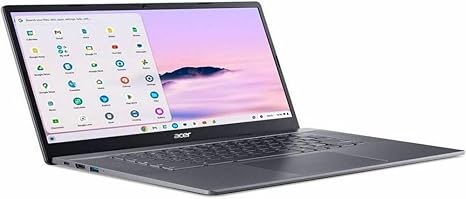
Welcome back to Reviews inside tv! Today, we’re checking out the Acer Chromebook Plus 515 CBE595-1T-32PF, a 15.6-inch touchscreen Chromebook powered by Intel’s Core i3 Gen I3-1315U processor. If you’re on the hunt for an affordable Chromebook that balances power and portability, this might just be worth a closer look. But does it deliver on the performance and experience it promises? Let’s find out.
This Chromebook is equipped with an Intel Core i3 Gen I3-1315U, a processor designed for basic to moderate everyday tasks. The i3-1315U offers a solid base clock of 1.20 GHz, which is great for day-to-day activities like web browsing, document work, and light media consumption. It comes with 8GB of RAM, which, in this case, provides decent multitasking ability without feeling sluggish when switching between apps. When it comes to storage, the 256GB SSD provides enough space for your essential files, apps, and a few large documents or media files. The SSD also ensures quicker boot times and faster data access compared to traditional HDD storage, helping with smooth performance in everyday use.
The 15.6-inch touchscreen display offers a Full HD resolution of 1920 x 1080, which is perfect for productivity tasks, media consumption, and light content creation. The screen’s touch capability adds an extra layer of interactivity, making it easier to navigate, zoom in on content, or work with touch-friendly apps. The display is an IPS panel, so you get wide viewing angles and decent color reproduction, though it’s not quite as vibrant as more premium displays like OLED or mini-LED. It’s good for everyday use but not for professional-grade photo or video editing.
In terms of battery life, this Chromebook comes with a typical configuration that should get you through a full day of office work, light web browsing, or media consumption. Expect anywhere from 8 to 10 hours of real-world use, depending on what you’re doing. The battery is quite solid for a device at this price point, and it also charges relatively fast, so you can plug it in for a quick top-up during breaks.
Now, when it comes to typing, the keyboard feels comfortable for short to medium typing sessions. It’s not as luxurious as some higher-end models, but it does the job with decent key travel and feedback. The trackpad is large, responsive, and offers good palm rejection, which is a nice touch for those who prefer using gestures for navigation. However, one downside here is that there’s no fingerprint reader, which could have added a nice touch of convenience and security, especially if you’re working with sensitive documents.
Let’s talk about ports and connectivity. The Acer Chromebook Plus 515 has a selection of essential ports, including USB-A, USB-C, an HDMI port for external monitors, and an SD card reader for additional storage. It’s missing Thunderbolt support, which would have been great for faster data transfer and connecting to high-performance peripherals. However, the inclusion of Wi-Fi 6 ensures fast and reliable wireless connectivity for most users, and Bluetooth 5.0 allows for smooth connections with wireless accessories like headphones and mice.
Performance-wise, the Chromebook handles light tasks such as web browsing, document editing, and media streaming just fine. It’s not the laptop you’ll want to turn to for gaming or intensive workloads like video editing, but for students, office users, or casual consumers, it does its job quite well. When multitasking with multiple tabs and apps, the 8GB of RAM holds up decently, though you might notice some slowdown if you push it too far with a lot of Chrome tabs open or heavier applications running simultaneously.
As for thermals, the Chromebook remains fairly cool under normal use, and there’s minimal fan noise. Under load, the fans kick in, but they’re not overly loud or distracting. It’s a pretty quiet experience, which is ideal for a laptop you might use in a shared space, like a coffee shop or classroom.
The build quality here is solid for the price. It’s constructed with plastic, but it doesn’t feel cheap. The chassis is relatively thin and lightweight, making it easy to carry around. Weighing in at just 3.75 pounds, it’s portable enough for daily commuting or carrying in a backpack, though it’s not the lightest Chromebook out there.
Now, let’s talk about the value for money. At its price point, the Acer Chromebook Plus 515 offers a good balance of features—adequate performance, a decent display, and all-day battery life. It’s well-suited for students, office workers, and casual users who need a simple, reliable device for browsing, document work, and media consumption. However, if you’re looking for something more powerful for gaming or content creation, you’ll likely need to look elsewhere.
Comparing it to some alternatives in the same price range, like the HP Chromebook 15 or the Lenovo IdeaPad 3, the Acer stands out with its 15.6-inch touchscreen, which offers a better interactive experience. However, it doesn’t offer the raw processing power of some higher-end models with Intel Core i5 or i7 processors, nor does it include features like a backlit keyboard or more advanced display options, which you might find in slightly more expensive models.
In terms of build and reliability, Acer generally has a strong reputation for providing good-quality devices at reasonable prices. While the Chromebook Plus 515 feels well-built for its category, it might not have the long-term durability of higher-end ultrabooks, so it’s important to manage expectations.
To sum it up, the Acer Chromebook Plus 515 CBE595-1T-32PF is a solid choice for those who need an affordable laptop for everyday tasks. It’s not the fastest or most powerful, but it offers excellent value in terms of battery life, display quality, and portability. If you’re a student, office worker, or someone who primarily needs a laptop for browsing, document editing, or media consumption, this one should definitely be on your radar.
Thank you for watching! If you found this review helpful, don’t forget to like, subscribe, and hit the bell icon to stay updated on our latest reviews. The link to get your hands on the Acer Chromebook Plus 515 is in the comments box below, and if you already own it, we’d love to hear your thoughts—leave a comment and share your experience. Catch you in the next one!
Available to buy here:


