

Available to buy here:
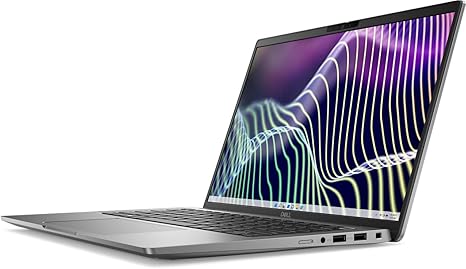
Welcome to “Reviews inside tv”! Today, we’re taking a close look at the Dell Latitude 7000 7440 14” Touchscreen Notebook. This is a sleek, business-oriented laptop that packs some impressive specs, but does it live up to the hype? Let’s break it down.
First, let’s get into the heart of the machine – the Intel Core i7-1365U processor. This is a 13th-gen chip with a deca-core (10-core) configuration, running at 1.30 GHz. For office work, web browsing, and light content creation, this CPU should offer a smooth, snappy experience. Multitasking between apps or handling spreadsheets with a dozen tabs open won’t slow you down. If you’re into heavier tasks like video editing or 3D rendering, the i7-1365U will handle those too, though it’s not quite at the level of more powerful chips like the i9 series. Still, for most users, this will be plenty.
Coupled with this is 16GB of memory, which is the sweet spot for multitasking in 2025. Whether you’re running a few apps or more demanding software like Photoshop or AutoCAD, this laptop won’t blink an eye. 16GB gives you the freedom to jump between programs without stuttering or lag, even if you’ve got multiple browser tabs and media files open at once. It’s worth noting that this memory is onboard, which means you can’t upgrade it later, so this is a solid choice if you’re going to stick with the system for a while.
Storage-wise, you get a 256GB SSD. While that’s decent for a light to medium workload, if you’re a creator or someone who works with large files, you might hit the limit. The SSD, however, ensures quick boot times and almost instant loading of applications, so you won’t be waiting long for your work to load. Plus, it helps your laptop resume from sleep almost immediately, which is perfect for those quick work sessions.
The 14-inch Full HD Plus touchscreen display offers a resolution of 1920 x 1200, which, while not the sharpest available, still delivers crisp visuals and an immersive movie-watching experience. It’s not OLED or mini-LED, so if you’re looking for vibrant colors with perfect blacks, this might not be the display for you. But for everyday tasks, browsing, and streaming, it holds its own well. The touchscreen is responsive, and while it’s not something everyone will use all the time, it’s nice to have for quick interactions and gestures.
When it comes to performance, this laptop excels in office productivity tasks. Web browsing, document editing, spreadsheets, and video calls are a breeze. It’s a business powerhouse that can handle typical work scenarios with ease. If you plan to stream video, the display quality will give you a solid experience with good color accuracy for the price. It’s not going to compete with high-end content creator machines in terms of richness, but it’s more than adequate for casual movie watching or streaming shows.
Moving on to content creation, the i7 processor and 16GB RAM combination is sufficient for basic photo editing or light video editing, but more demanding workflows might slow things down a bit. If you’re into gaming, however, this laptop won’t be the best fit. The integrated graphics won’t handle AAA titles at higher settings, but casual games or older titles should work well.
Now, let’s talk about thermals and noise. Under light loads, like office tasks or video streaming, the Latitude 7000 stays relatively cool and quiet. There’s no noticeable fan noise, and the temperature of the chassis remains comfortable. When pushing the system with more demanding workloads, such as video editing or gaming, the fans do kick in, and you might notice some heat around the keyboard and the underside. However, it’s nothing too drastic or uncomfortable for short bursts of heavy use. Extended sessions with high demands might lead to thermal throttling, but for most tasks, this won’t be an issue.
The battery, rated at around 50Wh, gives you solid all-day performance under normal office workloads – expect anywhere between 8 to 10 hours of use. Streaming videos or using more intensive apps will reduce that, but it’s more than enough for a day of work. Charging speeds are decent, though not rapid, so expect a couple of hours to fully charge from near zero.
The Latitude 7000 is relatively light at just 2.6 pounds, making it highly portable. Whether you’re commuting, moving between meetings, or just carrying it around for a day at the office, it won’t weigh you down. The slim profile makes it easy to slip into a bag, and while it’s not as ultra-slim as some premium ultrabooks, it offers a good balance of portability and performance.
Now, let’s talk about the keyboard and trackpad. The key travel and feedback are solid for typing long emails or documents. The layout is well thought out, with full-sized arrow keys and a power button conveniently placed. For longer typing sessions, it’s comfortable, and you won’t feel fatigued too quickly. The trackpad is responsive, offering smooth cursor control and good palm rejection. It’s not as large as some premium models, but it’s definitely up to the task for daily use.
Ports are plentiful, which is a nice surprise. You get a USB-A port for legacy devices, two USB-C ports (one with Thunderbolt 4), an HDMI port for external displays, and a microSD card reader for added versatility. There’s also a headphone jack and Wi-Fi 6 support, ensuring you can connect to fast networks without any issues. Unfortunately, you can’t upgrade the RAM or storage later, so if you need more power in the future, you’ll be stuck with what you have, which might be a dealbreaker for some.
Speaking of value, the Dell Latitude 7000 7440 is a solid choice for business professionals or anyone who needs a reliable workhorse. It’s not a gaming laptop or a creator’s dream, but it shines in productivity, portability, and battery life. The build quality feels premium, with an aluminum chassis that’s solid without being too heavy. It’s a laptop that doesn’t stand out in any single area but brings all the essentials together well.
Is it worth the price? For a business-oriented laptop with solid performance and decent build quality, yes. If you’re looking at competing models, you might find slightly more power or better displays from other brands, but the Latitude 7000 holds its ground as a reliable, efficient machine for day-to-day office work.
If you’re comparing it to competitors in this price range, other business ultrabooks like the Lenovo ThinkPad or HP Elite Dragonfly might offer better keyboards or more power, but the Dell Latitude 7000 does a fantastic job of striking the right balance between performance and portability. It’s not perfect for everyone, but it will serve business professionals, students, or casual users very well.
To wrap things up, the Dell Latitude 7000 7440 is a great choice for those looking for a dependable, portable work laptop with solid performance and a decent display. It won’t win any awards for gaming or creative work, but for the tasks it’s built for, it’s a solid choice.
Thank you so much for watching! If you want to pick up the Dell Latitude 7000 7440, you can find the link in the comments box. If you’ve already tried it, let us know your thoughts down below. Don’t forget to like, subscribe, and hit the bell icon so you never miss a review. Catch you next time!
Available to buy here:


