

Available to buy here:
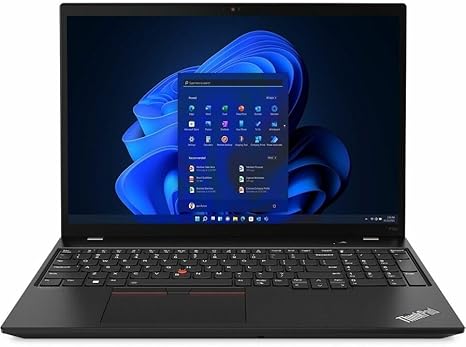
Welcome to Reviews inside tv! Today, we’re looking at the Lenovo ThinkPad P16s Gen 2, a 16-inch mobile workstation designed to handle demanding workloads. This model is packed with some serious specs aimed at professionals who need reliability, performance, and portability all in one package. Whether you’re a creative, a business user, or someone who needs to tackle high-intensity tasks on the go, the P16s promises a lot. But does it deliver? Let’s find out.
First, let’s run through the key specs. The Lenovo ThinkPad P16s Gen 2 is powered by an AMD Ryzen 7 PRO 7840U processor, which is built for efficiency and performance. It offers eight cores and 16 threads, making multitasking feel smooth, whether you’re juggling multiple documents, spreadsheets, or running heavy apps like Adobe Creative Cloud. Coupled with 16 GB of memory, this laptop can run several programs simultaneously without a hitch, making it an excellent choice for office work, light content creation, or running virtual machines.
On the storage side, you get a 512 GB SSD. While this isn’t the largest SSD out there, it’s enough to hold your essential files, documents, and some media. Plus, the speed of an SSD, especially compared to traditional SATA storage, makes this laptop boot up quickly and access files at a rapid pace—something you’ll definitely appreciate in day-to-day use. The 16″ display, with a WUXGA resolution of 1920 x 1200, delivers clear, vibrant visuals. It’s great for watching videos, reviewing documents, or even some light gaming. While it doesn’t offer the deep black levels of OLED or mini-LED, the clarity here is still impressive for this category.
Now, how does it perform? In real-world usage, the ThinkPad P16s shines for office and productivity tasks. Switching between multiple web tabs, editing documents, and attending video calls is seamless. The Ryzen 7 PRO CPU and 16 GB of RAM handle these tasks with ease, without significant lag. If you need to stream video, whether it’s a conference or your favorite show, the display looks sharp, and the sound quality is good for the size—perfect for a mobile workstation, but don’t expect booming audio. For creative professionals, like graphic designers or video editors, this laptop can handle light editing tasks efficiently, but don’t expect it to rival high-end gaming laptops or workstations for heavy-duty rendering or exporting. It’s more suited for on-the-go editing or reviewing projects, rather than full-scale video production.
Gaming isn’t this laptop’s primary focus, but it can handle casual games and older titles fairly well at lower settings. You won’t be able to play the latest AAA games at ultra settings, but for lighter, less graphically demanding games, it does just fine. For tasks like coding, compiling, or even running virtual environments, the Ryzen 7 PRO delivers solid performance, making it a versatile option for tech professionals.
Now, let’s talk about thermals and fan noise. The P16s Gen 2 runs relatively cool under light workloads, but the fan does kick in noticeably when the system is under load, such as during gaming or video editing. It’s not overwhelmingly loud, but it’s noticeable if you’re in a quiet environment. The keyboard area and the underside of the laptop get warm under stress, but it doesn’t reach uncomfortable temperatures. However, long gaming sessions or heavy rendering work might cause some thermal throttling, which can affect performance, especially during extended gaming marathons.
Battery life is another area where this laptop does well. With a 46 Wh battery, you can expect around 7-8 hours of use during normal productivity tasks. This is solid for a 16-inch workstation, but if you’re streaming videos or running more demanding tasks, you may get a little less. The charging speed is good, with a standard charger that doesn’t feel bulky, so taking it on the go isn’t a hassle.
When it comes to the keyboard and trackpad, Lenovo does not disappoint. The keyboard offers excellent key travel and feedback, making it comfortable to type for extended periods. Whether you’re writing emails or working on long documents, the experience is very comfortable. The trackpad is large, responsive, and accurate, with good palm rejection, though you might want an external mouse if you’re working on precise tasks for long hours.
The P16s offers a solid range of ports for connectivity. You get two USB-A ports, two USB-C ports with Power Delivery, and Thunderbolt 4 support, making it future-proof and ready for high-speed data transfer. There’s also an HDMI port for connecting to external monitors or projectors, plus an SD card reader for photographers and videographers who need to offload media. Wi-Fi 6 ensures fast and reliable internet connectivity, and Bluetooth 5.2 is a nice bonus for connecting peripherals like wireless headphones or a mouse. One thing to note is that the RAM is soldered, so if you plan on upgrading later, you’ll be out of luck.
As for build quality, this Lenovo ThinkPad feels solid. It’s made from a durable plastic chassis with some metal accents, giving it a premium feel without adding too much weight. At just 3.9 pounds, it’s portable enough to carry around in a bag all day without it feeling cumbersome, though it’s not the lightest in its class.
So, what are the pros and cons of this machine? Well, the biggest pros are its solid all-around performance, excellent keyboard, and good display quality. It’s a strong choice for business professionals, students, and light content creators who need a reliable laptop for office work and some creative tasks. On the downside, the battery life could be better, especially if you’re working on more intensive tasks, and the thermal performance could use some improvement if you plan on pushing this laptop hard for long periods. It’s not the best option for heavy-duty gaming or demanding creative work like 4K video editing, but for most everyday tasks, it performs admirably.
At its price point, the ThinkPad P16s is competitive. Compared to other workstations in its range, like the HP Elite Dragonfly or Dell Precision 14-series, it offers a similar performance profile but comes in a bit more affordable. It wins in terms of port selection and build quality, but if you’re looking for a more powerful GPU for gaming or advanced content creation, you might want to look elsewhere.
In conclusion, the Lenovo ThinkPad P16s Gen 2 is a great choice for professionals who need a reliable, portable workstation for everyday tasks, content creation, and business applications. It’s not going to replace a high-end gaming laptop or a workstation meant for hardcore video production, but for most users, it strikes a good balance between performance, build quality, and portability.
Thanks for watching! If you’re interested in this laptop, check out the link in the comments box. Let me know if you already own the ThinkPad P16s or if you have any questions—I’d love to hear your thoughts. Catch you in the next video, and remember, the perfect laptop is just a click away!
Available to buy here:


