

Available to buy here:
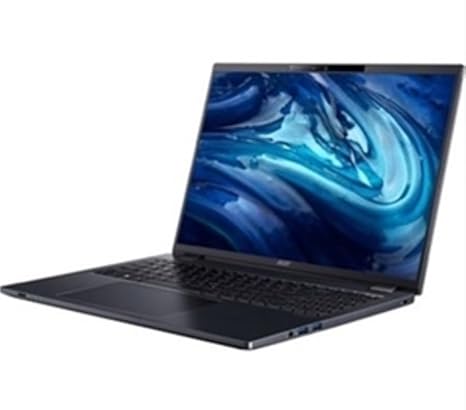
Welcome to Reviews inside tv! Today, we’re looking at the Acer TravelMate P4 16, a business-oriented laptop designed to handle everyday office tasks with efficiency and a bit of style. The model we’re reviewing, the TMP416-53-59NC, packs a decent punch in terms of performance and portability, with an eye-catching blue design. But does it have what it takes to be your next work companion? Let’s find out.
The TravelMate P4 16 is powered by the Intel Core Ultra 5 125U processor, part of Intel’s 12th-generation Core family. This chip features a balance of performance and efficiency cores, making it ideal for multitasking—whether you’re managing multiple browser tabs, editing spreadsheets, or hopping on video calls. With a base clock of 1.2 GHz and turbo boost up to 4.7 GHz, it’s not the fastest processor on the market, but it holds its ground well for office productivity and light creative tasks. For those diving into heavier workloads like video editing or graphic design, this might not be your first pick, but for everyday office duties, it will serve you just fine.
The integrated Intel Iris Xe Graphics handles basic graphics tasks with ease, but don’t expect to run AAA games or render intensive media. It’s more than enough for watching videos, office work, and light photo editing. For more demanding gaming or creative workloads, you might want to look for something with dedicated graphics.
In terms of memory, the Acer TravelMate P4 16 comes equipped with 16 GB of RAM. This is a sweet spot for multitasking, allowing you to juggle numerous applications without noticeable slowdown. Whether you’re running a dozen tabs, working with large Excel files, or having multiple programs open, 16 GB ensures a smooth experience. For users that typically run more resource-intensive programs like Adobe Photoshop or even some video editing software, you’ll appreciate the extra headroom. But keep in mind, this laptop doesn’t have the option for upgrades, as the RAM is soldered in place.
Storage-wise, this laptop features a 512 GB SSD. This is a significant improvement over traditional hard drives, providing faster boot times and quicker file access. If you’re mostly dealing with office documents, spreadsheets, and presentations, this amount of storage should suffice. However, if you plan on keeping large media files or projects, you may need to look for external storage or a higher-end model with more built-in space.
The 16-inch WUXGA display offers a resolution of 1920×1200 pixels, giving you a bit more vertical real estate than a typical Full HD screen. It’s not the brightest screen in the world, with a typical brightness of 300 nits, but it’s more than enough for indoor use. It offers decent color accuracy, covering around 45% of the NTSC color space, which is fine for office work and media consumption but won’t blow you away if you’re a creator who demands highly accurate colors for editing.
Battery life is a standout for the TravelMate P4 16. With a 56 Whr battery, you can expect between 8 to 10 hours of battery life under light use—think browsing, word processing, and streaming video. Under heavier loads like multiple video calls or intense multitasking, that number might dip to around 6-7 hours, but it’s still solid for a laptop in this category. The laptop also supports fast charging, so you won’t be tethered to the wall for too long when you need a boost.
In terms of physical design, the TravelMate P4 16 is built with a sturdy plastic chassis, which keeps it light yet durable. It’s easy to carry around at just 1.7 kg (3.75 lbs), so taking it to and from meetings or class won’t feel like a chore. The size is perfect for business travelers who want a screen large enough for comfortable work but without the bulk of a full-fledged gaming laptop.
Typing on this machine is a pleasant experience. The keyboard has decent key travel and responsive feedback, making long typing sessions a breeze. The layout is standard, with a full-sized number pad, which is great for anyone who deals with numbers regularly. The trackpad is accurate and supports multi-touch gestures well, though it’s a little on the smaller side for some users.
Connectivity options on the Acer TravelMate P4 16 include a mix of modern and legacy ports. You get two USB 3.2 Type-A ports, a USB Type-C port, an HDMI 2.0 output, and an SD card reader, which are all useful for plugging in external devices like flash drives, monitors, and SD cards for photographers. For wireless connectivity, you get Wi-Fi 6 and Bluetooth 5.2, ensuring fast and reliable connections for video calls, file transfers, and streaming.
Now, let’s talk about performance and thermals. During office tasks, the TravelMate P4 16 runs quietly and stays cool. The fans are nearly silent during light work, but when you push it a bit harder, like with streaming or multitasking, the fans become more audible, but it’s nothing overwhelming. The keyboard deck stays comfortably cool even under load, which is great for lap use. However, during sustained heavy tasks, such as exporting large media files or handling extended video calls, the laptop can heat up slightly. This is normal for a thin, lightweight laptop, but it’s good to keep in mind if you need to use the device for long, demanding sessions.
For everyday office use, the Acer TravelMate P4 16 is a fantastic option, offering great value for money. The performance is more than enough for students and professionals who need a reliable, portable workhorse for standard tasks like browsing, document creation, and media consumption. The 16 GB of RAM and 512 GB SSD give it an edge over entry-level laptops, and the large display is a nice touch for anyone who spends hours in front of their screen.
In terms of competitors, the TravelMate P4 16 stacks up well against other business laptops like the Lenovo ThinkPad L14 and the HP ProBook 445. Both of these models offer similar specs but at a slightly higher price, so the Acer could be a good value choice for those looking to save a bit without sacrificing too much in performance.
If you’re a creator or gamer looking for a machine that can handle more intensive workloads, you might want to look at something with a more powerful CPU, dedicated GPU, and higher-resolution display. But for those who need a solid, reliable laptop for productivity and light media consumption, the Acer TravelMate P4 16 is definitely worth considering.
In conclusion, the Acer TravelMate P4 16 is a solid option for anyone looking for an affordable, reliable, and portable laptop for office and productivity work. It’s not perfect, but it excels in the areas that matter most for most users: performance, battery life, and portability. If you’re a student, office worker, or someone who needs a dependable machine for everyday tasks, this could be your perfect match. Thanks for watching, and don’t forget to like, subscribe, and hit that bell icon to stay updated on all our latest reviews. You’ll find the link to grab this laptop in the comments box below. Have any questions or want to share your experience with the Acer TravelMate P4 16? Drop a comment, and I’ll see you in the next video!
Available to buy here:


