

Available to buy here:
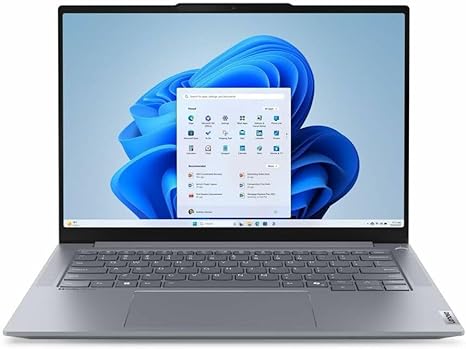
Welcome to Reviews inside tv, your go-to spot for detailed, no-nonsense tech reviews. Today, we’re looking at the Lenovo ThinkBook 21LD000WUS, a sleek 14.5-inch notebook that promises both productivity and performance in a compact package. Whether you’re a student, a professional, or someone who needs a reliable laptop for daily tasks, this device might have something to offer. But how does it really perform in everyday use? Let’s find out.
This ThinkBook is powered by the Intel Core Ultra 5 125H processor. It’s part of Intel’s latest Ultra series, which brings impressive power and efficiency. With 16GB of RAM, multitasking is a breeze. You can run multiple programs at once without seeing any slowdown—whether that’s having dozens of browser tabs open, working on a Word document, or streaming a video while you answer emails. This combination of processor and memory delivers solid all-around performance for office work, light content creation, and everyday tasks.
The laptop’s 512GB SSD offers fast read and write speeds, making boot-up times quick and file transfers smooth. This amount of storage is ideal for everyday users, giving you enough space for documents, media, and some software without feeling cramped. While it’s not a massive storage capacity like some higher-end gaming or creator laptops, it’s more than adequate for the average user who doesn’t need terabytes of space.
Now let’s talk about that display. The 14.5-inch WQXGA screen offers a 2560 x 1600 resolution, which is above the typical Full HD. This translates to sharper text, crisper images, and a better overall experience, especially for watching movies or editing documents. The higher pixel count adds more clarity, which is particularly useful for anyone working on detailed tasks like design work or reading fine text. The display quality is strong, with good color reproduction, though it’s not quite as vibrant as what you’d get from an OLED or high-end IPS panel. Still, for most users, this will be a pleasant, sharp display to work with.
When it comes to real-world use, this laptop feels like a solid performer in daily tasks. Browsing the web, handling emails, and running office applications—everything is snappy and responsive. For media consumption, the display does a great job with movies and shows, offering rich visuals without issues. While the speakers won’t fill a room with sound, they’re decent enough for personal use, providing clear mids and highs, though don’t expect any deep bass.
Now, if you’re a creator, you might wonder how this laptop handles content creation. With the Intel Core Ultra 5 and 16GB of RAM, it’s suitable for light photo editing or video editing, but don’t expect it to breeze through heavy video exports or demanding design software. It can handle casual content creation well, but more intensive workflows might see a slowdown.
For gaming, this isn’t a dedicated gaming machine, but it can handle casual gaming at moderate settings. With the integrated graphics, games like League of Legends or Minecraft will run smoothly on lower settings, but more demanding titles like Cyberpunk 2077 or Call of Duty will likely require you to lower the resolution and settings for a playable experience. The ThinkBook isn’t a gaming laptop, so if that’s your main priority, you’ll want to look elsewhere.
Speaking of performance, let’s get into the thermals. Under normal tasks, the ThinkBook stays relatively cool, with the keyboard and chassis remaining at comfortable temperatures. However, under more demanding workloads like gaming or video exports, you might notice some warmth, especially around the center of the keyboard. The fan noise isn’t overwhelming, but it does become noticeable during extended sessions of heavy use. If you’re using this laptop on your lap during intense work, you may want to keep an eye on comfort as the fan noise and heat could become a bit distracting.
Now, let’s talk about battery life. The ThinkBook comes with a battery that should last around 8-10 hours for typical office work—this includes web browsing, document editing, and media streaming. Under more demanding tasks, like heavy multitasking or watching full-length movies, expect it to drain a bit faster, but the battery performance is solid for a laptop in this category. When it comes to charging, the ThinkBook is pretty efficient, and you won’t need to sit next to an outlet for hours. A full charge should take about 1.5 to 2 hours, which is decent.
When it comes to portability, this laptop weighs just under 3 pounds, making it light enough to carry around without feeling weighed down. Its slim profile means it fits easily into most bags, making it a good choice for students or professionals who need something lightweight to take to meetings or classes. The build quality feels solid, with a premium finish that’s not overly flashy, but definitely durable. The hinge is smooth and robust, ensuring the screen stays securely in place when you adjust the angle.
Now, let’s look at the keyboard and trackpad. The keyboard offers a comfortable typing experience with good key travel and feedback. It’s not the quietest keyboard, but it’s certainly usable for long typing sessions. The trackpad is responsive and accurate, with good palm rejection and smooth gliding. The layout is functional, with a full set of keys, including the dedicated function row and an appropriately placed power button. If you’re typing a lot every day, this keyboard should feel comfortable, though if you’re used to mechanical switches or deeper key presses, you might notice a difference.
As for connectivity, the ThinkBook is well-equipped. It offers USB-A and USB-C ports, with one of the USB-C ports supporting Thunderbolt, which is great for data transfer or connecting to high-end peripherals. It also includes an HDMI port for connecting to external displays, which is a nice touch if you need to hook up to a projector or a larger monitor. There’s also an SD card reader and a headphone jack, covering most of the bases for external accessories. Wi-Fi 6 is present, ensuring stable internet connections, and Bluetooth is available for connecting wireless devices like headphones or a mouse.
One thing to keep in mind is that RAM and storage are soldered in this model, meaning you won’t be able to upgrade them later. While this is common in thinner and more portable laptops, it’s something to think about if you’re someone who likes to upgrade their system over time.
Overall, the Lenovo ThinkBook 21LD000WUS is a solid choice for students, office workers, and anyone looking for a reliable, all-around laptop that performs well without breaking the bank. It’s not a powerhouse for gaming or intensive content creation, but for everyday use, it’s more than capable. The display is sharp, the performance is solid, and the battery life is reliable. However, the lack of upgradability might be a concern for those who want more flexibility in the future.
In terms of value, the ThinkBook offers a good balance of performance and price. While there are certainly alternatives in this price range, this Lenovo laptop stands out for its build quality, decent display, and solid everyday performance. It’s ideal for someone who needs a laptop that can handle the basics—web browsing, office tasks, and media consumption—without any major performance hiccups.
If you’re deciding between this and other models, you’ll want to consider whether the ThinkBook’s battery life, portability, and display quality outweigh its limitations in gaming and high-end content creation.
Thanks for watching Reviews inside tv. If you’re interested in this laptop, you can find the link in the comments below. Don’t forget to like, subscribe, and hit that bell icon so you never miss a review. Drop any questions or comments if you’ve already used the ThinkBook or if you’ve got any thoughts on the review. See you next time, and remember—don’t just take our word for it, experience it yourself!
Available to buy here:


