

Available to buy here:
Welcome to “Reviews inside tv,” the place where we give you the most in-depth and unbiased reviews on the latest tech products. Today, we’re looking at the Logitech MX Mechanical Wireless Illuminated Performance Keyboard. If you’ve been in the market for a high-performance keyboard, chances are you’ve seen this one pop up a lot. But does it truly live up to the hype? Let’s take a closer look.
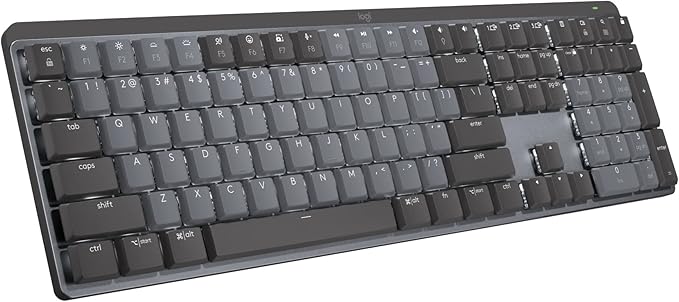
The Logitech MX Mechanical keyboard is designed with a lot of attention to detail, offering both a premium feel and impressive functionality. One of its standout features is its tactile quiet mechanical switches, which provide satisfying feedback with each key press. These switches are designed for people who want precision but don’t want to disturb those around them with noisy typing. The low-profile keys not only improve comfort but also add a sleek look to the device, making it ergonomic without compromising on functionality. The keyboard’s full-size layout ensures you have everything you need, from the number pad to all the essential keys.
But beyond these basic features, what really sets the Logitech MX Mechanical apart is its smart illumination. The backlit keys light up the moment your hands approach the keyboard, making it easy to use in low light conditions. And the smart lighting adapts automatically based on your environment, ensuring that you don’t have to worry about manually adjusting brightness.
In terms of versatility, this keyboard shines. You can pair it with up to three devices simultaneously, thanks to Bluetooth Low Energy or the Logi Bolt receiver. It works across multiple operating systems, including macOS, Windows, Linux, iOS, and Android. This makes it ideal for people who switch between devices frequently or need a reliable multi-device setup. If you need extra control, the Logi Options+ software lets you customize function keys, adjust backlighting effects, and even enable Flow for cross-computer control.
On the power front, the MX Mechanical boasts USB-C quick charging. You can expect up to 15 days of use on a full charge, even with the backlighting turned on, and up to 10 months with the backlighting off. This is a huge plus for people who don’t want to constantly worry about battery life. Plus, it’s worth mentioning that Logitech is environmentally conscious, with the MX Mechanical containing 45% certified post-consumer recycled plastic in its Graphite version.
I spent some time using the Logitech MX Mechanical keyboard for a variety of tasks—typing, casual gaming, and even working across different devices. Setting up the keyboard was incredibly straightforward. Pairing it with my devices was quick and easy, and the Flow feature worked smoothly, allowing me to seamlessly switch between my desktop and laptop with no hiccups. Typing on the keyboard was a joy, especially when I found myself typing long documents. The low-profile mechanical keys gave me just the right amount of feedback without any unnecessary noise, making it ideal for shared office spaces or quiet environments.
Of course, no product is perfect. While the MX Mechanical excels in many areas, there are a few things to note. The low-profile keys, while comfortable, may not be for everyone. If you’re used to high-profile keys, the flatter design could take some time to adjust to. Additionally, while the smart backlighting is a cool feature, it’s not as customizable as some might expect. It automatically adjusts based on your environment, but if you’re looking for highly adjustable or RGB-style lighting, this keyboard might leave you wanting more.
When it comes to value for money, the Logitech MX Mechanical sits in the mid-to-premium price range. It’s priced higher than standard office keyboards but offers excellent quality, a premium feel, and plenty of advanced features for those who need them. For those looking for something cheaper, there are plenty of alternatives that offer decent performance without the premium build. However, for those who want the ability to connect to multiple devices seamlessly, enjoy a tactile but quiet typing experience, and value smart backlighting, this keyboard is certainly worth considering.
Comparing the MX Mechanical to other mechanical keyboards on the market, one notable alternative is the Keychron K3, which also offers Bluetooth multi-device support and low-profile switches. While the Keychron K3 does provide similar features, the build quality and key feel of the Logitech MX Mechanical feel more premium. Another competitor is the Logitech G915, which offers RGB lighting and higher-end switches but comes at a significantly higher price point. For the price of the MX Mechanical, you’re getting a solid balance of performance, comfort, and durability without going overboard on features that you might not need.
In terms of build quality, the MX Mechanical feels sturdy and well-constructed, with an aluminum top plate that gives it a premium touch. While there isn’t much long-term data available yet, based on Logitech’s reputation for quality products, it’s safe to assume that this keyboard will stand the test of time. The use of recycled plastic is a nice touch for eco-conscious consumers, but it doesn’t sacrifice build quality in the process.
As for customer support, I haven’t needed to contact Logitech personally, but the company has a solid reputation for responsive and helpful customer service, so you can feel confident if any issues arise.
Wrapping up, the Logitech MX Mechanical Wireless Illuminated Performance Keyboard delivers a smooth, efficient typing experience with a sleek, modern design. Its combination of tactile quiet switches, smart illumination, and multi-device functionality make it ideal for a variety of tasks, whether you’re working, gaming, or simply typing away. While it’s priced higher than basic office keyboards, it provides excellent value for those who prioritize quality, comfort, and versatility.
If you’re someone who juggles multiple devices, enjoys a quieter typing experience, and values smart features, this keyboard is a solid investment. It’s not perfect for everyone—especially if you’re a fan of more customizable lighting or prefer higher-profile keys—but it’s a fantastic choice for many, especially those in shared spaces or home offices.
Thanks for watching today’s review. If you’re interested in grabbing the Logitech MX Mechanical for yourself, be sure to check the comments section below for more details. And hey, if you already own one, let us know your thoughts. Don’t forget to like, subscribe, and ring the bell so you don’t miss out on our future reviews.
Goodbye till next time, and remember, we always bring the best of the best inside “Reviews inside tv!”
Available to buy here:


