

Available to buy here:
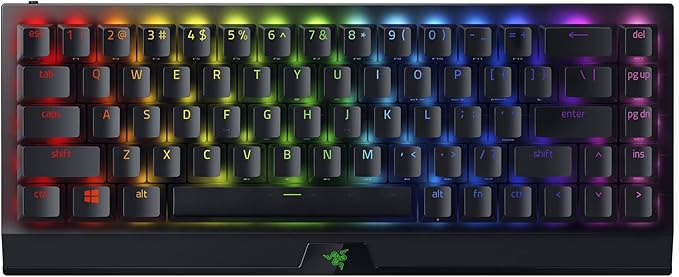
Welcome to Reviews inside tv, the place where we break down the latest tech to see if it really lives up to the hype. Today, we’re looking at the Razer BlackWidow V3 Mini HyperSpeed 65% Wireless Mechanical Gaming Keyboard. It promises a lot with its compact design, responsive keys, and impressive battery life. Let’s see if this keyboard checks all the boxes.
First, let’s talk about the features. The BlackWidow V3 Mini is designed for gamers who need precision in a smaller package. It connects in three ways—via Bluetooth, HyperSpeed Wireless, and USB-C. This makes it versatile enough for different setups, whether you’re playing on a PC, laptop, or even a console. The Bluetooth option is great for power efficiency, while HyperSpeed Wireless is there for those lag-free gaming sessions. And if you need to charge while you play, the USB-C connection has got you covered.
One of the standout features is the green mechanical switches. They offer that satisfying clicky, tactile feedback that many gamers love. It’s a great choice for those who want an audible confirmation with every key press—ideal for fast-paced gaming or typing where you need to feel that clear response. But it’s not just about the feel. These switches are optimized for gaming, ensuring a precise execution of every command, giving you a competitive edge during gameplay.
When it comes to aesthetics, the Razer Chroma RGB lighting is a game-changer. With 16.8 million colors and a range of lighting effects, you can sync the keyboard’s lighting with your battlestation, creating a dynamic, immersive experience. The per-key lighting is customizable, allowing you to set up lighting schemes that match your style—or your favorite games.
Battery life is another highlight here. The BlackWidow V3 Mini promises up to 200 hours of use on HyperSpeed Wireless or Bluetooth mode, which is impressive for a mechanical keyboard. It’s not just about the quantity of hours, though. The charging process is quick—about five hours to go from zero to full. That means you won’t have to wait too long to get back into action.
The keycaps are made from doubleshot ABS plastic, ensuring durability and resistance to wear and tear. This is important for gamers who spend hours at a time smashing keys. These keycaps are made to last, with thick walls that resist cracking or fading over time. Plus, because the labelling is doubleshot-molded, it won’t wear off, keeping the keyboard looking fresh for a long time.
Now, let’s talk about real-world use. Setting up the BlackWidow V3 Mini is easy. If you’re using Bluetooth, the connection is seamless, and switching between modes is straightforward. The key switches are responsive—whether you’re typing emails or going for a high-speed game session, the tactile feedback is consistent. I tested it with a few games, including some first-person shooters and strategy games, and the keypresses felt fast and accurate. The green switches definitely deliver that clicky feel, which can be a joy for some but a bit loud for others, so it’s something to consider if you’re in a shared space.
The 65% compact layout is another plus. It’s small enough to save desk space but still includes all the essential keys. If you’re someone who needs a tenkeyless design but still wants all the keys for gaming, this layout is a sweet spot. It’s a great option if you’re looking for portability without sacrificing functionality.
When we look at the pros and cons, there’s a lot to love about the BlackWidow V3 Mini. For one, the connectivity options—Bluetooth, HyperSpeed Wireless, and USB-C—are fantastic, giving you flexibility in how you want to connect. The green mechanical switches offer great tactile feedback, perfect for those who enjoy that clicky response. The battery life is remarkable, lasting up to 200 hours, which is more than enough for even the most extended gaming sessions. The keycaps are solid and durable, ensuring longevity even after lots of use. The RGB lighting is customizable and immersive, adding a lot of personality to your setup.
However, it’s not without its drawbacks. The compact design, while great for portability, might be a deal-breaker for those who prefer a full-sized keyboard. It might take some getting used to if you’re used to having a number pad or dedicated function keys. Additionally, the clicky green switches, though satisfying, could be noisy for people who need a quieter workspace. This could be a concern if you’re gaming in a shared or office environment.
As for value for money, the BlackWidow V3 Mini does a good job of justifying its price tag. There are other mechanical keyboards in the market at similar prices, but not many offer the same combination of features—especially the battery life, the customizable RGB, and the build quality of the keycaps. You might find similar performance at a lower price, but the overall experience here feels premium.
Comparing it to other options, there are a few contenders. For example, the Logitech G Pro X and Corsair K65 RGB Mini are similar in size and functionality. The G Pro X has hot-swappable switches, which is a great option for users who want to customize their switches down the line. The Corsair K65, on the other hand, offers similar RGB features and build quality but might not have the same battery performance. In terms of value, the BlackWidow V3 Mini stands strong, especially for those who prioritize connectivity, RGB, and battery life.
When it comes to build quality, the BlackWidow V3 Mini feels solid. The doubleshot ABS keycaps are tough and durable, and the keyboard frame itself is sturdy. The green mechanical switches are well-constructed, and the overall feel of the keyboard reflects Razer’s commitment to quality. While I haven’t had it long enough to speak to its longevity over several years, Razer generally has a good reputation for durable products, and the build quality here is certainly a promising sign for long-term use.
If you’re wondering about customer support, I didn’t need to contact Razer during my testing, but the company is known for having solid customer service. Razer’s support team tends to be responsive, and users on various forums have praised the brand for addressing issues quickly.
Now, to wrap things up, the Razer BlackWidow V3 Mini HyperSpeed 65% Wireless Mechanical Gaming Keyboard is a solid choice for gamers looking for a compact, customizable, and durable keyboard. The connectivity options, green mechanical switches, and impressive battery life make it stand out in a crowded market. The compact design and clicky switches are great for gamers who want performance without taking up too much desk space. However, if you’re someone who prefers a quieter keyboard or a full-sized layout, this may not be for you.
Thank you for watching today’s review. If you’ve got any questions or already own the BlackWidow V3 Mini, feel free to drop a comment below and share your thoughts. You can also find the link to grab one in the comments box. Don’t forget to like, subscribe, and hit the bell icon so you won’t miss any of our upcoming reviews. Until next time, it’s from Reviews inside tv—where we always bring you the inside scoop.
Available to buy here:


