

Available to buy here:
Welcome to “Reviews inside tv”! If you’re looking for an affordable solution to extend your home network or create a reliable Wi-Fi access point, you’re in the right place. Today, we’ll be looking at the TP-Link WiFi Access Point TL-WA801N, a versatile little device that offers a number of features designed to meet various networking needs. But is it the right fit for your setup? Let’s take a deeper look.
The TP-Link WiFi Access Point TL-WA801N is a compact yet powerful networking device that operates on the 2.4 GHz frequency band, providing wireless speeds of up to 300 Mega bits per second. It’s perfect for situations where you need reliable coverage for tasks like HD video streaming, voice calls, or general web browsing. With support for multiple operational modes—including Access Point, Range Extender, Bridge, and Client modes—this device is built to cater to a variety of network requirements. Whether you’re setting up a new network or extending an existing one, the TL-WA801N is designed to offer flexibility in deployment.
One of the standout features of this device is its ability to support Passive Power over Ethernet, or PoE. This allows the device to receive both power and data through the same Ethernet cable, which not only simplifies the installation but also provides up to 30 meters, or 100 feet, of flexibility for deployment. Whether you’re looking to place this in a hard-to-reach spot or need it to cover a larger area, the included PoE injector makes setup convenient and clean.
Inside, the TL-WA801N uses MIMO (Multiple Input Multiple Output) technology to transfer data more efficiently. By using multiple antennas to send and receive data at the same time, MIMO technology ensures faster speeds and improved performance in environments where a lot of devices are connected at once. This is especially beneficial for homes with multiple devices streaming or gaming at the same time, as it helps reduce network congestion.
When it comes to security, the TP-Link TL-WA801N has you covered with WPA2 encryption. This ensures that your wireless network is protected against unauthorized access, keeping your data secure as it travels across the network. The device also features a quick setup option with a one-touch connection button, making it incredibly easy to get started, even for those who might not be very tech-savvy.
In terms of real-world performance, I found the TP-Link WiFi Access Point to be straightforward to set up, especially with the included PoE injector. Installation was quick, and I appreciated how easy it was to switch between modes based on my needs—whether I was using it as an access point, extending my range, or connecting a client device. During my testing, I focused on its ability to handle HD video streaming, web browsing, and voice calls across different rooms in my house. The speeds were consistent, and I didn’t experience any noticeable lag or buffering during video calls or streaming.
However, there were a few areas where the TL-WA801N could fall short, depending on your specific needs. While the 300 Mega bits per second speed is more than sufficient for casual internet use and streaming, it may not be enough for larger households or users with heavy data demands. For example, if you’re someone who regularly downloads large files or streams 4K content, you might want to look for a more powerful access point that supports higher speeds.
When comparing the TP-Link WiFi Access Point TL-WA801N to other similar devices on the market, it’s clear that it offers a lot of flexibility for the price, especially when considering its multiple modes and PoE support. Competing devices in this price range, such as the Netgear WN3000RP or the Linksys RE3000W, may offer similar speeds, but they typically lack the versatility of modes and the included PoE injector. However, if you’re specifically looking for faster speeds or newer Wi-Fi standards, you might want to consider options that support Wi-Fi 5 or Wi-Fi 6, which would give you better long-term performance for high-demand tasks.
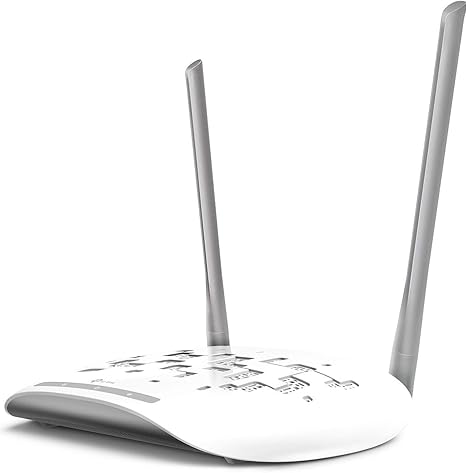
The build quality of the TP-Link TL-WA801N is solid, especially considering the affordable price. It’s compact, with a minimalistic design that can easily blend into any environment. However, the two fixed antennas may limit flexibility in terms of signal direction, so it’s important to place it in a location that optimizes coverage.
As for longevity, while I haven’t had the device long enough to test it extensively over months or years, TP-Link has a strong reputation for building durable networking products, and the two-year warranty and 24/7 technical support provide peace of mind for long-term use. This is especially valuable if you encounter any issues during setup or operation.
In terms of customer support, I didn’t personally need to reach out to TP-Link’s support team, but their reputation for responsive customer service and the included technical support speaks volumes. They’re known for being helpful, and it’s always reassuring to know that help is available when needed.
When it comes to updates, TP-Link typically pushes out firmware updates when necessary to improve performance or add features. However, updates for this particular model haven’t been a major focus of attention as of yet, and since the device performs its core functions well, there doesn’t seem to be any pressing need for regular updates.
To wrap up, the TP-Link WiFi Access Point TL-WA801N offers an impressive balance of performance, flexibility, and ease of use for an affordable price. Its range of modes, solid performance at 300 Mega bits per second, and the added convenience of Passive PoE make it an excellent option for home users who need to extend their Wi-Fi coverage or set up an access point. While it may not be the fastest option for heavy data users or larger households, it’s a reliable choice for everyday use.
If you’re looking for a versatile, cost-effective networking solution that checks all the boxes for most basic home networking needs, this product is worth considering. However, if you need ultra-fast speeds or support for newer Wi-Fi standards, there are other options available that might better suit those specific demands.
Thank you for watching today’s review! If you have any questions about the TP-Link WiFi Access Point TL-WA801N or if you’ve had any experience with it yourself, feel free to leave a comment below—I’d love to hear your thoughts. Remember, the link to purchase the product is in the comments box. Don’t forget to like, subscribe, and hit the bell icon to stay up to date with all our latest reviews. Until next time, this is “Reviews inside tv,” signing off. Keep your networks strong and your connections steady!
Available to buy here:


