
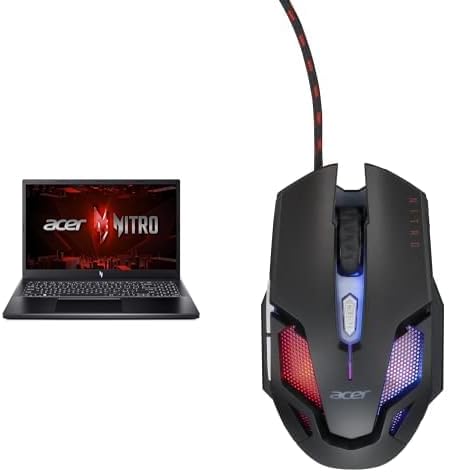

Available to buy here:
Welcome to Reviews inside tv, where we break down the tech that matters to you. Today, we’re taking a close look at the Acer Nitro V, a laptop built for gamers and creators who need raw power and performance. With the Intel Core i5-13420H processor, NVIDIA GeForce RTX 4050 GPU, and a host of features designed to elevate your gaming experience, this laptop promises to be a powerhouse. But, how does it really stack up in everyday use? Let’s find out.
The Acer Nitro V features a 15.6-inch Full HD display that boasts a fast 144Hz refresh rate, ensuring a smooth visual experience whether you’re gaming, watching movies, or working on creative projects. This is paired with an 82.64% screen-to-body ratio, so you’re getting plenty of screen real estate for your tasks. Under the hood, it runs on the 13th Gen Intel Core i5-13420H processor, which offers solid multi-core performance, perfect for everything from productivity to gaming. The i5-13420H is backed by the NVIDIA GeForce RTX 4050 GPU, which will handle most modern games at medium to high settings with ease. You’re getting 8GB of DDR5 RAM, which is more than enough for light multitasking, but you might want to upgrade if you’re into heavy workloads like video editing. Storage is handled by a 512GB Gen 4 SSD, providing fast load times and plenty of space for games, software, and media.
When it comes to performance, this laptop shines in various real-world scenarios. For office work, it easily handles multiple browser tabs, document editing, and even a few heavier applications without noticeable slowdowns. Running web-based apps, email, and video calls won’t be an issue, thanks to the capable processor and efficient RAM. For media consumption, the 144Hz display gives movies and TV shows a smooth, vibrant look, while the speakers offer decent sound quality for casual listening, though external speakers or headphones would provide a better experience for audiophiles.
If you’re a content creator, the Nitro V is more than up to the task for photo editing, light video editing, and music production. Export times in programs like Adobe Premiere Pro will be quick, thanks to the combo of the i5 and RTX 4050. Gaming-wise, this laptop can handle titles like Cyberpunk 2077, Call of Duty: Warzone, and Alan Wake 2 at 1080p with settings dialed up to medium or high. Expect average FPS around 60 to 80, depending on the title and settings. With ray tracing off and DLSS/FSR on, you’ll notice even smoother gameplay. However, if you’re aiming for ultra settings and higher FPS, this laptop may struggle with more demanding titles at full settings. Still, for most gamers, it provides a great balance of price and performance.
Setting up the Nitro V is straightforward, and it doesn’t come with too much bloatware, so you’re good to go right out of the box. The keyboard offers decent key travel, making it comfortable for long typing sessions, though it’s not the quietest keyboard out there. The trackpad is responsive, and the palm rejection works well, making it easy to navigate. The fan noise isn’t intrusive under light use but can become noticeable during intense gaming or rendering sessions, which is to be expected in a gaming laptop.
Now, let’s talk about thermals. While the Nitro V does a solid job of keeping temperatures in check during everyday tasks, it can heat up under load. The keyboard deck and underside do get warm when gaming for extended periods, but they don’t get unbearably hot. As for the fan noise, it’s not overly loud, but during long gaming sessions or intensive tasks, the fans will definitely ramp up, which could be a bit distracting. There’s also a slight dip in performance after long gaming sessions as the laptop may throttle its performance to manage heat. So, while it’s capable in short bursts, sustained heavy use might cause a little slow-down, especially in CPU-heavy tasks.
Battery life is decent for a gaming laptop, but it won’t last all day. Expect around 4 to 5 hours of light use like browsing or video streaming. When gaming, you’re looking at closer to 1.5 to 2 hours, so you’ll likely need to keep the charger nearby for longer sessions. The charging experience is efficient, and the included charger isn’t overly bulky, making it fairly portable.
In terms of connectivity, the Nitro V comes with Wi-Fi 6, which ensures fast, stable internet speeds whether you’re gaming or working online. There’s also Gigabit Ethernet for those who prefer wired connections, plus USB-A, USB-C, and HDMI ports to easily connect to peripherals and external displays. You’ll find that it works well with most docks, external monitors, and accessories, and the lack of an SD card reader might be a downside for photographers and videographers, though that’s becoming less of an issue with modern workflows. As for RAM and storage, the 8GB of DDR5 RAM is soldered, so upgrading would require replacing the entire board, which might limit future-proofing. The 512GB SSD is plenty for most, but if you’re planning to store a large game library, you may need an external drive.
So, what are the upsides? The Acer Nitro V offers solid gaming performance at 1080p, a smooth 144Hz display, and decent overall build quality. It’s a great laptop for gamers on a budget or those who want a capable machine for light content creation. The inclusion of Wi-Fi 6 and a responsive trackpad is a nice bonus. On the downside, the thermal management could be better for long gaming sessions, and the battery life is on the shorter side, which is typical for this category. The lack of an SD card reader might also be a dealbreaker for some content creators.
When it comes to value for money, the Acer Nitro V is a solid choice for budget-conscious gamers and creators. Its performance-to-price ratio is impressive, but if you’re looking for top-tier graphics or a higher-end display, you might want to look at something like the ASUS ROG Zephyrus G14 or the Lenovo Legion 5i, which offer similar specs but with better thermal performance and slightly higher price points. However, for the price, the Nitro V is a strong contender in the entry-level gaming laptop market.
In terms of build quality, Acer has done a solid job with the Nitro V. The plastic chassis feels sturdy, though it doesn’t quite have the premium feel of aluminum. The hinge is fairly rigid, and the laptop feels solid when opening or closing. Long-term reliability seems promising, though Acer hasn’t had any major issues with this series in the past. Customer support is typical for the brand—helpful but not always the fastest. That said, Acer’s warranty terms are competitive, offering a year of coverage with the option to extend.
To wrap it up, the Acer Nitro V is an excellent option for those looking for a solid gaming laptop at a reasonable price. It’s perfect for casual gamers, students, and anyone needing a versatile machine that can handle a bit of everything. However, if you’re a content creator who needs more power or a gamer who demands the highest FPS in AAA titles, you might want to explore other options. Still, it’s a strong choice for the price, and it’s tough to beat the combination of features you get here.
Thanks for watching! If you’re interested in the Acer Nitro V, you can find the link to grab it in the comments box below. Feel free to drop any questions or share your experience with the laptop if you already own one. Catch you in the next review – and remember, your next gaming session might just get a whole lot smoother.
Available to buy here:


