
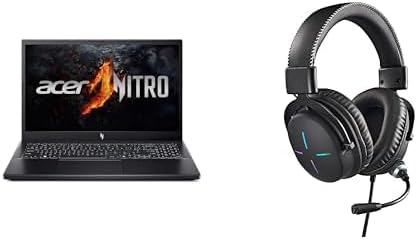

Available to buy here:
Welcome to “Reviews inside tv”! Today, we’re taking a close look at the Acer Nitro V Gaming Laptop, a powerful machine designed for both gaming and creative work. Featuring an AMD Ryzen 5 7535HS processor paired with an NVIDIA GeForce RTX 4050 GPU, it promises to deliver the kind of performance gamers and creators crave. But does it really live up to the hype? Let’s break down what this laptop offers, how it performs in the real world, and who it’s really for.
Starting with the specs, the Acer Nitro V comes equipped with an AMD Ryzen 5 7535HS processor. This is a 6-core, 12-thread CPU that strikes a balance between power and efficiency. It’s designed to handle gaming, multitasking, and productivity with ease, making it a solid choice for anyone who needs to juggle different tasks at once. The GPU, an NVIDIA GeForce RTX 4050, brings AI-powered graphics to the table, ideal for gaming and content creation. Whether you’re editing photos, rendering videos, or diving into the latest games, this GPU can handle it. The 8GB of DDR5 RAM is fast and responsive, and with two slots, it’s upgradeable to a maximum of 32GB, ensuring the laptop can grow with your needs. Storage-wise, you get a 512GB PCIe Gen 4 SSD, which offers rapid read/write speeds for quick game loads, boot times, and file transfers. And with Wi-Fi 6, you’re looking at stable and fast internet connectivity, whether you’re gaming online or streaming content.
Now, let’s talk about the 15.6-inch Full HD IPS display. It’s a beauty, with vibrant colors and sharp details, making it perfect for gaming, media consumption, and creative work. The 144Hz refresh rate ensures smooth motion during fast-paced gameplay, while the wide 16:9 aspect ratio gives you ample screen space for productivity or multitasking. Whether you’re battling your way through a game or watching the latest show, the display offers impressive clarity and fluidity. But of course, the real question is, how does all of this translate into actual use?
In terms of performance, the Acer Nitro V doesn’t disappoint. During everyday tasks like web browsing, email, and office work, it’s quick and responsive. You can easily have multiple tabs open, run spreadsheets, and attend video calls without any noticeable lag. Moving into media consumption, this laptop shines with its crisp, vibrant display. Watching movies or streaming video looks great, and with the stereo speakers, you’ll get a satisfying audio experience.
When it comes to gaming, the Nitro V does a solid job with modern titles. According to real-world benchmark data, titles like Cyberpunk 2077 and Call of Duty: Warzone run well at high settings, with average FPS numbers staying above the 60fps mark, making for a smooth and immersive experience. If you’re running a demanding game at ultra settings, you may need to tweak things down a bit to keep the frame rates consistently high. That said, the RTX 4050 and Ryzen 5 combination deliver impressive performance for most gaming scenarios.
For content creators, this laptop performs admirably, too. Whether you’re photo editing in Lightroom, creating videos in Premiere Pro, or doing some light 3D rendering, the Nitro V offers solid performance. While not a workstation replacement for high-end creators, it certainly gets the job done for intermediate-level tasks.
One thing to note, however, is the thermals. While the Nitro V manages heat well during light use, things do heat up under load, particularly when gaming or running demanding applications. The keyboard deck and underside can get warm, though it’s not uncomfortably hot. The fans, while not silent, are generally only noticeable during heavy workloads. Under lighter tasks, the laptop remains relatively quiet. However, during extended gaming sessions or video exports, you’ll likely hear the fans ramp up, though they aren’t overwhelmingly loud. It’s a trade-off for the power the laptop packs under the hood.
Battery life is another key consideration. With a 52.5Wh battery, the Nitro V offers around 5 to 6 hours of light use—perfect for office work, browsing, and media consumption. For gaming or heavy creative workloads, expect closer to 2-3 hours, so you’ll need to stay near a power outlet during intensive sessions. Charging is fairly quick, with the laptop topping up in around 1.5 to 2 hours, though the charger is a bit bulky for travel.
The keyboard on the Nitro V is responsive with good key travel, making it comfortable for typing long documents or emails. The layout is standard, but you do get a full-size arrow key cluster and a number pad, which is great for those who need a more traditional layout. The trackpad is smooth and accurate, though it’s a little on the smaller side for users who prefer generous space for multitouch gestures. Additionally, it features a fingerprint reader for secure login, which works well in practice.
As for ports, the Nitro V offers a healthy selection. You get USB-A ports, USB-C, HDMI for external monitors, an SD card reader, and an Ethernet jack. This makes it easy to connect to docks, external monitors, or other peripherals. For wireless connectivity, Wi-Fi 6 ensures strong performance, and Bluetooth gives you the freedom to pair wireless accessories. The memory and storage are upgradable, giving the laptop some future-proofing potential, though keep in mind that the RAM is soldered in, so you can’t upgrade it after purchase.
So, who is this laptop for? The Acer Nitro V is a great option for gamers who want a well-rounded, affordable laptop that can handle both games and creative tasks. It’s also a solid choice for students or professionals who need a laptop that can handle everything from office tasks to light content creation. If you’re a hardcore content creator or need a high-end workstation, there are better options out there, but for most users, the Nitro V strikes a nice balance.
Of course, no product is perfect, and the Nitro V has its share of drawbacks. While its performance is solid, it does run a bit warm under load, and the fans can be a bit noisy during intense gaming sessions. The battery life, while decent for light use, won’t get you through long gaming marathons. But these are small sacrifices for the kind of performance you get at this price.
For value, the Acer Nitro V is a great choice, especially if you’re looking to stay within a reasonable budget. It offers solid gaming performance, decent build quality, and a great display for the price. If you’re comparing it to other gaming laptops in this range, like the Lenovo Legion 5 or ASUS TUF series, the Nitro V holds its own, offering similar performance but with a slightly more portable design.
To wrap up, the Acer Nitro V is a capable, versatile gaming laptop that will suit a variety of users—from gamers to students to light creators. It offers solid specs for the price, a vibrant display, and a good selection of ports. While it’s not perfect, it strikes a nice balance between performance, portability, and cost. If you’re after a laptop that can handle gaming and everyday tasks with ease, the Nitro V is a great choice.
Thanks for watching! Be sure to check the comments box for the link to get your hands on the Acer Nitro V. If you have any questions or already own this laptop, feel free to share your thoughts in the comments. And don’t forget to like, subscribe, and hit the bell icon to stay updated with more reviews. Catch you next time, and remember—gaming and work don’t have to be a hassle with the right laptop!
Available to buy here:


