

Available to buy here:
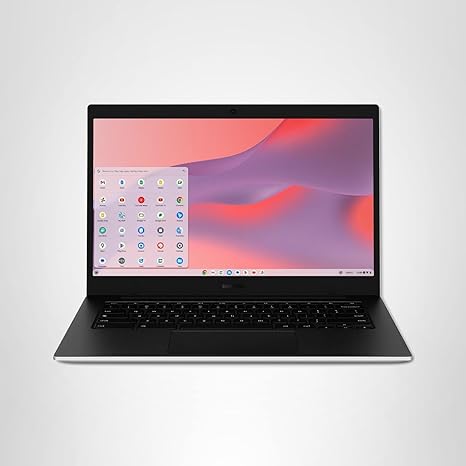
Welcome to Reviews inside tv! Today, we’re looking at the Samsung 14″ Galaxy Chromebook Go. This Chromebook is designed to be slim, lightweight, and built for busy students who need a reliable device for all-day work, study, and entertainment. With a focus on portability and durability, the Galaxy Chromebook Go is set to handle the demands of school life without weighing you down.
The core specs are straightforward but effective for the target audience. Powered by the Intel Celeron N4500 processor, this Chromebook isn’t aiming to compete with high-performance machines but instead delivers solid, everyday performance for students. The 4GB of RAM is decent for light multitasking, web browsing, and document work, though it might show its limits if you run too many tabs or apps at once. Storage comes in at 64GB, which is on the lower end, but remember, ChromeOS relies heavily on cloud storage, so this won’t be a dealbreaker unless you’re storing tons of local files.
The 14-inch display is a sweet spot for portability while still offering enough real estate for comfortable browsing and document editing. It’s an HD screen, so while you won’t get the vividness or sharpness of higher-end options, it’s perfectly fine for basic tasks like reading, writing, and streaming video. The display does an adequate job of handling colors and brightness, but it’s not going to dazzle you with incredible saturation or clarity, especially under bright lighting.
Now, the battery life—Samsung claims up to 12 hours, and in real-world usage, it can definitely last through a full day of schoolwork or watching a few episodes of your favorite show. With such a long battery life, it’s hard to complain about the power on this device; it’s geared for students who don’t want to worry about running out of juice during the day.
When it comes to connectivity, the Galaxy Chromebook Go is ready for your school needs. Wi-Fi 5 is on board, offering speeds up to three times faster than the previous generation. While that’s great for browsing, video calls, and general productivity, it’s worth noting that the Wi-Fi performance might not be as snappy as newer devices with Wi-Fi 6. Ports are simple but functional: you get two USB-C ports, a USB-A, and a headphone jack. The addition of USB-C allows for faster data transfer and future-proofing, though it’s a bit light on other connectivity options.
As for thermals, this Chromebook is designed to stay cool and quiet. In light use, it runs virtually silent with no noticeable heat buildup. However, under heavy usage, like streaming a video for hours or keeping many tabs open, the fan can occasionally be heard, but it’s not obnoxiously loud.
Now, let’s talk about the keyboard and trackpad. The keyboard is decent for typing long essays or chatting online. The key travel and feedback aren’t as satisfying as what you’d find on premium devices, but for the price, it’s more than serviceable. The trackpad is responsive with smooth gestures, but it’s not as large or as precise as some higher-end models.
At just under 3 pounds, this Chromebook is extremely portable. The slim design is perfect for students who need to carry it in a backpack all day without adding much extra weight. The build quality is surprisingly sturdy for a device in this price range. Samsung has crafted this with military-grade durability in mind, so it can handle a few bumps and drops. It’s not indestructible, but it’s tougher than your average budget laptop.
In terms of performance, it’s all about managing expectations. This Chromebook isn’t going to excel in heavy creative tasks like video editing or gaming. However, if your needs are web browsing, document editing, watching videos, and attending virtual classes, it will serve you well. For casual use and schoolwork, it’s plenty fast, and the ChromeOS system keeps things snappy with its focus on web apps.
One thing to keep in mind is the 64GB storage. While the cloud is a great way to keep files, if you plan to store a lot of media or large files locally, you may run into space issues. That being said, for students who rely heavily on Google Drive, this won’t be an issue.
Now, is this the laptop for you? If you’re a student looking for something that’s light, durable, and can handle day-to-day school tasks, the Samsung Galaxy Chromebook Go is a solid choice. It’s not the most powerful device, but it delivers great battery life and a robust design for those who need something to take from class to class without worrying about charging or fragility.
On the other hand, if you need a more powerful machine for gaming, video editing, or anything beyond basic productivity, you might want to look at other options. But for students who need something affordable, dependable, and easy to carry around, this Chromebook hits the mark.
For the price, the Galaxy Chromebook Go is a great value. While it’s not a powerhouse, it’s perfectly adequate for light schoolwork, entertainment, and web browsing. And with a strong, durable design and excellent battery life, it’s hard to find a better option in this price range.
If you’ve enjoyed this review, make sure to like, subscribe, and hit the bell icon to stay up to date on all the latest laptop reviews. Thanks for watching, and let us know in the comments if you’ve already used this Chromebook or have any questions!
Catch you in the next one!
Available to buy here:


