

Available to buy here:
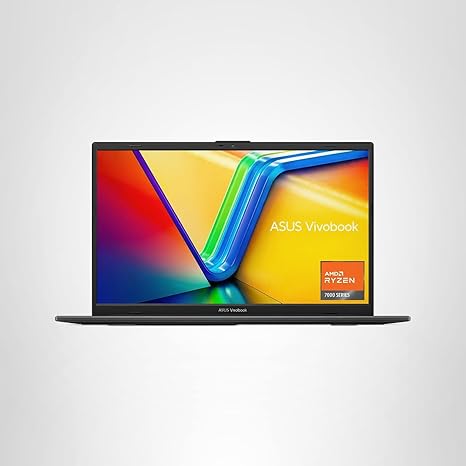
Welcome to Reviews inside tv, where we break down the latest tech to help you make the right choices. Today, we’re taking a closer look at the ASUS Vivobook Go 15.6” FHD Slim Laptop. This budget-friendly, everyday workhorse promises efficiency and reliability at an attractive price point, but does it truly deliver? Let’s find out.
This laptop comes with an AMD Ryzen 3 7320U Quad-Core processor, offering a solid balance of power for multitasking, web browsing, and light gaming. With 8GB of DDR5 RAM and 256GB SSD storage, it’s designed to handle daily tasks like streaming, shopping, and word processing without breaking a sweat. The 15.6-inch Full HD display isn’t the brightest we’ve seen, with a 250-nit peak brightness, but it’s adequate for indoor use. Its 45% NTSC color gamut offers decent color reproduction, making it suitable for everyday media consumption and productivity work. It’s certainly not a display for professional photo or video editing, but for casual viewing and office work, it gets the job done.
Under the hood, the AMD Ryzen 3 7320U offers four cores and eight threads, which provides a smooth experience for office work and light multitasking. You won’t be running demanding software like video editing suites or modern AAA games, but for things like web browsing, streaming, and word processing, it’s more than capable. The integrated AMD Radeon graphics are great for basic tasks—watching videos or light gaming like Minecraft and older titles will run fine, but you’ll want to lower the settings for more graphically intensive games.
When it comes to real-world performance, this laptop handles office tasks without any noticeable lag. With 8GB of RAM, you can easily keep several browser tabs open while working on documents or spreadsheets. The 256GB SSD ensures quick boot times and fast file access. It’s a decent amount of storage for basic users, but if you store a lot of large files or media, you might want to consider external storage or upgrading the internal SSD.
Battery life is another strong point for the Vivobook Go, with up to 11 hours of runtime from its 42Wh battery. In real-world use, this could translate to around 7-8 hours of web browsing and light productivity, which is solid for a budget device. It’s not class-leading, but it’ll definitely get you through a full day of work or study without needing a charge. And when you do need to top up, the fast charging feature means you can get a significant charge boost in just an hour or so.
The build quality is durable, designed to meet US MIL-STD 810H military standards. This means it’s been tested against high temperatures, low temperatures, shock, vibration, and altitude, making it a sturdy option if you need a laptop that can withstand a little rough handling. However, it’s not the most premium feeling laptop in its class. The plastic chassis, while solid, doesn’t have the same high-end feel as aluminum models, and it’s a bit on the thicker side, weighing in at around 3.7 pounds. Still, it’s light enough to carry in a backpack without straining your shoulders.
The keyboard features quiet, comfortable typing with a full-sized layout, including a numeric keypad, which is a rare but appreciated feature on budget laptops. The trackpad is responsive, and palm rejection is solid, making the overall input experience fairly comfortable. The 720p HD webcam is decent for video calls, and the privacy shutter is a nice touch for extra security.
In terms of connectivity, the Vivobook Go offers Wi-Fi 5 and Bluetooth 5.1, which are both reliable for everyday use but may not be as fast or future-proof as Wi-Fi 6 or Bluetooth 5.2. As for ports, you get a standard mix: two USB-A 3.2 ports, one USB-C port, an HDMI 1.4, a microSD card reader, and a headphone jack. The USB-C port is great for fast data transfer and connecting to external displays, but there’s no Thunderbolt here. The lack of Ethernet may be a downside for some, but Wi-Fi 5 should suffice for most users.
Now, let’s take a moment to talk about performance and thermals. The laptop is fan-cooled, and while it stays relatively quiet under light tasks, it does get noticeably warmer during heavier workloads like video streaming or casual gaming. The fan noise is mild but present under load, and the palm rest area can get a little warm, though it’s never uncomfortable. During extended use, there’s no significant thermal throttling or performance drops, which is a good sign for day-to-day reliability.
In terms of gaming, don’t expect to run the latest AAA titles at high settings. The integrated Radeon graphics handle light games like Fortnite and older titles decently at 720p or 1080p, but you’ll need to dial down the settings for smoother performance. If you’re into casual gaming or just want a system to get some light playtime in, this laptop will do the job. However, for more demanding titles, you’ll need something with a dedicated GPU.
As for its value for money, the ASUS Vivobook Go 15.6” is priced quite competitively in the budget segment. It offers solid performance for everyday tasks, good battery life, and a durable build. It’s not going to blow you away with premium features or power, but for the price, it’s a reliable option. Compared to some rivals in the same price range, it holds its own, especially when considering the military-grade durability and long battery life.
In conclusion, the ASUS Vivobook Go 15.6” is a solid choice for students, office workers, or anyone who needs an affordable laptop for everyday tasks. It’s not a powerhouse, but it provides the essentials—reliable performance, good battery life, and decent build quality—all at an attractive price. If you’re a casual user who doesn’t need high-end gaming or pro-level content creation, this laptop will serve you well. However, if you’re looking for something more capable for gaming or intensive creative work, you might want to consider options with a more powerful GPU.
Thanks for watching Reviews inside tv. The link to get the ASUS Vivobook Go is in the comments box, and if you have any questions or already own this laptop, drop a comment below. Don’t forget to like, subscribe, and hit the bell icon so you don’t miss our next review. Until next time, take care and happy laptop hunting!
Available to buy here:


