

Available to buy here:
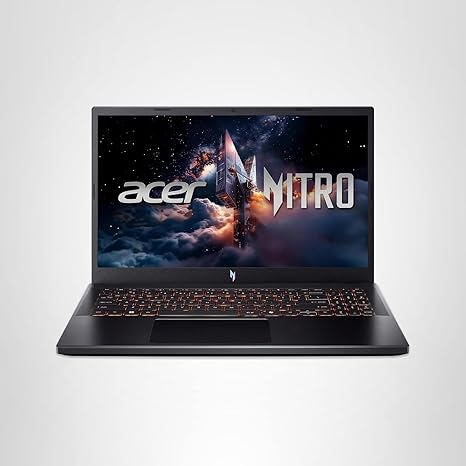
Welcome back to Reviews inside tv! Today, we’re looking at a laptop that promises a powerful gaming experience with features aimed at both casual users and serious gamers: the Acer Nitro V Gaming Laptop. With a sleek design and some serious specs, the Nitro V is designed to handle gaming, streaming, and heavy multitasking—let’s see how it really performs.
The Acer Nitro V is powered by the Intel Core i7-13620H processor, a chip that’s built to handle multitasking with ease. With its 10 cores and 16 threads, this chip delivers impressive performance for a wide range of tasks. Whether you’re gaming, editing videos, or streaming, this CPU can handle it all. Coupled with the NVIDIA GeForce RTX 4050 GPU, you get impressive AI-powered graphics performance, making everything from ray tracing to high-FPS gaming feel smoother and more immersive. Whether you’re gaming or working with demanding software, the combination of these two pieces of hardware will keep things running smoothly.
With 16GB of DDR5 RAM, the Nitro V has more than enough memory for multitasking and more demanding applications. Whether you’re juggling multiple browser tabs, working in Photoshop, or running a few heavy apps at once, this amount of RAM ensures things stay responsive. Plus, with its 1TB PCIe Gen 4 SSD, the Nitro V delivers quick load times, faster file transfers, and plenty of storage for all your games, files, and media. The storage is lightning-fast, thanks to the Gen 4 SSD, and while it’s not the largest drive available, it offers plenty of space for most users.
Now, let’s talk about the display. The Nitro V sports a 15.6-inch Full HD IPS screen with a fast 165Hz refresh rate. This high refresh rate makes it a dream for fast-paced games, offering smooth motion and reducing ghosting. The screen also features a wide 16:9 aspect ratio, giving you plenty of real estate for multitasking or watching movies. While it’s not 4K or OLED, the IPS panel offers decent color accuracy, and the 165Hz refresh rate gives you an edge in competitive gaming. However, if you’re used to OLED or higher-end displays, the quality here may feel a bit lacking in comparison, but for its price, it gets the job done.
When it comes to connectivity, the Nitro V doesn’t disappoint. It comes with a range of ports that will meet almost any need. There’s Thunderbolt 4 for fast data transfer and charging, USB 3.2 Gen 2 ports, HDMI 2.1, and an Ethernet port for reliable online gaming, plus a headphone jack and SD card reader. You also get Wi-Fi 6, which ensures fast, stable internet connections, whether you’re gaming at home or in a café. That said, if you’re looking for cutting-edge connectivity options, the Nitro V has you covered, though its lack of some newer ports like USB 4 could limit future-proofing.
Performance-wise, the Nitro V delivers solid gaming results. With the RTX 4050, you’ll get great frame rates in most modern games, especially at 1080p. For example, in titles like Cyberpunk 2077 and Call of Duty: Warzone, you can expect to hit around 70–90 FPS on High settings at Full HD resolution. While you might not get the ultra-high frame rates seen in more premium gaming laptops, it’s a solid experience, especially if you enable DLSS for an even smoother ride. However, if you’re chasing 144Hz gameplay at higher settings, this laptop might fall a little short.
Thermals and noise are an important aspect of any gaming laptop, and the Nitro V generally handles heat well. The dual-fan cooling system keeps temperatures in check during extended gaming sessions, although it can get a little warm on the underside when pushed to its limits. Fan noise is mostly noticeable under load, but it doesn’t become overly loud or distracting, making it suitable for long gaming sessions or productivity work without too much disruption.
Now, let’s talk battery life. With a 57.5Wh battery, you’re looking at around 5–7 hours for general office work and media consumption. However, gaming or heavy tasks will quickly drain the battery in a few hours, so you’ll likely need to keep it plugged in for most intensive tasks. On the bright side, the Nitro V charges quickly, and its relatively lightweight design makes it easy to carry around at 4.66 pounds, even though it’s not the lightest gaming laptop on the market.
When it comes to the keyboard and trackpad, Acer’s made sure that the Nitro V is comfortable for long sessions. The backlit keyboard offers decent key travel and good feedback, making it a solid choice for those who type a lot. The trackpad is responsive and accurate, though it’s a bit on the smaller side compared to other laptops in this range. Still, it gets the job done for most casual tasks. Plus, the addition of AI-powered noise cancellation through Acer’s PurifiedVoice technology ensures clear communication during video calls or gaming.
In terms of build quality, the Nitro V’s chassis is solid, made from a mix of plastic and metal that feels robust without being overly heavy. The gradient design on the back adds a bit of flair, but it’s still a professional-looking device that won’t look out of place in the office. It’s durable, though not as premium-feeling as some higher-end gaming laptops. That said, the build quality is impressive for the price.
Now, let’s quickly run through the pros and cons. On the positive side, the Nitro V offers a solid gaming experience, especially at 1080p, with strong CPU and GPU performance, a fast display, and good connectivity options. It’s well-built, has a reliable cooling system, and delivers decent battery life for everyday tasks. On the downside, the display could be brighter, the speakers aren’t the most impressive, and the battery drains quickly under load. For those seeking top-tier gaming performance or 4K display options, this laptop might not be the best fit.
When it comes to value for money, the Acer Nitro V is a solid choice in the mid-range gaming laptop market. Its price point is competitive, offering a great balance between performance and features. If you’re looking for a laptop that can handle both gaming and productivity without breaking the bank, the Nitro V delivers. In terms of competitors, it holds up well against models like the ASUS TUF F15 or the Lenovo Legion 5, both of which offer similar specs but might edge out the Nitro V in certain areas like display quality or build.
So, who’s this laptop best suited for? If you’re a gamer who mainly plays at 1080p or a content creator who needs a powerful yet portable machine, the Nitro V is a solid option. It’s also great for office workers or students who need a laptop that can multitask without breaking a sweat. If you’re looking for ultra-high-end graphics or a premium display, though, you might want to look elsewhere.
Before you go, don’t forget to hit that like button, subscribe, and tap the bell icon so you never miss a review from Reviews inside tv! Thanks for watching, and if you’ve got any questions or thoughts on the Acer Nitro V, drop them in the comments below. Catch you in the next video—until then, keep gaming, and keep your tech game strong!
Available to buy here:


