

Available to buy here:
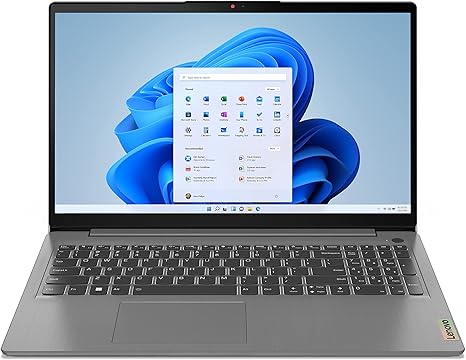
Welcome back to Reviews inside tv! Today, we’re taking a look at the Lenovo IdeaPad 3i, a sleek, essential laptop designed to handle the daily grind with ease. With its slim profile, 15.6-inch display, and solid specs, it’s geared towards everyday users who need reliable performance for work, study, and entertainment. But does it live up to its promise? Let’s break it down.
First, let’s look at the core specs. The Lenovo IdeaPad 3i is powered by the 12th generation Intel Core i5 U-series processor, paired with 8GB of RAM and a 512GB solid-state drive. This combination gives you enough muscle for day-to-day tasks like web browsing, document editing, and video calls. The processor is designed to balance power efficiency and performance, making it an excellent choice for anyone who needs a laptop that won’t drain the battery too quickly but still gets the job done. The 8GB of RAM is adequate for multitasking—switching between a few apps or dozens of browser tabs won’t slow you down, but if you’re the kind of person who keeps 30+ tabs open or dabbles in memory-heavy tasks like photo editing, you might hit some limitations.
When it comes to the display, Lenovo offers a 15.6-inch Full HD IPS panel with narrow bezels, giving you a wider viewing area and more screen real estate. The display delivers solid color accuracy, and the contrast levels are decent for most office work and media consumption. While it’s not the brightest screen out there—sitting at a typical 250-300 nits—it’ll handle indoor use just fine, but might struggle under direct sunlight. The IPS technology ensures better viewing angles, meaning you won’t lose color fidelity when sharing the screen with others. Whether you’re watching a movie or in a video call, the display quality is dependable, even though it’s not quite as immersive as the OLED or mini-LED panels found in higher-end laptops.
One of the standout features of the IdeaPad 3i is its portability. At just 0.78 inches thick and weighing in at only 1.7 kg, it’s light enough to carry around in a bag without adding too much extra weight. Whether you’re heading to class, working from a coffee shop, or traveling for business, it won’t slow you down. That slim design also makes it easy to slip into tight spaces, which is perfect if you need to move between different workstations throughout the day.
In terms of connectivity, the IdeaPad 3i doesn’t skimp on ports. You get a full-function USB Type-C port, capable of faster data transfers, power delivery, and even 4K display connectivity. This is a feature that’s becoming more common in premium laptops, but it’s great to see it here on a more affordable model. In addition, there are two USB 3.2 Type-A ports, a USB 2.0 port, an HDMI 2.0 output for external monitors or projectors, and an SD card reader for quick media transfers. Whether you’re docking to an external monitor or plugging in a USB drive, the variety of ports ensures you won’t have to constantly juggle adapters.
On the audio front, the Lenovo IdeaPad 3i includes Dolby Audio for richer sound and Smart Noise Cancelling for more tailored audio performance during video calls or media consumption. The dual microphones help improve clarity, cutting out a lot of the background noise, and the HD webcam with a privacy shutter adds an extra layer of security when you’re not using it. If you do a lot of Zoom calls or attend virtual meetings, these features make a noticeable difference.
For performance, the Intel Core i5 processor, coupled with Intel Iris Xe integrated graphics, gives the laptop the ability to handle some light creative work, such as photo editing or video streaming. But it’s not going to perform like a dedicated gaming laptop. For casual gaming, you might be able to play titles like Fortnite or League of Legends at lower settings, but don’t expect it to power through graphically demanding AAA titles like Cyberpunk 2077 or Red Dead Redemption 2. The Iris Xe GPU is decent for general use, but it’s more suited for productivity tasks than gaming or high-end content creation.
Now, let’s talk thermals and noise. During light tasks, like web browsing or watching videos, the IdeaPad 3i stays relatively cool, and the fan noise is kept to a minimum. However, under load—when running multiple apps or during extended video exports or gaming sessions—the fans do kick in, and you’ll notice more noise. The laptop doesn’t run as hot as some budget models, but prolonged heavy usage could lead to some thermal throttling, which may result in a slight dip in performance. If you’re looking for something that can handle intensive tasks over long periods without any slowdown, this may not be the best option.
Battery life is another important factor. The IdeaPad 3i comes with a 45Wh battery, which is good for around 6-8 hours of mixed usage. That includes light office work, streaming, and browsing. For more intensive tasks, like video editing or gaming, you might be looking at a bit less, so it’s best to carry the charger with you if you plan to be away from an outlet for an extended period. Charging is relatively fast, with the laptop going from 0 to 50% in about 45 minutes, so it’s convenient for quick top-ups throughout the day.
Moving on to the keyboard and trackpad. The IdeaPad 3i features a full-size keyboard with a number pad, which is great for anyone who does a lot of typing or number crunching. Key travel is decent, providing a comfortable typing experience for long sessions. While the layout is fairly standard, the size of the arrow keys may be a bit small for some people, so if you do a lot of gaming or work that requires those keys, it could feel a bit cramped. The trackpad is responsive and large enough for gestures, but not as smooth or accurate as more premium models. Palm rejection works well, though, so accidental clicks won’t be an issue.
For build quality, the Lenovo IdeaPad 3i feels solid without being overly premium. The chassis is made from plastic, which keeps the weight down but doesn’t give it the same robust feel as all-metal designs. Still, the build quality is good for a budget laptop, and it doesn’t feel cheap. The hinge is sturdy, and while there’s some flex in the top lid, it doesn’t impact the user experience.
So, who is the Lenovo IdeaPad 3i for? It’s a great option for students, office workers, or anyone who needs a reliable, budget-friendly laptop for general use. It’s not a powerhouse for gaming or intensive creative work, but it covers all the basics—web browsing, document editing, video calls, and media consumption—with ease. If you’re looking for something to handle day-to-day tasks and don’t want to spend a fortune, it’s a solid choice.
That being said, if you need a laptop with better gaming capabilities or higher-end creative performance, you might want to look elsewhere. The IdeaPad 3i does have its limitations, particularly when it comes to graphics-heavy applications and sustained performance under heavy load.
Overall, the Lenovo IdeaPad 3i offers excellent value for its price. It doesn’t try to do too much, but it does what it’s meant to do very well. If you’re after something simple, portable, and efficient for daily use, this laptop won’t disappoint.
Thanks for watching! Don’t forget to check the comments box for the link to get the Lenovo IdeaPad 3i. If you already own this laptop, drop a comment and let us know how it’s been working for you! And hey, while you’re here, remember to like, subscribe, and hit that bell icon so you don’t miss any of our upcoming reviews. Until next time, stay tech-savvy, and keep those laptops running smoothly!
Available to buy here:


