

Available to buy here:
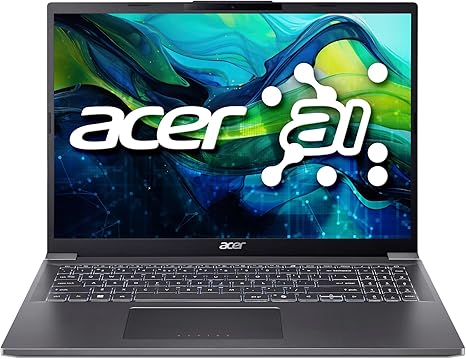
Welcome to “Reviews inside tv”! Today, we’re taking a closer look at the Acer Aspire 16 AI Ready Laptop, a device that promises to tackle everything from productivity to entertainment with its powerful specs and smart features. If you’re someone who needs a laptop that can do it all, this might just be the one you’ve been waiting for. But does it live up to the hype? Let’s explore.
The Acer Aspire 16 comes with a 16-inch WUXGA display, offering a resolution of 1920 x 1200 and a 16:10 aspect ratio. The extra vertical space is ideal for productivity, whether you’re browsing the web, working on documents, or getting creative. The display is an IPS panel, meaning wide viewing angles and solid color reproduction. It’s also equipped with Acer’s BluelightShield technology, which helps reduce eye strain during those long hours in front of the screen. Now, it doesn’t have OLED or mini-LED, but for this price range, the display quality is more than sufficient for most tasks.
Under the hood, the Aspire 16 is powered by the Intel Core Ultra 7 processor 155U. This processor comes with Intel AI Boost, meaning it can automatically optimize performance based on your usage, making this laptop more responsive in demanding scenarios. Paired with 32GB of LPDDR5X RAM, you can expect smooth multitasking performance whether you’re running multiple apps or working with large files. The 1TB PCIe Gen4 SSD further complements this setup, offering fast data access speeds and plenty of storage for your files, videos, and games.
In terms of GPU, this model relies on Intel Graphics, so it’s not designed for hardcore gaming, but it can handle light gaming and content creation without much trouble. If you’re someone who wants to dive into more graphically demanding titles, this laptop might not be the best choice, but for everyday work and some casual gaming, it’s more than capable. The inclusion of Intel Wi-Fi 6E is also a great touch for fast and stable wireless connections, and the Bluetooth 5.3 support ensures smooth pairing with peripherals.
Now, how does this all translate into real-world usage? For office work, this laptop delivers a snappy experience. Whether you’re working with spreadsheets, writing documents, or juggling multiple browser tabs, everything feels smooth and responsive. It’s even great for video calls, thanks to the 1080p webcam with Acer’s PurifiedVoice and PurifiedView 2.0. The AI-enhanced features make you look and sound better in meetings, even in low-light environments.
If you’re into media consumption, the display does a solid job for watching videos, streaming movies, and binge-watching shows. The IPS panel gives you good color accuracy and decent brightness, but don’t expect the level of contrast or vibrancy you’d get from OLED. Still, for most users, the display will get the job done without issue.
When it comes to content creation, the Aspire 16 shows its strengths with the 32GB of RAM and fast SSD. Photo and video editing will be efficient, and if you’re a creator working with AI or high-resolution files, this laptop can keep up. Video export times are quick, but if you’re into heavy 4K rendering or 3D modeling, you might want to look for something with a dedicated GPU.
For gaming, this laptop can handle casual games without breaking a sweat, but for AAA titles like Cyberpunk 2077 or Call of Duty: Warzone, expect to dial down the settings. The Intel Graphics aren’t built for high-end gaming, but titles like Fortnite or Minecraft will run just fine. If you’re aiming for a 144Hz refresh rate and smooth, competitive gaming, this laptop won’t be your best bet.
Performance-wise, the laptop is very quiet, and under light loads, the fans remain almost silent. However, under heavier tasks like gaming or intensive video editing, the fans do kick in, and while they’re not obnoxiously loud, you will hear them working hard. During extended gaming sessions or heavy workloads, the laptop maintains a comfortable temperature on the keyboard deck and underside, with minimal thermal throttling.
Battery life is solid, but not outstanding. The 16-inch display is a bit larger, and the battery isn’t massive, so in real-world usage, expect around 6 to 8 hours of use under typical office workloads. If you’re streaming videos or doing something more demanding, expect closer to 5 hours. It’s not a laptop you’d want to use all day without a charger on hand, but it’s good for shorter workdays or travel. The charging speed is decent, with fast-charging support that gets you up to 50% in about 30 minutes, making it convenient for quick top-ups between meetings or classes.
Portability-wise, the Acer Aspire 16 is impressively lightweight for its size. It’s built with an aluminum chassis, giving it a premium feel without adding unnecessary bulk. At just over 1.7 kg, it’s easy to carry around in a backpack or shoulder bag for a day of work at a café or a meeting at the office. The sleek design also doesn’t feel cheap, and it’s quite sturdy for everyday use.
The keyboard is comfortable to type on for extended periods, with good key travel and feedback. The layout is standard, but it’s worth noting that the number pad is missing, so if that’s important to you, you might find the layout a bit cramped. The trackpad is large, accurate, and supports multi-touch gestures, making it a joy to use for everyday navigation.
In terms of connectivity, the Aspire 16 is well-equipped, with two Thunderbolt 4 Type-C ports, USB 3.2 ports, HDMI 2.1, and a headphone jack. It also supports Bluetooth 5.3, so you can easily connect wireless headphones or a mouse. The addition of Thunderbolt 4 means you can dock the laptop to external monitors or high-speed storage devices without a problem. Wi-Fi 6E ensures that internet speeds are fast and stable, especially when working in busy or crowded areas with many devices.
One of the standout features is AcerSense, which allows you to manage system settings with just a tap, making it easier to boost performance or adjust your settings on the fly. It’s a small addition, but it adds convenience to your day-to-day use.
Now, let’s talk about the pros and cons. On the plus side, you’re getting solid performance, great connectivity options, and a sleek, lightweight design. The 32GB of RAM and 1TB SSD are generous, ensuring you have plenty of power for multitasking and file storage. The display is sharp, and the webcam is excellent for video calls. Battery life could be better, but it’s average for a laptop of this size. On the downside, the Intel GPU limits the gaming potential, and the lack of a dedicated graphics card means that serious gamers or creators working with graphics-heavy applications might want to look elsewhere.
When it comes to value for money, the Acer Aspire 16 offers a strong package. Its performance is competitive for its price, and it holds up well against similarly priced laptops from brands like Dell and HP. For those who need a versatile laptop for work, study, or light entertainment, this one offers solid all-around performance. If you’re looking for a laptop that’s better for heavy gaming or intensive creative work, though, there are better options in this price range.
In terms of build quality, the Aspire 16 feels premium thanks to its aluminum chassis, and Acer has a solid reputation for reliability. The only real question mark is how well the laptop holds up over time, but based on its construction and Acer’s track record, it should be a durable machine.
In conclusion, the Acer Aspire 16 is an excellent choice for students, professionals, and casual creators who need a reliable, all-around laptop. It’s light, fast, and capable of handling most tasks with ease. If you’re a serious gamer or need top-tier graphics performance, you might want to consider something with a dedicated GPU. But for everyday use, this laptop offers a lot of value for its price.
Thanks for watching! The link to grab this laptop is in the comments box below. Let us know what you think or if you already own one—feel free to share your experience! And don’t forget to like, subscribe, and hit the bell icon for more reviews. Until next time, happy computing!
Available to buy here:


