

Available to buy here:
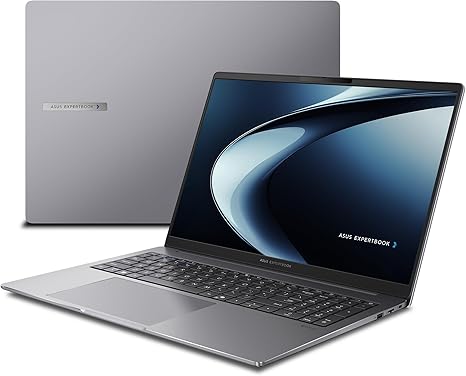
Welcome to “Reviews inside tv,” where we bring you all the details you need to know about the latest and greatest in tech. Today, we’re looking at the ASUS ExpertBook PM3 16” Business Laptop, a machine built for the modern professional, combining power, security, and reliability. Whether you’re juggling spreadsheets, managing projects, or navigating virtual meetings, the ASUS ExpertBook promises to keep you productive. But does it truly deliver? Let’s dive into the details and see if it lives up to the hype.
The heart of the ASUS ExpertBook PM3 is its AMD Ryzen AI 7 350 Processor. With a clock speed of 2.0GHz and the added power of 50 TOPS for its neural processing unit (NPU), this laptop promises a significant performance boost, especially when it comes to AI-driven tasks. This is the kind of processor that makes multitasking and demanding business applications feel smooth and responsive. Whether you’re handling large datasets, running complex calculations, or managing several office apps at once, this CPU can hold its own. Paired with 16GB of RAM, which is more than enough for heavy office use, the laptop is able to manage multiple applications without noticeable slowdowns. For those who need extra memory, the machine’s RAM is upgradable, offering flexibility for future-proofing.
Storage comes in the form of a 512GB M.2 NVMe PCIe 4.0 SSD. This SSD delivers fast read and write speeds, reducing load times and allowing for quick file access. 512GB is a good starting point, though for power users, especially those working with large files, it may feel a bit tight. Thankfully, the SSD is upgradeable, so you can always swap it out for something larger if your workload demands it.
The 16-inch WUXGA anti-glare display offers a resolution of 1920 x 1200, which is a bit of an odd size but still delivers decent clarity for everyday work. The anti-glare coating helps reduce reflections, making it easier to work in bright environments. It’s not the sharpest display on the market—especially compared to a 4K panel—but for business tasks, it strikes a solid balance between clarity and battery conservation. If you’re not doing color-critical work, the display should meet your needs just fine.
When it comes to security, ASUS has included a range of features aimed at protecting your data. There’s a fingerprint scanner for quick login, a 1080p webcam with a privacy shutter, and enterprise-grade security options like TPM 2.0 for encryption. The inclusion of the Kensington Nano Security Slot and AI-driven data protection with Copilot also adds an extra layer of confidence for those handling sensitive information.
As far as connectivity goes, the ExpertBook PM3 has you covered. You get two USB 3.2 Gen 1 Type-A ports, two USB 3.2 Gen 2 Type-C ports that support Display and Power Delivery, HDMI 2.1 for external displays, a 3.5mm audio jack, and a Gigabit Ethernet port for stable wired connections. The inclusion of WiFi 7 means you’re future-proofed when it comes to wireless connectivity, ensuring faster speeds and more stable connections when it becomes widely available.
Battery life on this laptop is solid, though we didn’t expect it to be a marathon runner given the 50Wh capacity. Real-world use, including web browsing and office tasks, should give you around 6-8 hours of uptime. If you’re running more demanding applications, such as video calls or editing large documents, expect the battery life to dip closer to 5-6 hours. It charges quickly thanks to USB-C Power Delivery, so you won’t be tethered to an outlet for long if you’re in a pinch.
On the comfort front, the keyboard on the ExpertBook PM3 is a standout. The keys have decent travel and feedback, making long typing sessions a breeze. The layout is practical, with no cramped keys or awkward placements. The trackpad is large, responsive, and features smooth palm rejection, so there’s no accidental misclicking. It’s a great keyboard for anyone who spends hours at a time typing, whether that’s on emails, reports, or project work.
The laptop’s build quality is another area where ASUS delivers. It’s built to military-grade MIL-STD 810H standards, meaning it’s designed to withstand the kind of wear and tear that comes with daily business life. Whether you’re carrying it in your bag to client meetings or working on it in a café, this laptop feels durable and tough without being bulky. At just 1.8 kg, it’s light enough for frequent travelers, though it’s a bit on the thicker side compared to some ultrabooks.
In terms of performance, the laptop can handle everyday business tasks, such as web browsing with many tabs open, video conferencing, and office applications, without breaking a sweat. For media consumption, it’s fine for streaming shows and YouTube videos, but don’t expect it to be a powerhouse for gaming or high-end multimedia creation. With that said, the ExpertBook’s focus is on productivity rather than media, so it serves its target audience well in that regard.
When it comes to gaming, the integrated AMD GPU is more than capable of running light and moderate games, though it won’t handle graphically demanding AAA titles like Cyberpunk 2077 or Red Dead Redemption 2 on high settings. If gaming is a priority for you, this probably isn’t the best choice, but for light gaming during downtime, you’ll be fine. It’s worth noting that the ExpertBook isn’t designed for heavy-duty gaming or creative workloads that demand a dedicated GPU, so keep that in mind if you’re in the market for something more versatile in that sense.
In terms of thermals, the laptop runs reasonably cool under everyday use, but during more intense sessions—like long Zoom calls or running business applications for extended periods—the fans can kick in and become a bit more noticeable. It’s not overly loud, but the fan noise may be distracting if you’re in a quiet environment. The chassis doesn’t get too hot, but there’s some warmth on the underside, especially under load.
Looking at the competition, the ASUS ExpertBook PM3 holds its own against similarly priced business laptops, such as the Lenovo ThinkPad L15 and HP ProBook 450. Compared to these, the ASUS offers better performance thanks to its Ryzen AI chip and more generous RAM options, as well as superior security features. While the ThinkPad and ProBook might have better keyboard feel or more flexible upgrade paths, the ExpertBook’s build quality and AI-enhanced features make it a strong contender in this category.
In terms of value for money, the ExpertBook PM3 is priced in line with its competitors, offering a solid balance of performance, security, and portability for business users. It might not be the best choice for gamers or creators, but for anyone who needs a reliable laptop for productivity, it delivers exactly what it promises. If you’re looking for a robust workhorse with a focus on security, productivity features, and solid everyday performance, this could be the laptop for you.
To sum it up, the ASUS ExpertBook PM3 is an excellent business laptop, especially for those who need something secure, durable, and capable of handling productivity tasks with ease. It’s ideal for professionals, office workers, and business owners who need reliable performance without the frills. If you need more power for creative or gaming tasks, you might want to look elsewhere, but for its target audience, this laptop does the job.
Thanks for watching today’s review! If you’re interested in the ASUS ExpertBook PM3, you’ll find the link to grab it in the comments box below. Have any questions or experiences with the laptop? Drop them in the comments—we’d love to hear from you! Until next time, keep your tech running smooth, and remember to stay productive.
Available to buy here:


