

Available to buy here:
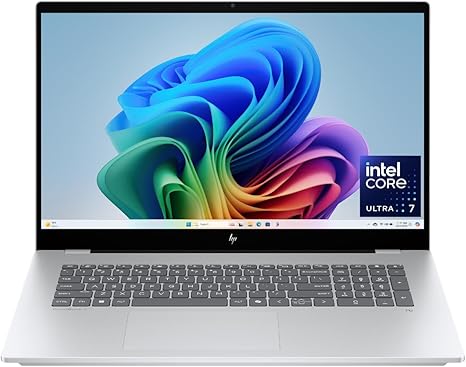
Welcome to Reviews inside tv, where today we’re exploring the HP OmniBook 7. With its large 17.3-inch display and some powerful internals, this laptop promises to be a versatile tool for both creators and professionals. But does it live up to the hype? Let’s take a closer look and find out how it performs in real-world scenarios, from office work to creative tasks.
The HP OmniBook 7 comes with an Intel Core Ultra 7 processor, offering 47 TOPS (trillions of operations per second) thanks to its AI-accelerated architecture. This chip is paired with 16GB of LPDDR5x RAM, which is optimized for next-gen applications and ensures smooth multitasking. Storage-wise, you get a 1TB PCIe Gen4 NVMe SSD, offering quick load times and enough space for most users’ needs, whether you’re dealing with large files or just want ample room for apps and media. And if you’re into visuals, the Intel Arc 140V GPU will assist with everything from media consumption to creative rendering, making this laptop a great choice for light gaming and content creation.
The 17.3-inch Full HD touchscreen is a standout feature here. With IPS technology, it delivers vibrant colors and a wide viewing angle of up to 178 degrees. This means you’ll have a solid visual experience whether you’re working alone or sharing your screen with someone else. The touch functionality adds a layer of convenience, especially when interacting with Windows 11 Home, which comes pre-installed along with the exclusive Copilot+ PC AI features. Whether it’s creating images with Cocreator AI or leveraging Windows Studio Effects for enhanced video calls, these smart assistants make everyday tasks more intuitive.
Now, let’s talk performance. In daily use, the HP OmniBook 7 shines. Web browsing, working with multiple documents, and hopping between video calls are all smooth thanks to the combo of that powerful CPU and ample RAM. Streaming is just as seamless, with vibrant visuals on that FHD touchscreen, and the built-in speakers, tuned by HP and Poly, deliver clear, balanced audio. But it’s when we move to creative tasks where the OmniBook 7’s potential really shows. Whether you’re editing photos, producing music, or even dipping your toes into video editing, the Intel Arc GPU accelerates those experiences with smooth rendering and quick export times.
But what about gaming? While the Intel Arc GPU isn’t meant to rival top-end gaming machines, it performs well in many popular titles. For instance, games like Fortnite or League of Legends will run at high settings, but more demanding titles like Cyberpunk 2077 will need to be dialed down to medium settings for a smoother experience. You’re not going to hit 60 FPS on ultra settings in the latest AAA titles, but for casual gaming, the experience is certainly more than adequate.
Speaking of thermals, let’s dive into that. In typical office use, the OmniBook 7 runs fairly cool, with only a slight warmth building up around the keyboard area. When pushed harder during creative work or gaming, you’ll notice the fans start to pick up speed, but they remain fairly quiet compared to other laptops in this range. The system does get noticeably hotter during extended gaming sessions, but there’s no significant throttling or performance dips, which is a plus for anyone working on long video editing projects or gaming for hours at a time.
When it comes to portability, the OmniBook 7’s size and weight are factors to consider. At 17.3 inches, it’s on the bulkier side, weighing around 5.5 pounds. It’s a bit heavy for lugging around in a backpack all day, but if you’re looking for a large screen to work or play on, it’s a trade-off that makes sense. The large screen and full keyboard layout make it a great choice for people who do a lot of typing or need that extra real estate for multitasking.
Battery life is another area where the OmniBook 7 is solid but not groundbreaking. With a 47.8Wh battery, you can expect around 6-8 hours of light office work, browsing, and streaming. Heavy workloads will drain the battery quicker, but that’s common for laptops with this kind of power. It charges fairly quickly, and while the charger isn’t the most compact, it’s travel-friendly enough for most users.
Now, let’s talk about the keyboard and trackpad. The keyboard offers good key travel and feedback, making it comfortable for long typing sessions. The layout is solid, with full-sized arrow keys and a number pad, so it’s well-suited for those who need to input a lot of numbers or data. The trackpad is responsive, with good palm rejection and accurate gestures. Plus, there’s one-touch access to Microsoft Copilot, which is handy for jumping straight into AI-powered productivity tools.
Ports and connectivity are impressive here, with a solid mix of USB-A and USB-C ports, an HDMI output, and an SD card reader. That’s great for connecting external monitors, docks, and storage devices, and the addition of Wi-Fi 6 ensures fast, reliable internet performance. As for Bluetooth, it’s the latest standard, so you’ll have no issues connecting wireless peripherals like headphones or a mouse.
One area that might disappoint some is the lack of upgradable RAM. While the 16GB RAM is sufficient for most tasks, the fact that it’s soldered means you won’t be able to expand it in the future. The storage, however, is upgradable, thanks to the M.2 slot, so you can add more storage down the line if needed.
In terms of build quality, the HP OmniBook 7 feels solid. The military-grade testing ensures it’s durable and able to handle bumps and drops. The materials used, including recycled plastics and metals, are designed to be eco-friendly without compromising on strength. It feels sturdy, and the hinge is robust, meaning you won’t have any trouble with it over time.
Now, a quick note on customer support. HP has a decent reputation for customer service, offering a standard one-year warranty with the option to extend it. While it’s not a standout feature of the laptop, it’s nice to know that you’re covered in case something goes wrong.
So, who is the OmniBook 7 for? This laptop is a great choice for anyone who needs a powerful, portable workstation with a large, vibrant screen. Creators who need AI-driven tools for media generation or those who need a laptop for video editing or graphic design will appreciate its performance. It’s also a solid option for office users and students who want a versatile machine that can handle anything from web browsing to spreadsheets.
On the flip side, if you’re a gamer looking for a high-end machine for AAA titles, this probably isn’t your best bet. Similarly, if portability is your top priority, the size and weight might be a dealbreaker.
At its price point, the OmniBook 7 offers solid value. It’s not a budget device, but it delivers good performance, a beautiful display, and smart AI tools that set it apart from many other laptops in this range. Compared to similar models, like the Dell Inspiron 17 or Lenovo IdeaPad 5, it holds its own with better AI features, a larger screen, and solid build quality.
Thanks for watching today’s review! If you’re interested in the HP OmniBook 7, you can find the link in the comments box below. Feel free to ask any questions or share your thoughts if you already own this laptop. Until next time, this is Reviews inside tv, signing off – stay tech-savvy!
Available to buy here:


