

Available to buy here:
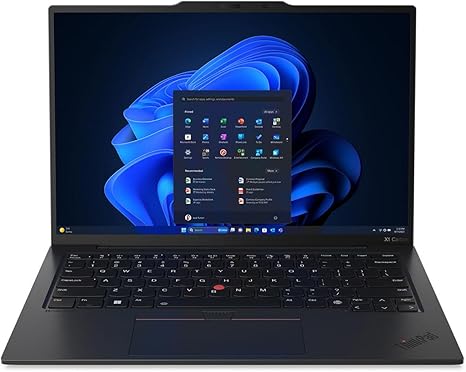
Welcome to Reviews inside tv! Today, we’re taking a close look at the Lenovo ThinkPad X1 Carbon Gen 12, a high-end 14″ notebook that’s designed for professionals, creators, and anyone who needs power on the go. With its sleek black design and impressive specs, this laptop aims to balance portability, performance, and premium build quality. But does it live up to the hype? Let’s find out.
The X1 Carbon Gen 12 comes equipped with an Intel Core Ultra 7 155U processor, part of Intel’s latest Evo platform, and backed by 16 GB of RAM. This setup promises smooth multitasking, from handling multiple office applications to more demanding creative workloads. Whether you’re working on a spreadsheet, a complex document, or editing media, this configuration should keep things running smoothly. The 512 GB SSD offers solid storage for your files, photos, and a few larger programs. Combined with a WUXGA display at 1920 x 1200 resolution, you’re getting a crisp, clear image that’s perfect for watching movies or diving into productivity tasks.
When it comes to real-world performance, the X1 Carbon excels in the office. It breezes through web browsing with dozens of tabs open, document editing, and video conferencing. The 16 GB of RAM means you can jump between apps without any noticeable lag. If you’re editing photos or video, this laptop won’t slow you down, although for more intense tasks, like 4K video editing, you might want something with a more powerful GPU.
Speaking of the GPU, the X1 Carbon Gen 12 doesn’t have a dedicated graphics card, so it won’t be suited for high-end gaming. However, for casual gaming or media consumption, this laptop holds its own. The display is one of its standout features, offering vibrant colors and decent brightness for indoor use. With 1920 x 1200 resolution, it’s not 4K, but it still delivers a great viewing experience for most content.
Battery life is another strong point. With a 14″ chassis and a relatively large battery for a laptop of this size, you can expect around 8-10 hours of productivity or media consumption. This is solid, but if you’re constantly running heavy software or gaming, you might find the need to charge up sooner. Charging speed is decent, so you won’t have to wait too long to get back to work.
As for the keyboard and trackpad, Lenovo has nailed the feel on this one. The key travel is comfortable, making it great for long typing sessions, and the trackpad is responsive and accurate. There’s no number pad, but that’s typical of this size, and the arrow keys are nicely placed. It’s clear that Lenovo has focused on creating a laptop that’s not just powerful but also a joy to use for extended periods.
Let’s talk about thermals and noise. The X1 Carbon Gen 12 is surprisingly quiet, even when pushed with multitasking and productivity tasks. The fans only kick into high gear when you’re really stressing the system, and even then, the noise is minimal. However, like most ultrabooks, it does get warm under heavy load, especially on the underside, but not excessively so. This makes it comfortable to use in your lap without feeling like you’re sitting on a heater.
In terms of portability, the X1 Carbon doesn’t disappoint. Weighing in at just 2.49 lbs (1.13 kg), it’s light enough to carry around all day without even noticing it in your bag. The build quality is top-notch—Lenovo uses premium carbon fiber and magnesium alloy materials, which makes the laptop feel both rigid and premium. The thin profile also contributes to the overall portability, so this is a great option for business travelers.
When it comes to ports, Lenovo has provided all the essentials. You’ve got two Thunderbolt 4 ports for fast data transfer and external monitor support, a USB-A port, an HDMI port for external displays, and a headphone jack. You’ll also find a microSD card reader, which is a nice touch for photographers or anyone needing quick data transfer on the go. Connectivity is robust too, with Wi-Fi 6E support, ensuring a fast and reliable internet connection even in crowded networks.
Now, let’s briefly touch on the competition. The ThinkPad X1 Carbon Gen 12 is competing against laptops like the Dell XPS 13 and HP Spectre x360 14. While the XPS 13 is similarly slim and portable, the X1 Carbon offers better keyboard feel and thermal management. The HP Spectre, on the other hand, might provide better display options, but the X1 Carbon remains a solid choice for business users who need the most reliable and consistent performance.
So, who should consider the ThinkPad X1 Carbon Gen 12? If you’re a student or professional who values portability, comfort, and reliability over raw gaming or creative horsepower, this is a fantastic choice. Its light weight, strong battery life, and powerful enough specs make it perfect for office work, media consumption, and casual tasks. However, if you’re looking for something more specialized, like heavy video editing or high-end gaming, you might want to look at alternatives with more powerful GPUs.
To wrap it up, the Lenovo ThinkPad X1 Carbon Gen 12 delivers in almost every area that matters—performance, portability, comfort, and build quality. It’s not without its drawbacks, like the lack of a discrete GPU and the relatively high price tag, but for most users, these are minor trade-offs for the overall experience. Thanks for watching, and if you’re interested in the Lenovo ThinkPad X1 Carbon, you can find the link in the comments box. Don’t forget to like, subscribe, and hit that bell icon to stay updated with our latest reviews.
Available to buy here:


