

Available to buy here:
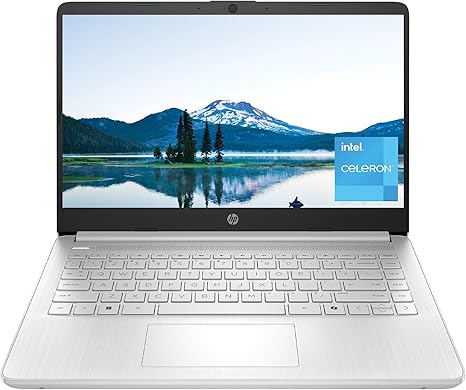
Welcome to “Reviews inside tv”! Today, we’re taking a closer look at the HP 14-inch Laptop, model 14-dq3500nr. This laptop positions itself as an affordable option for students, office users, or anyone who needs a simple, reliable device for day-to-day tasks. But is it more than just a budget pick, or does it struggle in the areas that matter most? Let’s break it down.
Starting with the specs, the HP 14 features an Intel Celeron N4500 processor, which is an entry-level chip designed for basic tasks like web browsing, document work, and light media consumption. It’s paired with 4 GB of DDR4 RAM, which is enough for light multitasking, but it could quickly feel limiting if you’re working with multiple applications at once. The storage comes in the form of a 64 GB eMMC drive, which is flash-based and provides faster speeds than traditional hard drives, though it’s much smaller in capacity compared to an SSD. While you’re not going to be storing a ton of files or large programs, it’ll handle the basics just fine.
In terms of display, you get a 14-inch HD screen with micro-edge technology, which means there’s virtually no bezel around the screen. This creates a more immersive experience and is great for multi-monitor setups, but the 1366 x 768 resolution leaves a lot to be desired when it comes to sharpness and clarity, especially for those used to higher-resolution screens. The display is decent for web browsing and streaming videos, but if you’re into detailed work like photo editing or anything requiring high color accuracy, you might find it lacking.
The Intel UHD Graphics can handle basic streaming and light gaming, but don’t expect to play graphically demanding games at high settings. It’s not a powerhouse in terms of gaming performance, but it’ll get the job done for casual titles and media consumption. The laptop also boasts the ability to smoothly stream 4K content, but keep in mind that the display itself is only HD, so you won’t fully enjoy the benefits of 4K unless connected to an external display.
Battery life is where this laptop shines for its price range. Thanks to the energy-efficient Celeron chip and low-power eMMC storage, you can expect solid battery performance. Under light use like web browsing and document editing, you’ll get around 6 to 8 hours, which is great for a day of productivity on the go. It’s not a powerhouse that’s going to last through intense video editing or gaming, but for basic tasks, it’s more than adequate.
The laptop’s keyboard and trackpad are serviceable, but not exceptional. The key travel is a bit shallow, which may not be ideal for those who do a lot of typing, but it’s manageable for short bursts of work. The trackpad is responsive and accurate, though it might feel cramped for users who rely heavily on precise navigation. It lacks some of the more premium features like backlit keys, but for its price, it’s not unexpected.
As for connectivity, the HP 14 offers a decent selection of ports. You get two USB-A ports, a USB-C port, an HDMI output, and a microSD card reader. It also has Wi-Fi 5, which is a little dated compared to Wi-Fi 6, but still offers reliable connectivity for most casual users. Bluetooth is included for connecting peripherals, and the laptop is on the lighter side, weighing in at just around 3.2 pounds, making it portable and easy to carry around.
When it comes to performance under load, the laptop handles everyday tasks like browsing multiple tabs, writing documents, and video conferencing without much issue. However, if you push it too hard with too many applications or resource-heavy tasks, you’ll start to see slowdowns, and the fans may kick in. There’s no thermal throttling or anything that drastic, but you’ll definitely notice when it’s under strain.
As far as build quality goes, this is a budget laptop, so don’t expect premium materials. The chassis is plastic, and while it’s light and portable, it feels a bit flimsy compared to higher-end laptops. The hinge is sturdy enough, but it’s not the type of laptop you’ll feel comfortable dropping. For the price, though, it’s pretty standard.
Now, let’s talk about whether this laptop is worth the money. At around $200, the HP 14 is an affordable option for students or people who need a no-frills laptop for light use. If you need more processing power or storage, there are definitely better options out there, but for basic tasks, it gets the job done. For someone looking for a second laptop or something for simple browsing and office work, it’s a solid choice.
In comparison to some other budget laptops, like the Lenovo IdeaPad 1 or the Acer Aspire 1, the HP 14 holds its ground in terms of pricing, but the lack of SSD storage and a higher-resolution display might make some users look elsewhere for a more balanced experience.
Ultimately, the HP 14 is best suited for users who don’t need top-tier performance but want a lightweight, portable laptop for casual tasks. It’s not going to be the right fit for gamers, content creators, or anyone needing heavy multitasking, but for everyday office work, schoolwork, and light media consumption, it’s a solid pick.
Thanks for watching! If you’re interested in the HP 14, you can find the link in the comments below. Let us know if you have any questions or if you already own one – we’d love to hear your thoughts. Until next time, keep on reviewing and stay tuned for more!
Available to buy here:


