

Available to buy here:
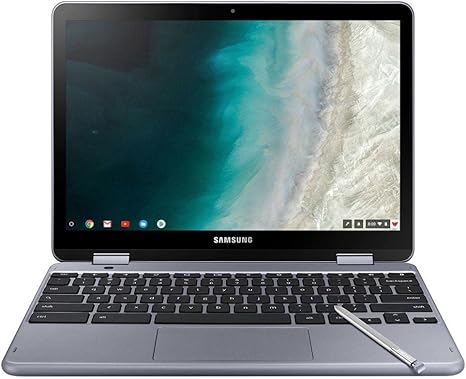
Welcome to “Reviews inside tv,” where we give you the real deal on the latest tech. Today, we’re checking out the Samsung Plus 2-in-1 12.2″ Touch-Screen Chromebook, featuring an Intel Celeron processor, 4GB of memory, and 32GB of eMMC flash storage. It’s a compact, budget-friendly option that promises versatility and solid performance for basic tasks. But does it live up to the hype? Let’s find out.
The Samsung Plus Chromebook is designed for users who need a lightweight, portable device that’s capable of handling everyday computing tasks with ease. It’s marketed primarily for students and casual users, but its 2-in-1 design makes it versatile for those who like the flexibility of a tablet with the functionality of a laptop. Now, let’s break down what’s inside.
At the heart of this Chromebook is the Intel Celeron processor, clocked at 1.50 GHz. For the everyday user, this means decent performance for basic tasks like web browsing, word processing, and checking emails. While it won’t be winning any awards for speed in high-demand applications, it’s perfectly adequate for light use. For multitasking, the 4GB of RAM is on the lower end, which can start to feel sluggish if you have too many tabs open or try to run more demanding apps. That said, for a Chromebook, this is still manageable for day-to-day tasks like social media and watching videos.
Storage comes in the form of 32GB eMMC flash memory. It’s fast enough for a Chromebook, but you’ll likely run out of space quickly if you store a lot of files or apps locally. However, since Chromebooks are built to rely heavily on cloud storage, this shouldn’t be a dealbreaker for most users. You can always expand your storage through Google Drive or an external SD card, but keep in mind that the onboard storage is limited.
The display here is a 12.2-inch touch screen with a resolution of 1920×1200, which is a nice touch for a Chromebook at this price range. While it’s not quite as sharp as higher-end models with Full HD displays, it provides a solid visual experience for streaming movies, browsing, or using productivity apps. The touchscreen functionality is smooth, and it’s responsive enough for casual use, though it’s not quite as precise as the best touchscreens out there. The size is compact, making it an ideal choice for portability, but it also means the screen can feel a bit cramped if you’re used to larger devices.
When it comes to performance, the Chromebook handles everyday office work like word processing, web browsing, and even media consumption with ease. Streaming video looks good on the 12.2-inch screen, and the Chromebook doesn’t struggle too much with apps like Google Docs or light photo editing. But, if you’re planning on doing anything intensive like video editing or gaming, you’ll definitely want to look elsewhere. The Intel Celeron processor and 4GB of RAM won’t cut it for those kinds of tasks.
One area where Chromebooks generally shine is in battery life, and the Samsung Plus is no exception. The 32GB eMMC flash storage and energy-efficient processor help it last for up to 10 hours on a single charge, depending on your usage. That’s enough for an entire workday or several episodes of your favorite shows. When you do need to charge, the USB-C charging port makes it easy to plug in, though the charging speed isn’t the fastest, so it’s better suited for topping off during the day rather than a rapid recharge.
Now, let’s talk about thermals and noise. The Samsung Plus doesn’t get hot under normal use, but with extended sessions, it can start to warm up, particularly around the keyboard. The fan isn’t particularly loud, but it can kick in when the system is under load. For most users, though, it’s going to be mostly quiet during daily tasks. If you’re doing something heavier, like watching a full-length movie or browsing with a ton of tabs open, it’s not going to get unbearable, but it’s not completely silent either.
The keyboard on this Chromebook feels decent for typing, but don’t expect a premium experience. The keys offer a good amount of travel and feedback, but they do feel a bit shallow, especially if you’re used to something more high-end. The trackpad is responsive and accurate for the most part, though it can feel a little cramped. If you’re someone who types for extended periods, the layout may feel a bit small, but it’s workable for short typing sessions.
For ports, the Samsung Plus is limited, as you might expect from a budget 2-in-1. It includes two USB-C ports, a microSD card slot, and a headphone jack. No HDMI or USB-A ports here, so if you plan to connect to external displays or use older USB accessories, you’ll need a dongle or adapter. The lack of ports is definitely something to keep in mind if you have specific peripherals you want to use regularly.
When we look at its portability, this Chromebook is incredibly light, weighing just over 2 pounds. It’s easy to slip into a bag and carry around all day without feeling weighed down. The slim design also means it’s easy to store in tight spaces when not in use, making it a perfect choice for students or travelers who need a compact device to get things done on the go.
In terms of build quality, the Samsung Plus is solid but not exceptional. The body is made of plastic, and while it doesn’t feel flimsy, it’s definitely not premium either. The hinge mechanism is smooth, but you’ll have to be cautious when adjusting it since it doesn’t feel quite as sturdy as higher-end models.
As for value, the Samsung Plus 2-in-1 Chromebook offers solid performance for basic tasks at an affordable price. If you’re a student or someone who just needs a device for light browsing, word processing, and streaming, it’s hard to beat this value. However, if you need more performance for things like heavy multitasking, video editing, or gaming, you’ll likely be disappointed.
For direct competitors, the Lenovo Chromebook Duet and the HP Chromebook x360 offer similar performance, with the Lenovo Duet being a bit more budget-friendly, while the HP x360 brings in a bit more versatility with a 360-degree hinge for a more tablet-like experience.
All in all, the Samsung Plus 2-in-1 Chromebook is a solid, budget-friendly option for casual users and students who need a light, portable device for everyday tasks. Its performance is more than enough for basic needs, but don’t expect it to handle anything too demanding. If you’re looking for a no-fuss Chromebook for light work and entertainment, it’s a great choice. However, for those who need more power or a higher-quality display, you might want to consider a higher-end model.
Thanks for watching! You can find the link to grab this Chromebook in the comments below. Feel free to ask any questions or share your experience with the Samsung Plus in the comments. Until next time, stay tech-savvy and keep those devices in check!
Available to buy here:


