

Available to buy here:
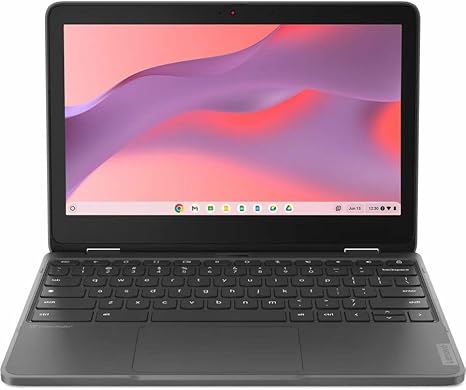
Welcome to “Reviews inside tv.” Today, we’re looking at the Lenovo 300e Yoga Chromebook Gen 4, a compact 2-in-1 convertible that promises versatility and performance for students and light everyday users. Whether you’re diving into schoolwork, streaming content, or just browsing the web, this Chromebook is built to offer a flexible, budget-friendly solution. Let’s see how it stacks up to the competition.
The Lenovo 300e Yoga comes with an octa-core ARM processor that blends the power of the Cortex A76 and A55 cores, making it capable of handling light multitasking, like web browsing, document editing, and video calls, without breaking a sweat. With 4GB of RAM, you’ll have enough memory for most basic tasks, though heavy multitaskers might feel a bit constrained. If you’re constantly juggling multiple tabs or working with more demanding apps, you may find it a bit slow at times, but for casual use, it’s pretty smooth.
The 32GB flash storage is decent for storing a few documents and apps, but keep in mind, this is not going to offer the space needed for large files or media-heavy projects. It does support cloud storage, so if you rely on Google Drive or other cloud services, the limited storage might not be a major drawback. The storage type, being flash memory, ensures faster boot times and app loading compared to traditional HDD storage, which is a plus for the price point.
Display-wise, the 11.6-inch touchscreen is built for clarity and ease of use. The resolution comes in at 1366 x 768, which is standard for a device in this category. While it won’t wow you with pixel-perfect clarity like higher-end models, it’s good enough for everyday tasks. The color reproduction is adequate, and the screen offers decent viewing angles, so you can comfortably work or watch media from various positions. However, don’t expect the vibrant colors and brightness you’d get from an IPS or OLED panel. For casual media consumption, though, it’s more than serviceable.
When it comes to battery life, the Lenovo 300e Yoga offers impressive performance considering its lightweight and compact design. You can expect around 8 hours of usage with moderate tasks like web browsing and streaming, which is a solid performance for a Chromebook at this price. The lightweight build makes it easy to carry around, and it doesn’t feel bulky in a bag, making it an ideal option for students and those who need a portable device for on-the-go productivity.
The keyboard and trackpad are both functional, but not particularly exceptional. The keyboard has decent key travel, which should suffice for typing out assignments or emails. It’s comfortable for short typing sessions, though longer sessions might cause some strain as the layout is compact. The trackpad is responsive, and multi-touch gestures work well, but it does feel a little small. If you’re used to larger trackpads, it might take some getting used to.
As for connectivity, the Lenovo 300e Yoga keeps things simple, offering essential ports like USB-A, USB-C, and a microSD card reader. While the inclusion of USB-C is nice for fast data transfer or charging, the lack of more ports may leave you scrambling for adapters if you need to connect external devices or monitors. It’s also worth noting the inclusion of Wi-Fi 5 and Bluetooth 5.0, which are adequate for typical internet browsing, but don’t expect the latest performance speeds you’d get with Wi-Fi 6.
Thermals are generally well-managed. This Chromebook doesn’t run hot under normal workloads, but under heavy use, you might notice some warmth around the keyboard and bottom of the chassis. The fan noise is minimal and typically doesn’t become a problem unless you’re running resource-heavy applications. For most users, this should be a quiet, comfortable device to use throughout the day.
One of the standout features of this Chromebook is its 2-in-1 convertible design. The hinge lets you flip the screen around, allowing you to use it in tablet mode, which is great for note-taking or watching videos on the go. This flexibility makes the Lenovo 300e Yoga a good choice for students who need both a laptop and a tablet-like experience in one device.
In terms of value for money, the Lenovo 300e Yoga stands out as a budget-friendly, versatile option for basic tasks. Its performance is enough for web browsing, document editing, and light media consumption. If you’re looking for a device primarily for school or casual use and need something compact, lightweight, and flexible, this Chromebook could be a solid choice. However, if you need more power, storage, or a higher-quality display, you might want to consider other options in this price range.
For those wondering how this model compares to others, you’ll find that the Lenovo 300e Yoga’s biggest competitors are other budget Chromebooks, like the HP Chromebook x360 or the Acer Spin 11. These offer similar features, but the Yoga’s 2-in-1 design and more flexible hinge may give it an edge for those who want versatility. However, if battery life or a more premium display is a priority for you, those other models might offer slightly better options for a similar price.
The build quality feels solid for a budget Chromebook. The plastic construction is sturdy enough for everyday use, but it does feel less premium than some metal alternatives. However, considering its price, this is to be expected, and the design is compact and functional. It’s easy to toss in a bag and carry around without worrying about it taking up too much space or adding unnecessary weight.
In terms of long-term reliability, Lenovo generally has a good reputation for making durable and dependable devices, so you can expect this Chromebook to hold up for a few years of standard use. Just don’t expect it to be a powerhouse that can handle demanding tasks like video editing or heavy gaming.
If you’re someone who just needs a reliable, budget-friendly device for school, work, or casual use, the Lenovo 300e Yoga could be a great fit. Its compact size, flexible design, and reasonable performance make it a standout in the entry-level Chromebook space. Just remember, if you’re looking for more power or a higher-end display, you may need to spend a bit more.
Thanks for watching, and if you’re interested, you can find the link to grab this Chromebook in the comments box below. If you already own one, feel free to share your experience or ask any questions in the comments. Don’t forget to like, subscribe, and hit the bell icon for more reviews like this. Until next time, take care, and happy browsing!
Available to buy here:


