

Available to buy here:
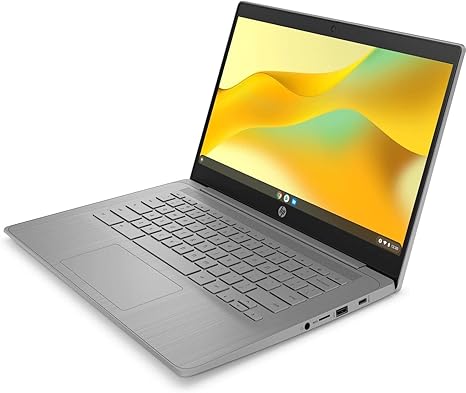
Welcome to “Reviews inside tv,” where today we’re looking at the HP Chromebook 14a-ne0013dx. This compact laptop is geared towards casual users, students, and anyone looking for an affordable, no-fuss machine for everyday tasks. With Chrome OS at its core, it promises simplicity, speed, and a reliable experience for basic computing needs. But does it live up to its promises? Let’s break it down.
At the heart of this Chromebook is the Intel Celeron N4120 processor. With 4 cores, 4 threads, and a clock speed that can go from 1.10 GHz up to 2.60 GHz, this is far from a powerhouse, but it’s certainly capable for lighter tasks. If you’re browsing the web, working in Google Docs, or even running a few tabs at once, it handles those scenarios just fine. However, you’ll notice some limitations when it comes to multitasking or running more demanding apps. It’s not a chip designed for heavy-duty workloads, and you won’t be editing 4K videos or running high-end games on this machine.
In terms of graphics, the integrated Intel UHD Graphics 600 is fine for basic media consumption and casual usage, but don’t expect stellar performance in gaming or anything GPU-intensive. It’s built for the essentials, so watching HD videos or using web-based applications will work without a hitch, but complex design work or high-end gaming are out of the question.
Moving on to RAM, it has 4GB of LPDDR4, which is acceptable for a Chromebook in this price range. While this won’t provide a super smooth experience if you have dozens of tabs open or are trying to juggle resource-heavy apps, for light users or students doing word processing and web browsing, it’s adequate. Upgrading the RAM isn’t an option, so if you’re someone who needs to keep several apps running smoothly, you may want to consider something with more memory.
The storage comes in the form of 64GB eMMC, which is typical for Chromebooks. While not as fast or spacious as an SSD, eMMC will get the job done for cloud-based computing and light local file storage. Keep in mind, however, that 64GB might fill up quickly if you download a lot of files or apps. Luckily, Chrome OS makes it easy to store files in Google Drive or other cloud services, so it’s a trade-off you may be comfortable with.
The 14-inch HD display is another area where you’re not getting premium quality, but it’s certainly functional for everyday tasks. With a resolution of 1366 x 768, you’ll get decent clarity for basic browsing and media consumption. The anti-glare coating helps with readability in brighter environments, and the 250 nits of brightness are enough for indoor use but could struggle a bit in direct sunlight. The micro-edge design means thinner bezels, which gives the laptop a slightly more modern feel.
Battery life is solid for light tasks, offering enough juice for around 6 to 8 hours of typical use, depending on your workload. That’s more than enough for a full workday of browsing, emailing, and watching videos, though if you’re doing more intensive tasks, you might find yourself reaching for the charger a bit sooner. The charging process is fairly quick as well, with the included charger filling up the battery without taking too long.
When it comes to connectivity, you get a decent range of ports. Two SuperSpeed USB Type-A ports, one SuperSpeed USB Type-C port, and an HDMI 1.4b port offer plenty of flexibility for external devices and monitors. The headphone/microphone combo jack is standard, and it’s great to see that HP hasn’t skimped on essential ports. The Wi-Fi and Bluetooth support is solid, ensuring reliable wireless performance for everyday use.
Now, onto the keyboard and trackpad. The keyboard offers decent key travel and feedback, making it comfortable enough for light typing tasks. It’s not going to compete with a premium ultrabook, but for this price, it works well. The trackpad is responsive, though it’s a bit smaller than what you might find on higher-end models. It’s accurate for the most part, though you might find it a little cramped if you’re used to larger trackpads.
As for thermals, this Chromebook stays cool and quiet for the most part. During light tasks like browsing or typing, you won’t hear the fans kick in at all. Under heavier loads, the fans do become noticeable but never overly loud, which is a nice touch. The chassis doesn’t get too hot either, making it comfortable to use for extended periods on your lap.
Now, let’s talk about value. The HP Chromebook 14a-ne0013dx is a budget-friendly option that delivers exactly what it promises. It’s not going to blow you away with its performance, but if you’re looking for something affordable and efficient for light everyday tasks, it checks the boxes. The build quality feels solid for the price, and the lightweight design makes it easy to carry around.
As far as competitors go, it’s in the same ballpark as other budget Chromebooks from brands like Lenovo and Acer. You might find slight differences in display quality or performance, but this HP model offers a nice balance of price and features for casual users.
In conclusion, this Chromebook is best suited for students, light office workers, or anyone who needs a no-fuss device for web browsing, email, and media consumption. If you’re looking for something more powerful for gaming or content creation, this is not the laptop for you. But for everyday use at a budget-friendly price, it’s a solid option.
Thanks for watching! You can find the link to grab the laptop in the comments box. If you’ve already got one, drop a comment below and let us know how it’s working for you. Don’t forget to like, subscribe, and hit that bell icon for more reviews! Until next time, keep it techy with “Reviews inside tv.”
Available to buy here:


