

Available to buy here:
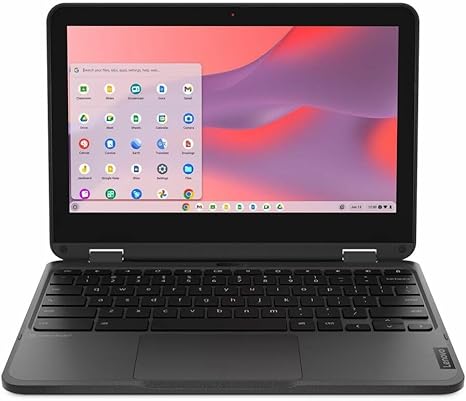
Welcome to “Reviews inside tv”! Today, we’re taking a close look at the Lenovo 500e Chromebook Gen 4s 83L40001US, an 11.6-inch touchscreen convertible 2-in-1 Chromebook designed for those who need a portable, versatile, and affordable device. Whether you’re a student, educator, or just someone looking for a solid Chromebook for daily use, this device promises a lot on paper. Let’s see if it lives up to the hype.
First, let’s run through the main specs. Under the hood, we’ve got the Intel N-Series N100 processor, paired with 8 GB of RAM and 64 GB of flash storage. While it’s not the most powerful configuration out there, the 8 GB of RAM is more than enough to handle everyday tasks like web browsing, document editing, and streaming. As for storage, the 64 GB flash memory may not offer massive capacity, but it ensures quick boot-up times and efficient file management. The 11.6-inch display features a 1366 x 768 resolution, which is standard for a Chromebook at this price point, delivering vibrant colors and decent sharpness. It’s also a touchscreen, so you can easily flip it into tablet mode for on-the-go use.
Now, let’s talk performance. With the Intel N100 chip and 8 GB of RAM, this Chromebook is optimized for basic tasks. Expect smooth multitasking with several browser tabs open, document work, or watching videos. However, if you’re planning on doing any heavy lifting like photo or video editing, this might not be the right choice for you. It’s more for light tasks like email, web browsing, and cloud-based applications. Streaming video? No problem. The 11.6-inch HD display does a decent job with media consumption. The anti-fingerprint coating is a nice touch, keeping the screen relatively smudge-free even after long video sessions.
But let’s not forget the real-world experience. The Lenovo 500e is built for versatility, and that 360-degree hinge lets you use it as a laptop, tablet, or even in tent mode. Typing on the keyboard is comfortable enough for short to medium typing sessions, and the trackpad is responsive for quick navigation. You might miss the precision of a larger, higher-end laptop, but for a Chromebook of this size and price, it does a good job. However, the keyboard layout can feel a bit cramped for those used to larger devices, and the absence of a backlight could be a drawback for those working in dim environments.
Thermal performance here isn’t a big concern. The N100 chip doesn’t generate much heat, so the laptop stays relatively cool, even when running multiple applications. The fan is mostly silent, but it may kick in under heavier loads. If you’re using it for light tasks, you likely won’t notice any noise, which is a plus for those working in quiet spaces.
Battery life is pretty solid, considering the size and power-efficient components. Expect around 8-10 hours of typical use, which covers browsing, video streaming, and document editing. Charging is fairly quick, thanks to USB-C charging, and the compact design makes it easy to toss in your bag and take with you wherever you go. At just a little over 2.5 pounds, this Chromebook won’t weigh you down, making it a great option for students or travelers who need something light and portable.
When it comes to connectivity, the Lenovo 500e offers a solid selection of ports. You get USB-A and USB-C ports for all your accessories, as well as a microSD card reader and a headphone jack. For many, that’ll cover most of their peripheral needs. The Wi-Fi 5 connectivity and Bluetooth 4.2 should be adequate for most everyday tasks, though it’s worth noting that some higher-end Chromebooks come with Wi-Fi 6 and Bluetooth 5.0 for faster speeds.
Now, let’s dive into the pros and cons. On the plus side, this Chromebook is incredibly portable, with a flexible 2-in-1 design that’s great for students and casual users. The 8 GB of RAM ensures smooth multitasking for everyday tasks, and the 64 GB flash storage provides decent speed and efficiency. The touchscreen functionality and anti-fingerprint display are also nice touches. On the flip side, the 1366 x 768 resolution is a bit limiting, especially if you’re used to higher-quality displays. The storage is also on the smaller side, which could be a dealbreaker if you need more space for offline files. Finally, while the performance is solid for light tasks, it’s not built for heavy workloads, so power users should look elsewhere.
Is this Chromebook worth the money? Considering the price, it’s a great value for those who need a lightweight, reliable device for basic tasks. It competes well with other budget Chromebooks in its range, like the HP Chromebook 11 and the Acer Chromebook Spin 11. However, if you need more power or a better display, you might want to spend a bit more on a higher-end model.
In terms of build quality, the Lenovo 500e feels solid for a budget device. The gray finish looks sleek, and the plastic body doesn’t feel cheap. It’s designed for durability, with a reinforced chassis that can handle the bumps and drops that are inevitable in a student or kid-friendly laptop. The hinge feels sturdy, and the overall construction is well-balanced for the price.
As for customer support, Lenovo generally has a solid reputation. Their warranty options are decent, but as with most Chromebooks, you’ll be dealing mostly with software support and updates through Google. For the most part, it’s a reliable brand, though the lack of premium features and materials does affect the overall experience.
So, who is the Lenovo 500e best suited for? If you’re a student, educator, or someone in need of a lightweight, budget-friendly device for everyday tasks, this Chromebook is a solid option. However, if you’re looking for something with more power, a sharper display, or a more premium feel, you might want to explore other options.
Thanks for watching, and be sure to check the comments box for the link to get your hands on the Lenovo 500e Chromebook. If you have any questions or if you already own this Chromebook, feel free to leave a comment below! Until next time, take care, and keep it techy with “Reviews inside tv”!
Available to buy here:


