

Available to buy here:
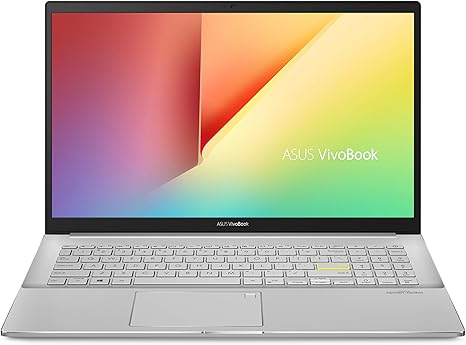
Welcome to “Reviews inside tv.” Today, we’re looking at the ASUS VivoBook S15 S533, a thin and light laptop designed to balance performance with portability. Targeted at professionals, students, and anyone in need of a reliable everyday laptop, the VivoBook S15 promises to handle everything from office tasks to entertainment with ease. But how does it really perform when the rubber meets the road? Let’s find out.
The ASUS VivoBook S15 S533 is powered by the 11th generation Intel Core i7-1165G7 processor. This quad-core CPU clocks in at 2.8 GHz, with the potential to turbo boost up to 4.7 GHz. That means it’s well-equipped to handle multitasking, from handling multiple browser tabs to managing demanding office applications and more. The integrated Intel Iris Xᵉ graphics do a good job for light gaming and media tasks but are obviously not suited for high-end gaming or intensive creative workloads. This chip is designed for efficiency, with Intel’s latest architecture, and it offers a decent performance-to-power ratio, which is ideal for a thin-and-light laptop like this.
When it comes to memory, the VivoBook S15 packs 16GB of DDR4 RAM. For most everyday users, this will be more than enough to handle a variety of tasks, from productivity apps like spreadsheets and word processors to more resource-intensive apps like photo editors or light video editors. The 512GB PCIe SSD offers fast read and write speeds, significantly reducing load times compared to traditional SATA SSDs and ensuring quick boot-ups and fast access to files. This combination of memory and storage makes the laptop feel snappy and responsive in real-world use, whether you’re working from home or watching your favorite show.
The 15.6-inch Full HD display features an 86% screen-to-body ratio, which is great for this price range. The NanoEdge bezel design maximizes the viewing area, giving you a nice, immersive experience while keeping the overall size compact and portable. The display is clear and vibrant, though not the most color-accurate compared to higher-end OLED or mini-LED screens. If you’re a content creator, you may want to look elsewhere for a more color-accurate screen, but for casual media consumption, it holds up well. The 60Hz refresh rate is standard and should be fine for productivity and general use, but it’s not designed for fast-paced gaming. The brightness is decent, making it suitable for indoor work but not the brightest option for working in direct sunlight.
This laptop weighs just 1.8 kg (3.97 lbs) and is only 16mm thick, which makes it highly portable for carrying around. It’s definitely in the category of ultrabooks, so you’ll have no trouble tossing it into a bag and taking it to class or meetings. Battery life is where the VivoBook S15 really impresses—thanks to the efficient Core i7 chip and a 42Wh battery, you can expect around 8 to 10 hours of mixed-use battery life. This is more than enough for a full day of work or study. The battery life might dip if you’re running intensive applications, but for everyday tasks, it’s more than sufficient. Charging is also pretty quick, and the included USB-C charger is lightweight, making it a great option for on-the-go users.
Speaking of usability, the ergonomic backlit keyboard feels comfortable for long typing sessions, with just the right amount of key travel and a solid, responsive feel. The trackpad is smooth and responsive, with decent palm rejection, and while it’s not the largest we’ve seen, it’s perfectly functional for most tasks. The added fingerprint sensor is a nice touch, providing quick and secure login via Windows Hello.
As for ports and connectivity, the VivoBook S15 doesn’t disappoint. It includes Thunderbolt 4 for fast data transfer and external monitor support, USB 3.2 Type-A and USB 2.0 Type-A for connecting peripherals, an HDMI 1.4 port for an external display, and a microSD card reader for easy file transfers. Wi-Fi 6 and Bluetooth 5 ensure reliable and fast wireless connections, even when you’re in crowded or high-traffic areas. It’s a well-rounded port selection that supports the laptop’s flexible nature, making it a solid choice for both work and play. While the RAM and storage aren’t upgradeable in this model, the specs it comes with should serve most users well over the life of the laptop.
Now, let’s talk about performance and thermals. The i7-1165G7 and Iris Xᵉ graphics perform well for everyday tasks and moderate content creation, but don’t expect to run the latest AAA games on high settings. In testing, games like “Shadow of the Tomb Raider” ran at about 30–35 FPS on medium settings, which is playable but far from a smooth gaming experience. The laptop doesn’t have a high-refresh-rate display, so even though the CPU is capable, the 60Hz screen limits the gaming experience. Under load, the laptop does get warm, particularly around the keyboard deck, but it doesn’t get uncomfortably hot. The fan noise is mild, only becoming noticeable under heavy loads like gaming or long video exports, but it’s not a constant distraction. The thermal management does its job, though you’ll want to keep it on a flat surface to maximize airflow.
When it comes to value for money, the ASUS VivoBook S15 S533 offers a lot for the price. It performs well across a wide range of tasks, has a solid display, and is very portable. However, you do make some trade-offs in terms of performance for gaming and high-end creative work. If you’re primarily working with office applications, streaming content, or engaging in light photo/video editing, this laptop will serve you well. The biggest competitor in this range is probably the Lenovo IdeaPad 5 or the HP Pavilion 15, but the VivoBook stands out with its Thunderbolt 4, which is a big plus for future-proofing your device.
In conclusion, the ASUS VivoBook S15 S533 is a great all-around laptop for those who need reliable performance without breaking the bank. Its lightweight design, solid performance, and good battery life make it a strong contender for students, office workers, or casual users who value portability and convenience. However, if you’re a serious gamer or a content creator working with high-res videos or 3D rendering, you may want to look for something with a more powerful GPU and a better display.
If you’ve already used this laptop or have any questions, feel free to drop a comment below. And if you’re thinking of grabbing one, check the link in the description for more details. Thanks for watching, and we’ll catch you in the next one. Stay tech-savvy!
Available to buy here:


