

Available to buy here:
Welcome back to Reviews inside tv, where we bring you honest, in-depth tech reviews. Today, we’re taking a close look at the Microsoft Surface Laptop for Business (2025) – a sleek, powerful machine aimed at professionals, creators, and anyone who needs reliable, long-lasting performance. This laptop packs a punch with its latest Intel Core Ultra 7 Series 2 chip and a slew of features designed for productivity and security. Let’s break it all down.
Starting with the specs, this Surface Laptop is equipped with Intel’s newest Core Ultra 7 processor from the Series 2 lineup, offering impressive power for multitasking, office work, and more demanding tasks like creative workloads or light gaming. Paired with 16GB of RAM, this configuration ensures that whether you’re switching between a dozen tabs or running larger applications, the experience is fluid. The 512GB SSD gives you plenty of space to store your documents, photos, and projects, and it loads everything fast thanks to the NVMe technology. With no SATA bottlenecks, expect smooth and quick access to files.
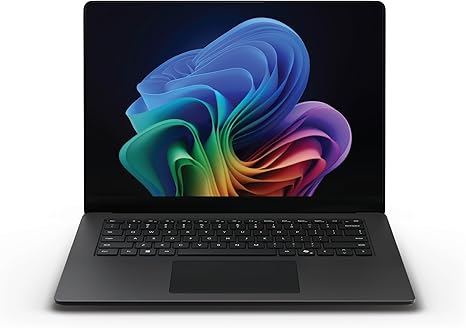
When it comes to the display, this laptop features the Surface PixelSense Flow touchscreen. The 13.8-inch screen boasts a 3:2 aspect ratio, offering more vertical space compared to traditional 16:9 displays. The razor-thin bezels help with immersion, and the high resolution ensures crisp visuals. This display is designed with creators and professionals in mind, offering excellent color accuracy and bright, sharp images, making it great for editing photos or videos on the go. The touchscreen adds extra versatility if you need to interact with your projects more directly.
In terms of performance, the Intel Core Ultra 7 processor and its integrated AI capabilities are a big deal. The AI Boost NPU can process up to 48 TOPS, accelerating tasks that rely on artificial intelligence, which is ideal for business professionals dealing with AI-powered applications, or anyone who wants a more responsive, intelligent machine. The GPU performance here is built into the CPU, which should handle everyday office tasks with ease, but it’s not a powerhouse for gaming or heavy graphics work. For casual gaming or light creative tasks, it will manage fine, but for high-end gaming or intensive 3D rendering, a dedicated GPU would be preferable.
Now, let’s talk battery life. With up to 22 hours of battery life, this laptop is all about all-day productivity. Whether you’re working on spreadsheets, attending Zoom calls, or streaming a few shows during your break, you won’t be constantly looking for an outlet. The laptop also supports fast charging, so you can get back to work quickly, whether you’re charging via Surface Connect or USB-C. Of course, real-world use can vary depending on your tasks, but this should cover you for most typical workdays with ease.
When it comes to the keyboard and trackpad, the Surface Laptop for Business doesn’t disappoint. The key travel is satisfying for typing long documents or emails, and the trackpad is large, responsive, and smooth. Whether you’re navigating through spreadsheets or editing a report, you’ll feel comfortable throughout the day. The layout is clean, with a functional placement for the power button, which doubles as a fingerprint reader – a nice touch for added security. It’s all about balancing comfort with productivity here, and it does so well.
On the connectivity front, this laptop has everything you need for a business or personal setup. You’ve got multiple USB-A and USB-C ports, with Thunderbolt support for fast data transfer, alongside HDMI for external monitors. There’s also an SD card reader, perfect for photographers or videographers on the go. On the wireless side, it comes equipped with Wi-Fi 6 for faster, more reliable connections and Bluetooth for any accessories you may want to pair.
The thermals on this laptop are solid, with no major heating issues even when running intensive tasks. The fan noise is barely noticeable under regular use, making it a great choice for meetings or quiet environments. Under heavier workloads, the laptop stays cool, although you’ll start to notice some fan noise when pushing it harder during extended sessions. But overall, it manages heat well, maintaining performance without overheating or significant throttling.
As for portability, the Surface Laptop for Business is light and slim, weighing in at just under 3 pounds. It’s thin enough to slip into a backpack and easy to carry around for meetings or business trips. The build quality is premium, with a robust yet sleek finish. Microsoft has clearly put a lot of effort into making this laptop both functional and stylish, with a chassis that feels sturdy without being too heavy.
Now, for the elephant in the room: value for money. At its price, the Surface Laptop for Business positions itself in the higher end of the market, but it does so for good reason. With its powerful Intel Core Ultra 7 chip, long battery life, and business-focused security features like Secured-core PC, it’s a solid option for professionals who need reliability and security. However, if you’re just looking for a simple everyday laptop without the added features for business and productivity, there are cheaper alternatives that might suit your needs better.
This laptop is definitely more for business users, creators, and anyone who needs reliable performance throughout the day, with the added benefits of great security and AI enhancements. If you’re a gamer or need specialized graphic power, you may want to consider other options, but for most office-based tasks, it’s a top choice.
The build quality is premium, and the overall experience is smooth and reliable. It’s a great machine for anyone who values portability, battery life, and consistent performance. If you’re a student, content creator, or business professional who needs a workhorse with excellent security features and long battery life, the Surface Laptop for Business is a fantastic choice.
If you’ve got any questions or want to share your experience with the Surface Laptop for Business, leave a comment below. And of course, don’t forget to like, subscribe, and hit that bell icon for more honest reviews here on Reviews inside tv. Thanks for watching, and I’ll see you in the next one!
Available to buy here:


