

Available to buy here:
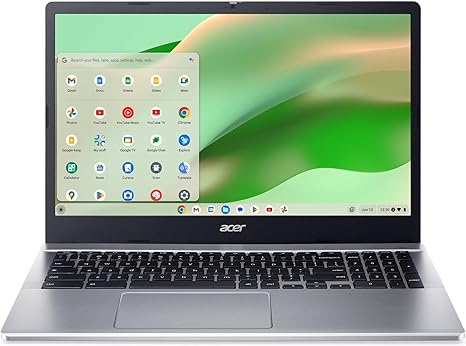
Welcome to “Reviews inside tv,” where we get straight to the heart of the best laptops out there. Today, we’re taking a closer look at the Acer Chromebook 315 CB315-5H-C7KX, a budget-friendly option with some impressive features that could make it a solid choice for everyday users. With its 15.6-inch Full HD display, Intel N100 processor, and the simplicity of Chrome OS, this Chromebook promises a smooth experience for tasks like browsing, document editing, and video calls. But, does it really deliver on its claims? Let’s find out.
At first glance, the Acer Chromebook 315 is clearly designed for users who need a laptop that can handle the essentials without a heavy price tag. It’s powered by an Intel N100 processor, capable of reaching speeds up to 3.4 GHz, making it more than capable of handling basic productivity tasks like web browsing, office apps, and light streaming. Accompanying the CPU is 4GB of LPDDR5 RAM, which offers decent performance for multitasking, but don’t expect smoothness when juggling too many resource-heavy apps. The storage comes in at 128GB via eMMC, which is on the lower end, but it should suffice for those who mostly work in the cloud or keep their files minimal. Plus, there’s the microSD card reader for a bit of extra expansion if needed.
The standout feature here is the 15.6-inch Full HD IPS display. While this isn’t the most premium screen out there, it certainly gets the job done for most tasks, offering sharp visuals and decent color accuracy for browsing or watching movies. It’s also an LED-backlit ComfyView panel, which helps reduce glare, making it comfortable to use in various lighting conditions. However, the brightness might not be the best for outdoor use, so keep that in mind if you plan on working in bright sunlight.
Performance-wise, the Acer Chromebook 315 delivers a straightforward experience. For light office work like email, documents, and web browsing, it handles these tasks without breaking a sweat. I found it quick to boot up—under 10 seconds as advertised—and it runs Chrome OS efficiently, with automatic updates running in the background. However, with only 4GB of RAM, you’ll notice some sluggishness when running multiple tabs or apps simultaneously. It’s not a dealbreaker, but it’s something to keep in mind if you tend to multitask heavily. For media consumption, the laptop performs reasonably well—streaming videos from platforms like YouTube or Netflix looks good on the Full HD screen, though the built-in speakers can sound a bit tinny at high volumes.
Now, let’s talk gaming. The Intel UHD Graphics aren’t designed for gaming, but they can handle light, less demanding titles like Minecraft or older games at low settings. Don’t expect to play graphically intense games at high settings—this laptop isn’t built for that. If you’re a casual gamer, it’ll suffice for simple games or mobile ports, but it’s not a laptop you’d want for a hardcore gaming session.
Thermals on the Acer Chromebook 315 are decent, considering the power constraints of the N100 processor. The laptop remains relatively cool to the touch during light tasks, though it can get a little warm under heavier load. Fan noise is fairly minimal, only becoming noticeable during more demanding tasks, but it’s nothing too intrusive.
In terms of battery life, Acer claims up to 10 hours, and in my testing, I found it to be fairly close to that under normal use. For web browsing and word processing, you’re likely looking at about 8 to 9 hours, which is solid for a budget Chromebook. However, if you’re watching a lot of video content, you may see the battery drain a bit quicker. Charging is done via USB-C, which is convenient, but the charging speed is fairly average—don’t expect a rapid charge.
When it comes to the keyboard and trackpad, the Chromebook 315 offers a comfortable typing experience for extended sessions. The key travel is reasonable, and the keys are spaced well enough to avoid feeling cramped. The trackpad is responsive, though it’s not the most premium feel, and palm rejection works well enough for day-to-day tasks. A nice bonus is the inclusion of a privacy shutter on the camera, which adds an extra layer of security.
As for ports and connectivity, the Chromebook 315 includes a decent selection, with two USB Type-C 3.2 Gen 1 ports, two USB Type-A ports, and an HDMI port, which is great for those who need to connect an external monitor or projector. It also comes with Wi-Fi 6E, which means faster and more reliable connections on supported networks, along with Bluetooth 5.1 for peripherals like mice and headphones.
Now, the pros and cons of this Chromebook are worth considering. On the plus side, it offers fast performance for everyday tasks, a decent display, and a long battery life—all at an affordable price point. The build quality feels sturdy for a budget model, and it’s lightweight and portable, making it easy to carry around. On the flip side, the 4GB of RAM may feel limiting if you’re trying to do too much at once, and the 128GB of eMMC storage could feel cramped if you store a lot of files locally. The speakers aren’t great, and while the graphics can handle basic games, it’s certainly not a laptop for gaming enthusiasts.
If you’re looking for a budget Chromebook that handles the essentials well, the Acer Chromebook 315 is definitely worth considering. Its performance is solid for light tasks, and the display and battery life are more than acceptable for casual users. However, if you need something with more power for multitasking or heavy apps, or you want a better display and audio experience, you might want to look at other options.
So, who is this laptop best for? If you’re a student, a casual office worker, or someone who mainly works in the cloud, this Chromebook could be a solid choice. But if you need more power or a higher-end experience, you might want to consider spending a bit more.
If you’ve enjoyed this review, don’t forget to like, subscribe, and hit that bell icon so you can stay updated on all our latest reviews. We’re always here to help you make the best tech decisions.
Thanks for watching, and as always, we’ll see you in the next review—where the real reviews are, inside your screen!
Available to buy here:


