

Available to buy here:
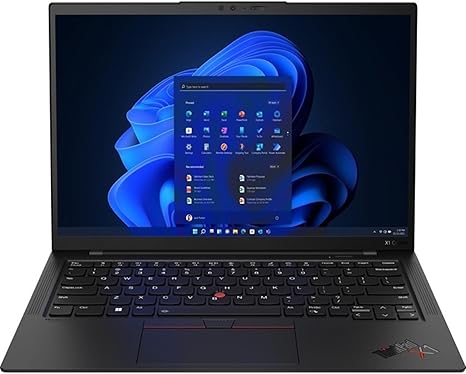
Welcome to “Reviews inside tv,” your trusted space for in-depth tech insights. Today, we’re looking at the Lenovo ThinkPad X1 Carbon Gen 10 14″ Ultrabook, a laptop that promises premium performance, portability, and reliability—three things that matter a lot for people who need a high-quality machine for work, play, or anything in between.
This sleek and stylish laptop is built with professionals in mind, offering a blend of top-tier specs that aim to make productivity, multitasking, and media consumption smooth and efficient. But does it deliver? Let’s break it down.
Under the hood, the ThinkPad X1 Carbon Gen 10 comes with an Intel Core i7-1270P processor, part of Intel’s 12th Gen series. This is a dodeca-core chip, meaning it has 12 physical cores—six performance cores and six efficiency cores—which is ideal for handling multitasking, demanding applications, and intensive workflows. Whether you’re running multiple office apps, editing videos, or even dabbling in some light gaming, the i7 processor will keep everything running smoothly. Paired with 32 GB of RAM, you can easily juggle multiple programs without any hiccups, from web browsing with dozens of tabs open to handling large files in creative software.
Now, let’s talk about the display. The 14-inch screen has a WUXGA resolution—1920 by 1200 pixels—which gives you a bit more vertical screen real estate than the standard 1080p, making it ideal for productivity tasks like coding, document editing, or multi-window work. It’s a touchscreen, which adds to the versatility for users who want direct interaction with their apps, whether that’s for taking notes, sketching ideas, or just quickly navigating around the system. The color accuracy and brightness are solid, but it’s not a full OLED or high-refresh-rate panel. So, while it’s great for productivity and general media consumption, gamers and creators looking for ultra-precise color may need something more specialized.
For storage, the ThinkPad X1 Carbon comes with a 512 GB SSD. While not massive by today’s standards, this should be more than enough for the average user—whether you’re storing work documents, a large music library, or even some movies. The SSD’s speed also ensures that the system boots up quickly, applications load almost instantly, and file transfers happen without delays.
When it comes to performance, this laptop isn’t just about specs—it’s about how it feels in real-world use. For office tasks, it performs effortlessly. You can switch between apps, run multiple browser tabs, and even run video calls all at once without any lag. For media consumption, watching movies or streaming shows on this display is enjoyable. The colors pop, the sharpness is clear, and the sound, while not booming, is serviceable for everyday use.
Now, for those of you into content creation—whether you’re a photographer, video editor, or music producer—the ThinkPad X1 Carbon Gen 10 won’t disappoint. The 32 GB of RAM is a significant advantage when working with large files in programs like Adobe Photoshop, Premiere Pro, or Logic Pro. For light video editing, you can expect smooth performance, though more demanding projects or 4K video editing may feel a bit sluggish due to the lack of a dedicated GPU.
Gaming, while not the laptop’s primary focus, is possible on this ultrabook. With the integrated Intel Iris Xe graphics, you can play lighter titles like Fortnite or Rocket League at decent settings, but for heavy AAA games, you’ll need to lower the graphics settings or play older titles.
Speaking of performance, let’s talk about thermals. With such a thin chassis, the ThinkPad X1 Carbon does a good job of keeping things cool under normal use, though it can heat up a bit under load. During extended work sessions, like video editing or gaming, the laptop’s temperature does rise, but it never gets uncomfortably hot. The fans, however, can get a bit noisy under load—though, it’s not overwhelming. The fan noise is usually just a low hum, but if you’re in a quiet environment, it may be noticeable.
When it comes to battery life, the X1 Carbon offers a reasonable 57 watt-hours of capacity. In typical office use, such as web browsing, word processing, and video streaming, you can expect around 8 to 10 hours of battery life, depending on usage. For heavier tasks, like video editing or gaming, that number will drop closer to 5 or 6 hours. It’s good enough for a full day of work, but if you’re constantly on the move or rely on long battery life, you may want to keep a charger handy. On the plus side, the laptop charges quickly, and the charger itself isn’t bulky, making it travel-friendly.
Let’s talk about input devices. The keyboard on the ThinkPad X1 Carbon is a standout. It has the iconic ThinkPad feel with a decent amount of key travel and a satisfying, responsive feedback. It’s comfortable for long typing sessions, which is a big plus for writers, coders, or anyone who spends extended time typing. The trackpad, while not massive, is accurate, responsive, and smooth—palm rejection is spot on, and the click is crisp. There’s also the signature TrackPoint for those who prefer using a nub instead of the trackpad.
In terms of ports and connectivity, the ThinkPad X1 Carbon offers a solid selection for an ultrabook. You get two USB-A 3.2 ports, two USB-C Thunderbolt 4 ports, an HDMI 2.0 port, a headphone jack, and a microSD card reader. This is more than enough for most users, though I’d like to see an additional USB-A port or Ethernet jack for those who need wired connections. For wireless, you’ve got the latest Wi-Fi 6 and Bluetooth 5.2, ensuring fast and stable connections to the internet and your devices. The laptop’s ports work well for docking stations and external monitors, making it a good choice for a home office setup.
Now, let’s talk about build quality. The ThinkPad X1 Carbon is built to last, with a chassis made of a blend of magnesium and carbon fiber, which gives it a premium feel without adding too much weight. It weighs just around 2.5 pounds, making it one of the lightest laptops in the business ultraportable category. It’s thin, sleek, and doesn’t feel fragile, which is important if you’re traveling with it regularly.
So, who is this laptop best for? If you’re a business professional, office worker, or even a student who needs a lightweight laptop for productivity tasks, this is an excellent choice. The performance is more than enough for multitasking, document creation, and media consumption. If you’re a creator or gamer looking for high-end graphical performance, however, you might want to look elsewhere or supplement it with a dedicated GPU for heavier workloads.
To sum it up: the Lenovo ThinkPad X1 Carbon Gen 10 is a premium ultrabook that delivers solid performance, a great display, and excellent portability. It does what it promises well—whether you’re working on documents, editing videos, or streaming movies. For the price, it’s a great investment for anyone who values portability, performance, and build quality.
Before we wrap up, don’t forget to hit that like button, subscribe, and ring the bell for more reviews just like this one.
Thanks for watching, and if you’ve already got your hands on the ThinkPad X1 Carbon, let us know how it’s working out for you in the comments. Until next time, happy computing!
Available to buy here:


