

Available to buy here:
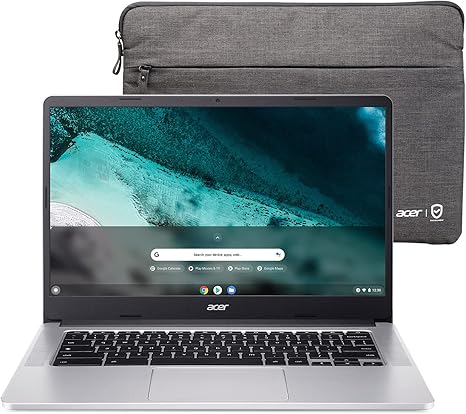
Welcome to “Reviews inside tv”! Today, we have a Chromebook that promises to blend performance with portability – the Acer Chromebook 314. With a sleek, 14-inch touchscreen display and a focus on speed and efficiency, this model targets students, office users, and anyone who’s looking for a lightweight laptop to manage day-to-day tasks with ease. But does it live up to its promises? Let’s take a closer look.
The Acer Chromebook 314 comes equipped with the Intel Pentium Silver N6000 processor, a quad-core chip capable of reaching up to 3.3GHz. While this isn’t going to handle heavy gaming or intensive creative workloads, it’s more than sufficient for typical Chromebook tasks like web browsing, document editing, and streaming media. Paired with 8GB of LPDDR4X RAM, multitasking feels smooth, and with Chrome OS optimizing resource use, the system doesn’t bog down under typical workloads. The 64GB of eMMC storage, while not huge, will suffice for most casual users, but you may want to rely on cloud storage for larger file needs.
As for the display, the 14-inch Full HD IPS touchscreen is a standout for this price point. The resolution of 1920 x 1080 is sharp and provides a good amount of real estate for productivity tasks like browsing, spreadsheets, or even watching movies. While it’s not OLED or mini-LED, the IPS panel does a good job of maintaining color accuracy and wide viewing angles. The anti-glare coating is particularly useful for reducing reflections when working in brighter environments. However, if you’re expecting high-end color reproduction, like you’d find on more premium laptops aimed at content creators, this might not fully satisfy. But for everyday tasks, it holds up well.
Battery life is where the Chromebook 314 stands out with a claimed 11.5 hours. In real-world usage, that holds pretty true, offering enough power to get through a full workday of browsing, document editing, and light media consumption without scrambling for a charger. The battery holds up well, and with Chrome OS’s efficiency, it delivers impressive longevity for a laptop in this price range. Charging is handled via the USB-C port, which supports USB 3.2 Gen 2 and DisplayPort over USB-C – definitely handy for future-proofing, especially for connecting external monitors or accessories.
Speaking of ports, the Acer Chromebook 314 offers a solid set for a budget-friendly laptop. You get two USB-C ports with fast data transfer speeds, plus another two traditional USB-A 3.2 Gen 1 ports. This setup will handle most of your peripherals, and the inclusion of DisplayPort over USB-C means you can hook this laptop up to external monitors without issue. There’s also Bluetooth 5.1 for wireless accessories and Wi-Fi 6 for fast and reliable internet connectivity, even in crowded environments. On the downside, there’s no Ethernet port, so if you need a wired connection, you’ll have to rely on an adapter.
The keyboard on this Chromebook is comfortable for typing long documents, offering decent key travel and a quiet, responsive feel. The OceanGlass touchpad feels accurate, with smooth scrolling and good palm rejection, though, like many touchpads, it might not offer quite the precision of a larger laptop’s dedicated pointing device. There’s no number pad here, which is typical for 14-inch laptops, but the overall layout is clean and functional.
Thermals are a bit of a mixed bag. Under light use, the laptop remains fairly cool and quiet, but during extended sessions of heavy multitasking or streaming, the fan can kick in. The fan noise is not overwhelming but can get noticeable if the system is working hard. The overall build quality feels solid for a Chromebook at this price – no creaky plastics, and the lid has a nice matte finish. It’s also surprisingly lightweight, making it easy to carry around in a backpack or briefcase without weighing you down.
In terms of performance, the Intel Pentium Silver N6000 handles basic tasks like web browsing, word processing, and light media consumption with ease. Streaming 1080p content or even running multiple browser tabs feels smooth, though more intensive tasks like video editing or heavy multitasking will quickly show the limits of the processor. Gaming is really not a strong suit here. The Intel UHD Graphics are best left for basic tasks like casual games or light media. For AAA titles or even less demanding modern games, you’ll likely see very low frame rates or experience a lack of smoothness, which makes this more of a productivity machine than anything else.
Now, as we move into the question of value, this Chromebook is priced very competitively for what it offers. With its solid build, long battery life, and a clean, easy-to-use operating system, it’s a great option for students, office workers, or casual users. However, if you’re looking for something more powerful for content creation or gaming, this isn’t the machine for you.
When comparing it to competitors, the Lenovo Chromebook Flex 5 or the HP Chromebook 14 are worth mentioning. These models offer similar specs but sometimes at a slightly higher price or with additional features like better displays or convertible designs. The Acer Chromebook 314 stands out with its lightweight design and solid performance for standard tasks but falls short if you need extra processing power or a more premium display.
In terms of long-term reliability, Acer has generally done well with its budget Chromebooks. The build is decent for the price, and with Chrome OS, updates are automatic and should continue for several years. However, it’s worth noting that the eMMC storage is not upgradeable, which might be limiting in the long run if you need more local storage.
Customer support is generally reliable with Acer, offering standard warranties and online support, though it’s always good to check the specific terms based on your region.
To sum up, the Acer Chromebook 314 is a great choice for anyone who needs a reliable, affordable laptop for everyday tasks. Its light weight, solid battery life, and good display make it an excellent option for students or light office work. If you need more power for content creation or gaming, however, you might want to look elsewhere. All in all, for the price, it delivers exactly what it promises.
If you enjoyed this review, make sure to like, subscribe, and hit the bell icon so you don’t miss out on our latest reviews. Thank you for watching, and remember, the link to get this Chromebook is in the comments box below. If you have any questions or experiences to share, feel free to leave them in the comments. Until next time, happy browsing and stay tech-savvy!
Available to buy here:


