

Available to buy here:
Welcome to “Reviews inside tv”! Today, we’re checking out the Acer Swift 3 OLED, a sleek and lightweight laptop designed to pack a punch in both performance and display quality. Whether you’re looking for a laptop for productivity, entertainment, or even some creative tasks, this model promises a lot. Let’s take a look at how it stands up in real-world use.
The Acer Swift 3 OLED comes with an Intel Core i7-12700H processor, a 12th-gen powerhouse from Intel’s Evo platform. This chip can boost up to 4.7GHz, which means it’s ready to handle high-demand applications like video editing or multitasking without breaking a sweat. It’s paired with 16GB of LPDDR5 RAM, providing smooth multitasking performance for your everyday tasks like browsing, office work, and more intensive workloads. The 1TB PCIe Gen 4 SSD ensures fast boot times and rapid file transfers. All this is packed in a thin, portable design, weighing just 3.09 pounds—light enough for carrying in a bag all day.
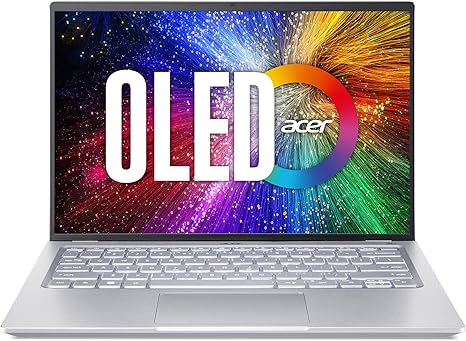
Now, the standout feature here is the OLED display. The 14-inch 2.8K WQXGA screen with a resolution of 2880×1800 is incredibly sharp, offering stunning visuals for both work and entertainment. With a 90Hz refresh rate and 1ms response time, it’s smooth for media consumption and productivity tasks. The DCI-P3 100% color gamut and HDR500 certification ensure vibrant colors and deep blacks, ideal for creators who need precise color accuracy. Whether you’re editing photos or streaming movies, this OLED screen delivers top-tier quality.
Let’s talk about real-world usage. For office tasks like web browsing, document editing, or even video calls, the Acer Swift 3 handles it all with ease. The 16GB RAM is more than enough for handling multiple browser tabs and office suites simultaneously, without any noticeable lag. For media consumption, the OLED display shines, offering rich, true-to-life colors that make videos pop. The DTS Audio from the dual front-facing speakers adds depth to sound, which is a nice touch for streaming movies or listening to music.
When it comes to content creation, whether it’s photo editing or light video work, the combination of the i7 processor and 16GB RAM gives you enough power to handle demanding software like Adobe Photoshop or Premiere Pro. For casual gaming, the Intel Iris Xe integrated graphics may not be a gaming powerhouse, but it can handle less demanding titles at medium settings. You’ll enjoy games like Fortnite or League of Legends at a smooth frame rate on this machine, but for AAA games like Cyberpunk 2077, you might have to dial down the settings.
One thing to keep in mind is the thermals. Under heavier loads like gaming or video rendering, the Acer Swift 3 does get warm, especially around the keyboard deck. The fans aren’t excessively loud, but they do become audible when the laptop is pushed hard. While the thermal performance is solid for the most part, you might experience some throttling during long gaming sessions or extended video editing if you’re really pushing the system. However, it doesn’t overheat to the point of uncomfortable use, which is a positive.
In terms of battery life, Acer claims up to 8 hours of usage. In my experience, this holds true for light tasks like office work and media streaming. For more demanding workloads like video editing, expect the battery to last a bit less, around 5 to 6 hours, depending on how heavy the tasks are. The fast charging capability is a huge plus, as it charges from 0 to 50% in just 30 minutes, making it easy to top up on the go.
When it comes to the keyboard, it’s backlit, making it easy to type in low-light environments. The key travel is comfortable, and the layout includes all the essentials. The trackpad is smooth and responsive, and palm rejection works well, so there’s no accidental movement when typing. The fingerprint reader on the power button is another handy feature for easy, secure logins.
Ports and connectivity are well-rounded. You get two USB Type-C ports supporting USB4 and Thunderbolt 4, which are great for fast data transfer and connecting external monitors or accessories. There are also two USB 3.2 Gen 1 ports, an HDMI 2.1 port, and a headphone jack. The laptop also supports Wi-Fi 6E, which means you can expect faster and more reliable internet speeds, especially in busy areas with many connected devices. Bluetooth 5.2 rounds out the wireless features, ensuring solid connections to peripherals like headphones or mice.
Now, the build quality is solid, with an aluminum chassis that feels premium yet light. The screen is sturdy, and the hinge opens smoothly. At just 0.63 inches thick, it’s easy to slip into a bag without it taking up too much space, making it perfect for students or professionals who need to carry it around often.
Let’s take a quick look at the pros and cons. On the plus side, the OLED display is a major standout—vibrant, sharp, and accurate. The performance is solid for most tasks, especially productivity and content creation. The lightweight design and fast charging are also great features. On the downside, the Iris Xe graphics limit gaming performance, and the thermal performance could be better for long, heavy workloads. Battery life, while decent, may not last the full day under demanding use, so you might want to keep your charger handy.
In terms of value for money, the Acer Swift 3 OLED is priced competitively for the specs it offers. Compared to other laptops in its range, like the Dell XPS 13 or HP Spectre x360, it holds up well, especially with the OLED display and solid performance. However, if you’re looking for something with more gaming power or longer battery life, there are alternatives to consider.
When it comes to build quality, Acer generally has a good track record with its Swift series. The aluminum body feels sturdy, and the hinge holds up well under regular use. Acer has also been reliable with software support, so you can expect timely updates and a solid warranty.
To wrap it up, the Acer Swift 3 OLED is a fantastic option for students, office workers, and creators who need a thin, powerful laptop with excellent display quality. Its combination of power, portability, and a vibrant OLED screen make it a great all-around machine, especially if you prioritize media and content creation. However, if you’re a gamer looking for heavy-duty graphics performance, this might not be the best fit.
Thanks for watching! Be sure to check the comments box for a link to get your hands on the Acer Swift 3 OLED. If you’ve used this laptop, let us know your thoughts in the comments below! Don’t forget to like, subscribe, and hit the bell icon for more honest reviews. Until next time, happy laptop hunting!
Available to buy here:


