

Available to buy here:
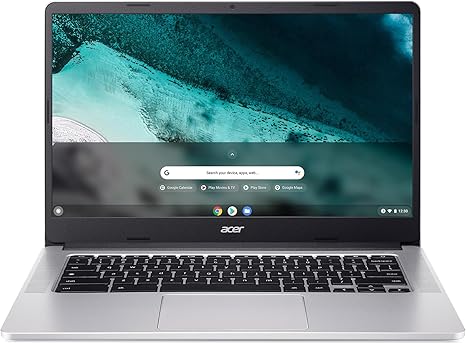
Welcome back to “Reviews inside tv,” where we take an in-depth look at the latest and most intriguing tech products. Today, we’re exploring the Acer Chromebook 314 CB314-3HT-C9VS. With its sleek design, 14-inch Full HD touchscreen, and the fast and secure ChromeOS, this Chromebook aims to be a reliable companion for students, casual users, and anyone who enjoys the simplicity of Google’s ecosystem. But does it live up to the promise? Let’s take a closer look.
At the heart of the Acer Chromebook 314 is the Intel Celeron N4500 dual-core processor. This chip, with a boost clock up to 2.8GHz, is designed to handle day-to-day tasks with ease. Whether you’re juggling browser tabs, writing emails, or using Google Docs, this processor ensures a smooth experience for typical productivity tasks. Paired with Intel UHD Graphics, you won’t be pushing this laptop for demanding creative or gaming workloads, but for web browsing, media consumption, and light apps, it performs well.
This model comes equipped with 4GB of LPDDR4X RAM, which is sufficient for most everyday tasks, but if you tend to run multiple apps or tabs simultaneously, you may find it a bit limiting. The memory is soldered, so you can’t upgrade it in the future, which might be a downside for power users looking to future-proof their device. The 128GB eMMC storage is also on the lower end, but it’s fast enough for the lightweight nature of ChromeOS. However, if you plan on storing large files locally, you’ll quickly run out of space. Thankfully, with cloud storage integration and support for Google’s apps, this shouldn’t be too much of an issue for the average user.
Now, let’s talk about the display. The 14-inch Full HD IPS touchscreen offers clear and vibrant visuals, with wide viewing angles and a decent color range. While it’s not quite up to the level of high-end displays like OLED or mini-LED, it delivers solid performance for media consumption, reading, and casual work. The touchscreen functionality adds a layer of interactivity that’s perfect for navigating through apps or taking notes with a stylus, though it can be a bit reflective under bright light due to its glossy finish. Still, the anti-glare coating helps maintain visibility during your regular use.
Battery life is always an important factor in a Chromebook, and Acer promises up to 12 hours of use on a single charge. In real-world scenarios, with a mix of web browsing, video streaming, and document work, you can expect around 8 to 10 hours of battery life, which should cover a full day of school or work without needing to recharge. Charging is quick too, with a USB Type-C port that supports charging and power delivery. The charger itself is compact and travel-friendly, making it easy to slip into your bag when you’re on the go.
Speaking of the ports, the Acer Chromebook 314 offers a decent selection, including two USB Type-C ports (USB 3.2 Gen 1), a USB 3.1 Gen 1 port, and a microSD card reader. While the inclusion of USB-C is great for future-proofing and quick file transfers, the lack of a full-sized HDMI port or an Ethernet jack may limit your options for connecting external devices or docking stations. However, for everyday users who primarily rely on Wi-Fi and cloud storage, these ports should be more than enough.
Thermal performance is something to keep an eye on with budget laptops like this one. The Acer Chromebook 314 remains fairly cool under light use, with the keyboard and underside staying comfortable during typical tasks. However, under load, such as during media streaming or extended web browsing, the fan can kick in, though it stays relatively quiet and doesn’t become overly intrusive. Over longer periods of intensive use, you might notice some heat buildup, but nothing that would make the laptop uncomfortable to use on your lap.
The keyboard on this Chromebook is spacious, with decent key travel and feedback, making it comfortable for long typing sessions. However, some users may find the layout a bit cramped, especially around the arrow keys and the absence of a number pad. The trackpad is responsive, offering smooth navigation and accurate gestures, and palm rejection works well even during longer typing sessions.
Now, let’s talk performance. In terms of real-world usage, this Chromebook performs admirably for office work, light browsing, and media consumption. Opening multiple browser tabs, streaming YouTube videos, or attending Zoom calls is smooth and efficient. However, you’ll want to avoid heavy multitasking or running multiple resource-hungry apps simultaneously, as the 4GB of RAM and Celeron chip may start to show their limitations. For casual gaming, you can play titles like Minecraft or older games, but you’ll need to keep the settings low for smooth gameplay.
As for the audio, the two built-in stereo speakers deliver clear sound for general use, though they’re not going to fill a room with booming audio. You’re better off using headphones for media-heavy tasks. The HD webcam offers a decent 720p video call experience, but it’s nothing to write home about.
When it comes to long-term value, this Chromebook is perfect for people who need a lightweight, simple laptop for web-based work, entertainment, and productivity. The security of ChromeOS, coupled with the fast boot times and automatic updates, ensures a secure and reliable experience for the long haul. Plus, you don’t have to worry about viruses, which is a big plus for those new to Chromebooks.
The Acer Chromebook 314 stands out in its class due to its affordable price, solid build quality, and overall performance for casual users. However, if you’re someone who needs more power for demanding tasks or a more premium display, you may want to consider other options.
Now, a quick reminder: if you’ve found this review helpful, don’t forget to like, subscribe, and hit the bell icon so you never miss a review. It helps us bring more content to you.
To sum it all up, the Acer Chromebook 314 is a fantastic choice for students, office workers, or anyone looking for a lightweight, secure, and reliable Chromebook at an affordable price. Its performance, display, and battery life are all well-suited to everyday tasks, though it may not be the best choice for power users or gamers. If you’re looking for a device that does what it promises without breaking the bank, this Chromebook is definitely worth considering.
Thanks for watching! If you have any questions or already own this Chromebook, feel free to drop a comment below. We’d love to hear your thoughts. Until next time, keep those laptops running smoothly!
Available to buy here:


