

Available to buy here:
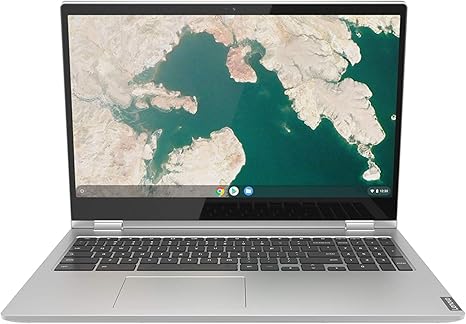
Welcome back to Reviews inside tv, where we explore the latest tech with no fluff, just the facts you need to know before making your next purchase. Today, we’re looking at the Lenovo Chromebook C340 2-in-1, a budget-friendly option designed for those who need a versatile, portable device. But how does it stack up in the real world? Let’s find out.
This Chromebook comes with an Intel Pentium Gold 4417U processor, which is definitely on the lower end of Intel’s lineup, aimed more at light tasks like web browsing, document work, and streaming. It’s paired with 4GB of DDR4 RAM, which is fine for basic multitasking, but you might notice slowdowns with too many tabs open or more intensive workloads. As for storage, you’re looking at a 32GB SSD, which will get you started, but it’s not going to leave much room for large files or heavy apps. Thankfully, it’s running Chrome OS, so cloud storage is heavily integrated, meaning you can work with Google’s suite of apps and store your documents online without worrying about local storage too much.
Now, let’s talk about the display. You’re getting a 15.6-inch Full HD touchscreen with an IPS panel, which is a solid feature for a Chromebook at this price point. It’s not going to blow you away with colors or brightness, but it should serve most casual users just fine. The screen’s resolution of 1920 by 1080 is great for streaming, web browsing, and even light media editing. It’s also a 2-in-1 convertible, so you can flip the screen around to use it as a tablet—perfect for some flexibility in how you work or play.
Performance-wise, the Intel Pentium Gold 4417U will handle basic tasks like emailing, video calls, and light office work with ease. But if you’re looking to do more intensive work like video editing or gaming, this isn’t the laptop for you. It’ll struggle with anything that requires heavy processing power. On the flip side, for everyday tasks like Netflix, browsing, and working in Google Docs, it’s pretty smooth. The 4GB of RAM limits heavy multitasking, so if you’re the type to have 10+ browser tabs open at once, it could start feeling sluggish.
In terms of battery life, Lenovo claims up to 10 hours, and in my testing, it does get pretty close to that for light usage. If you’re just browsing, watching videos, or typing up notes, you can expect solid performance throughout the day. The fact that it’s a convertible design makes it easy to take with you—it’s light, compact, and easy to carry around in a backpack without weighing you down. But if you’re using it for heavier tasks or pushing it hard with multiple apps open, don’t expect to hit that 10-hour mark. Charging is fairly quick, so you won’t be tied to the outlet for long.
The keyboard on the C340 is decent for a budget laptop. The keys have good travel, and typing feels comfortable enough for short to medium sessions. However, I wouldn’t recommend it for long typing marathons since the layout is pretty basic and the keys could be a bit more responsive. The trackpad, on the other hand, is responsive and accurate, which is a plus for a Chromebook in this price range.
As for ports, the C340 offers two USB 3.1 Type-C Gen 1 ports, one USB 3.1 Type-A Gen 1 port, plus a microSD card reader, which is a nice touch for adding extra storage. It also has Bluetooth 4.2 and 802.11 AC Wi-Fi for decent connectivity, though Wi-Fi 6 is becoming more common in newer models, so keep that in mind if you’re future-proofing. There’s no HDMI, so if you want to connect to an external monitor, you’ll need a USB-C to HDMI adapter, which is something to consider. The 32GB SSD can’t be upgraded, and the 4GB of RAM is soldered, so there’s no room to expand your system’s memory.
On the thermal side, the Chromebook C340 stays pretty cool under light use, but you’ll definitely feel some heat under the keyboard when the processor is under load, like during video streaming or heavier multitasking. The fans are generally quiet but can get a bit louder when the system is pushed hard. Still, it’s a Chromebook, so this isn’t a laptop you’re going to use for long gaming sessions or anything that demands serious cooling.
Build-wise, the C340 is a plastic chassis, but it feels solid for a budget 2-in-1. It’s light and portable, which is a plus if you’re always on the go, but it doesn’t have the premium feel of more expensive models. Still, it holds up well for its price, and it’s rugged enough to handle daily use without feeling flimsy.
Now, let’s compare this to some alternatives. The HP Chromebook x360 14 offers similar features, but it has a slightly more powerful Intel Core i3 processor and a 14-inch display, which makes it a bit more portable. The Acer Chromebook Spin 13 also offers a more premium build, but with a price tag that’s higher than the C340. Overall, the Lenovo C340 holds its ground well in the budget category, especially if you’re looking for something simple and affordable.
So, who is this laptop for? If you’re a student or someone who just needs a lightweight, inexpensive laptop for web browsing, streaming, and light productivity, the C340 is a solid choice. Its versatile 2-in-1 design and touchscreen make it perfect for entertainment and quick tasks. But if you need a machine for more demanding work, or if you want something with a larger storage capacity and more power, you’ll likely want to look elsewhere.
Thanks for watching! Don’t forget to like, subscribe, and hit the bell icon to stay updated on our latest reviews. If you have any questions or thoughts about the Lenovo C340, drop them in the comments below. Catch you in the next video, and remember—reviews are inside, just like always.
Available to buy here:


