

Available to buy here:
Welcome back to “Reviews inside tv,” where we bring you all the insights you need on the latest tech. Today, we’re taking a close look at the Lenovo ThinkPad P16s Gen 4, a laptop that’s designed for professionals who need solid performance, reliability, and portability in their workstations. Whether you’re running complex software, multitasking with multiple applications, or looking for a device that can handle the demands of creative or business tasks, this one might just catch your attention. But does it live up to the hype? Let’s find out.
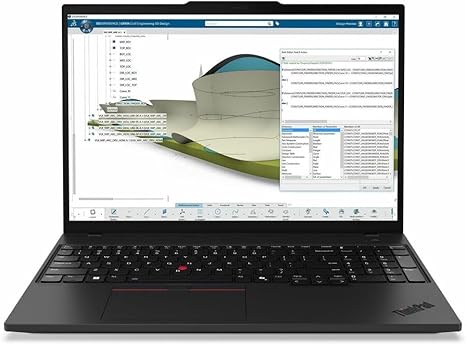
The Lenovo ThinkPad P16s Gen 4 is built for those who need a mobile workstation that can handle demanding workloads. Featuring an AMD Ryzen AI 7 PRO processor, 32 GB of DDR5 SDRAM, and a 512 GB SSD, this machine promises to offer a high-performance experience. The 16-inch WUXGA display provides a resolution of 1920 x 1200, which ensures sharp visuals, and the ample memory allows for smooth multitasking. With these specs, it seems like a serious contender in the mobile workstation category. But how does it stack up in real-world use?
Let’s break it down, starting with the core specs. The AMD Ryzen AI 7 PRO processor is a solid choice for professional users. With multiple cores and impressive clock speeds, this CPU can handle tasks like data analysis, 3D rendering, and even video editing without breaking a sweat. Whether you’re editing documents, running simulations, or juggling multiple programs, the Ryzen AI 7 PRO shows its strength in handling day-to-day productivity tasks. When paired with 32 GB of DDR5 RAM, you’ll be able to switch between tasks without any noticeable lag or performance hiccups, making it an excellent choice for anyone who needs to keep several applications open at once.
In terms of graphics, the ThinkPad P16s is equipped with integrated AMD Radeon graphics, which means you’re not going to get the same performance as a machine with a dedicated GPU. However, this is not a gaming laptop. If you’re working with 2D design, spreadsheets, office applications, or streaming video, it’ll perform just fine. For lighter creative work or media consumption, it holds its ground, but if you need something for high-end 3D rendering or gaming, you’ll likely want to look at a more dedicated workstation.
The 512 GB SSD provides a good balance between speed and storage. With an NVMe SSD, expect fast boot times and quick access to files, which is a crucial feature for professionals who rely on speed and efficiency. If your workflows involve heavy data manipulation or dealing with large files, this SSD will keep you productive without slowing down your system.
Now, let’s talk display. The 16-inch WUXGA screen with a 1920 x 1200 resolution is crisp and vibrant, making it a great option for professionals who need accurate colors for presentations, spreadsheets, or even casual media consumption. It’s not as sharp as a 4K display, but the resolution is perfectly sufficient for productivity and media streaming. The screen is bright enough to work in well-lit environments, and it also offers decent color accuracy, so designers or content creators will be happy with it for less color-critical work. For general tasks, it does the job well.
When it comes to performance, this laptop truly shines in productivity scenarios. Multitasking is a breeze. Whether you’re switching between video calls, web browsing, or editing documents, the combination of the Ryzen AI 7 PRO CPU and 32 GB of DDR5 RAM ensures everything runs smoothly. The SSD adds to the experience, ensuring that your files load quickly, and applications open with minimal delay. Streaming movies or shows on this display is equally pleasant—colors pop, and details are clear, making it a good choice for leisure time after a busy day of work.
For content creators, the laptop performs admirably, though it’s not the powerhouse that some might require for high-end video editing or 3D rendering. For lighter editing tasks, photo manipulation, or audio production, this laptop holds up just fine, though export times could be a bit slower compared to machines with higher-end GPUs.
Battery life on the ThinkPad P16s is fairly standard for a mobile workstation. The 32 GB of RAM, paired with the Ryzen AI 7 PRO processor and SSD, helps in making this machine relatively power-efficient. In typical use—light office work, streaming, and web browsing—you can expect anywhere from 6 to 8 hours of battery life, depending on how intensive your tasks are. When it comes to charging, the laptop charges relatively quickly, which is always a plus for those on the go.
The keyboard on this ThinkPad is a typical Lenovo gem. The key travel is just right for comfortable typing, making it ideal for long sessions, whether you’re writing emails, coding, or drafting reports. The trackpad is smooth and responsive, though it’s not the largest you’ll find. It’s more than enough for everyday tasks, but power users who rely on precise mouse control might want an external option. The keyboard layout is well thought out, with the function keys arranged sensibly, and the arrow keys are just the right size for easy navigation.
As for ports and connectivity, the ThinkPad P16s doesn’t disappoint. It offers multiple USB-A ports, USB-C with Thunderbolt, HDMI, and even an SD card reader, which gives you flexibility when connecting external monitors, docking stations, or peripherals. Wi-Fi 6 ensures fast, stable connections, and Bluetooth 5.2 gives you good range for wireless accessories.
In terms of thermals, the ThinkPad P16s does a good job of staying cool during extended use. Under light tasks, the laptop runs almost silently, and even when pushed with heavier workloads, the fan noise remains relatively unobtrusive. On the flip side, like most laptops, it will heat up under demanding tasks, but it doesn’t suffer from significant throttling, which means you won’t experience performance drops during long sessions.
Now, let’s talk about the real-world trade-offs. The ThinkPad P16s is not a gaming laptop. It can handle the occasional casual game, but it’s built for professionals and business users who need a reliable workhorse. Its display is good, but not groundbreaking, and while the battery life is decent, you won’t be able to rely on it for marathon work sessions without access to a charger.
When it comes to build quality, the ThinkPad P16s is solid. The body feels sturdy, though not overly heavy, and the materials used in the construction feel premium. It’s a workhorse laptop that’s built to last, and the hinge quality is robust, ensuring that the screen remains stable at any angle.
For those concerned with value, the ThinkPad P16s is a solid investment if you’re in the market for a mobile workstation that offers a good balance of power, portability, and durability. It might not have the raw power of some of the higher-end models, but it’s still a great option for those who need to get work done without breaking the bank. Compared to other mobile workstations in the same price range, it offers good performance and a reliable design.
If you’re considering other options, laptops like the HP ZBook Firefly 14 or the Dell Precision 5000 Series are worth considering. They offer similar performance, but depending on your specific needs, the P16s might offer a better balance of features.
In conclusion, the Lenovo ThinkPad P16s Gen 4 is an excellent option for business professionals, office workers, and even casual content creators. It provides reliable performance, a solid build, and a great keyboard, making it ideal for day-to-day work. If you’re a gamer or require high-end graphics, this one might not be for you, but if you need something that can handle heavy office workloads and content creation on the go, this is a great choice.
Thanks for watching! If you’re interested in this laptop, check out the link in the comments box below. Don’t forget to like, subscribe, and hit that bell icon so you never miss out on future reviews. If you’ve already got your hands on the ThinkPad P16s, feel free to share your thoughts or ask any questions in the comments. Until next time, stay tech-savvy!
Available to buy here:


