

Available to buy here:
Welcome to “Reviews inside tv”! Today we’re looking at the Lenovo 500e Chromebook Gen 3, a versatile 2-in-1 device aimed at those who need portability, decent performance, and flexibility. It’s a compact laptop with a touchscreen, and it’s built to handle everyday tasks with ease. Whether you’re a student, professional, or someone who just needs a reliable device for web browsing and basic productivity, this one might have caught your attention. Let’s break it down and see how it actually holds up.
The Lenovo 500e Chromebook Gen 3 features an Intel Celeron N4500 processor, which is a dual-core chip clocked at 1.10 GHz. While it’s not the most powerful chip out there, it’s certainly capable of handling standard tasks like web browsing, document editing, and media consumption. You’re not going to be running complex software or doing heavy multitasking on this device, but for light office work, video calls, and basic browsing, it should serve you well. In terms of GPU, this laptop relies on the integrated Intel UHD Graphics, which isn’t going to push frames in graphically demanding games or creative software but will manage everyday visuals and media playback without issue.
In the RAM department, you get 4 GB of memory, which is really the minimum for a Chromebook in this class. While this might be sufficient for casual use, if you tend to have a lot of tabs open or want to do some light multitasking, you might run into some slowdowns. This is a budget device, so keep your expectations in check when it comes to performance under heavier workloads. It also comes with 4 GB of onboard memory, so there’s no room for upgrading here. For storage, this Chromebook has eMMC storage, which isn’t as fast as an SSD or NVMe drive, but it’s fine for basic tasks like saving documents or storing a few movies.
The 11.6-inch screen features a resolution of 1366 x 768, which isn’t exactly sharp by modern standards, especially considering the high-resolution displays found in many budget laptops today. It’s fine for basic tasks, and the touchscreen functionality adds a layer of interactivity, but don’t expect a display that’s great for color accuracy or detailed media creation. The screen’s brightness and color quality are decent for everyday use, but it won’t be a standout if you’re doing photo editing or working in bright environments. It’s ideal for casual media consumption, like watching videos or browsing the web, but don’t expect an immersive experience with this screen.
Now, let’s talk about battery life. Lenovo claims that the 500e Chromebook can last up to 12.1 hours on a full charge. This is a strong point of the device—depending on how you use it, you can expect to get through a full day of work, school, or entertainment without needing to plug in. Keep in mind, though, that your actual battery life may vary based on screen brightness, Wi-Fi usage, and what tasks you’re running. Still, it’s a solid runtime for this type of device.
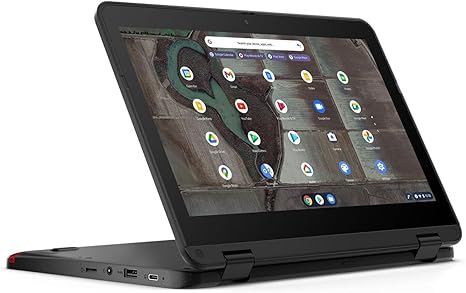
In terms of build quality, the Lenovo 500e Chromebook Gen 3 is built for durability with a rugged design that can withstand a few bumps and spills. It has an all-plastic chassis, which is fine for the price, and it feels sturdy enough for daily use. The convertible 2-in-1 form factor is a nice touch, making it a great option for users who need flexibility in their device, whether it’s for note-taking or watching movies. At just around 2.8 pounds, it’s lightweight and portable, which is a plus for students or anyone who needs to carry their laptop around all day.
The keyboard on this Chromebook is adequate for short typing sessions, but long-term comfort may be a concern for those who type for hours. The keys have a decent amount of travel, but the feedback is somewhat shallow, so it’s not the most comfortable typing experience for heavy typists. The trackpad is responsive, but it’s not the most premium feeling—you can expect it to work fine for basic gestures and navigation, but don’t expect the precision you’d get on higher-end laptops.
Connectivity-wise, the Lenovo 500e Chromebook includes USB-A and USB-C ports, along with an HDMI port for easy external monitor connection. It also has a microSD card reader and a headphone jack, so there are enough options for plugging in peripherals, but don’t expect Thunderbolt or a lot of high-speed connectivity options. The Wi-Fi and Bluetooth support is typical for a device in this class, so you shouldn’t experience any major issues with wireless connectivity.
When it comes to thermals, this Chromebook stays relatively cool, even under load. There’s no significant fan noise, and the device doesn’t get too hot, making it a good choice for long sessions on your lap. The lack of active cooling means you won’t have to deal with noisy fans, but the trade-off is that the device won’t be as powerful as laptops with more advanced cooling systems.
For real-world usage, this Chromebook excels in scenarios like light office work, web browsing, and media consumption. It’s not a gaming laptop by any stretch of the imagination, but it’ll handle the odd casual game or video stream just fine. If you’re looking for a laptop to handle more demanding tasks like video editing or heavy multitasking, you’ll likely want to look elsewhere. But for basic everyday tasks, the Lenovo 500e Chromebook performs well and is responsive enough for users who prioritize simplicity and portability.
For those wondering about the price-to-performance ratio, the Lenovo 500e Chromebook Gen 3 is a solid choice for the price. It’s not going to blow you away with its performance or features, but it offers good value for users who need a basic, reliable laptop. It’s not going to compete with higher-end Chromebooks or ultraportables, but if you’re looking for something that gets the job done at a reasonable price, this is a decent option. The biggest competition in this category would be devices like the Acer Chromebook Spin 11 or the HP Chromebook 11 G6, which offer similar specs at a comparable price point.
All in all, if you’re looking for a budget-friendly, durable laptop that can handle day-to-day tasks, the Lenovo 500e Chromebook Gen 3 could be a good choice. It’s not the fastest or the most feature-packed laptop out there, but it’s well-built and offers solid battery life, making it a good option for students, casual users, or anyone who needs a reliable, lightweight device for everyday use.
Thanks for watching! If you want to grab the Lenovo 500e Chromebook Gen 3, check the link in the comments box. Feel free to drop any questions or share your experience if you’ve used this laptop. Until next time, happy browsing, and don’t forget to like, subscribe, and hit that bell icon for more in-depth reviews on “Reviews inside tv.”
Available to buy here:


