

Available to buy here:
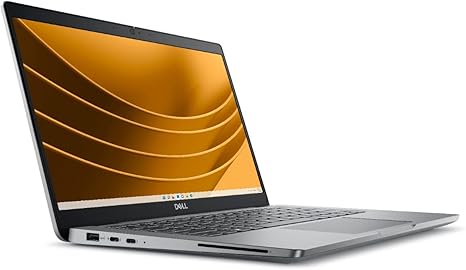
Welcome to “Reviews inside tv”! Today, we’re looking at the Dell Latitude 5000 5450, a sleek and compact 14″ notebook that’s designed to meet the needs of professionals, students, and casual users alike. With its Intel Core Ultra 5 processor, 16GB of DDR5 RAM, and a 256GB SSD, this laptop is aiming to deliver solid performance across a variety of tasks. But does it really live up to the promise? Let’s break it down.
First, let’s talk about the specs. The Latitude 5450 is powered by the Intel Core Ultra 5 125U processor, a mid-range chip that’s part of Intel’s latest Ultra lineup. With 10 cores and 12 threads, this CPU strikes a balance between power efficiency and performance. It’s more than capable of handling daily office tasks like web browsing, document editing, and video calls, but it’s also capable enough to tackle light content creation and multitasking. For gaming, though, it won’t be breaking any records. But for those working in spreadsheets, emails, or running office applications, this CPU provides a smooth and responsive experience.
Paired with this processor is Intel’s integrated Iris Xe graphics. While not a powerhouse for gaming, Iris Xe is sufficient for light video editing, media consumption, and casual gaming. You can expect to run games like League of Legends or older titles on medium settings, but don’t expect much from demanding AAA titles. The integrated graphics should do just fine for everyday tasks, but heavy creative workflows or gaming enthusiasts may want to look elsewhere.
In terms of memory, this laptop comes with 16GB of DDR5 SDRAM, which is more than enough for most users. With DDR5, you’re getting faster memory speeds, which translates to quicker program loading and multitasking capabilities. If you’re juggling multiple tabs in your browser, working with large documents, or running a few applications at once, 16GB will make a noticeable difference in responsiveness compared to the standard 8GB configurations you often see in budget laptops. The 256GB SSD ensures quick boot times, fast file transfers, and nearly instant wake-up from sleep mode. That SSD also helps in keeping the system light and responsive, with minimal loading times for programs and quick access to your files. For users with larger storage needs, you might find 256GB a bit limiting, but it’s sufficient for most day-to-day tasks and casual use.
The 14-inch Full HD display provides a crisp 1920 x 1080 resolution. While it’s not the most vibrant panel on the market, it does a good job for typical office work and media consumption. Watching movies or streaming shows is an enjoyable experience, with decent brightness and clarity. The screen does fall short in color accuracy compared to higher-end laptops or displays aimed at content creators, but for everyday use, it gets the job done. The 60Hz refresh rate is standard for most office laptops, and while it’s not the smoothest for gaming, it’s perfectly fine for web browsing and document work.
Now, let’s talk about real-world performance. When it comes to office work, this laptop feels snappy. Apps open quickly, multitasking is seamless, and handling tasks like web browsing with multiple tabs, working on spreadsheets, or attending video calls doesn’t faze this machine. Media consumption is pleasant, with the Full HD screen providing a nice balance of sharpness and comfort for watching videos. Whether you’re catching up on the latest shows or listening to music, the laptop’s audio output is clear, though it’s not going to blow you away in terms of depth or bass.
If you’re into content creation, like photo or video editing, this laptop can handle light workloads. For heavier video exports or professional-level editing, it may struggle, especially since the Iris Xe graphics are not designed for high-end creative tasks. Still, for quick edits or organizing photos, the laptop holds up well.
For those of you who like to game, the Latitude 5450 isn’t really made for AAA titles, but you can expect decent performance on lighter or older games. If you’re planning to play something like Fortnite, you should be able to run it at lower settings, but anything more demanding like Cyberpunk 2077 is going to push the limits of this device. It’s just not built for heavy gaming, and that’s something to keep in mind if you’re looking for a high-performance gaming rig.
When it comes to thermals and noise, the Latitude 5450 keeps things fairly cool. Under light workloads, the laptop remains virtually silent. Under heavier tasks like media rendering or running multiple apps, the fan kicks in, but it remains reasonably quiet. The keyboard deck doesn’t get too warm during extended use, but you might feel some heat under the machine if it’s placed on your lap, especially during more intense tasks.
Battery life is another strong suit of this laptop. With a typical 50Wh battery, you can expect around 8 to 10 hours of use under normal conditions—think light office work, web browsing, and streaming. If you’re pushing the machine with more demanding tasks, like running several apps or editing media, that number will dip a little, but it’s still decent for a workday’s worth of usage. The battery charges fairly quickly, and the compact size of the charger makes it easy to take with you if you’re on the go.
The keyboard and trackpad are pleasant to use for long typing sessions. The key travel is comfortable, and the keys are responsive without feeling too shallow or stiff. The trackpad is smooth and accurate, and palm rejection works well, ensuring a good experience while typing and navigating. There are no extra frills, like a number pad, but the layout is clean, which is a nice touch for portability.
As for ports and connectivity, you’re looking at a solid selection. The Latitude 5450 comes with two USB-A ports, two USB-C ports, one of which supports Power Delivery and DisplayPort, an HDMI 2.0 port, and an SD card reader. This gives you plenty of options for connecting peripherals, external monitors, and docks. Wi-Fi 6 and Bluetooth 5.2 are also included, so you’ll have a fast and reliable wireless connection for both work and leisure.
When it comes to build quality, the Latitude 5450 doesn’t disappoint. The Titan Gray color gives it a professional and premium look, and the chassis feels solid. It’s made from a mix of plastic and metal, which gives it durability without feeling too heavy. The laptop weighs in at around 3.1 pounds, making it easy to carry around throughout the day without straining your back.
Now, let’s talk about the competition. At this price point, the Latitude 5450 faces off with several similar models. If you’re looking for something more budget-friendly, you might consider the Lenovo ThinkPad L14, which offers similar performance but with a more business-centric build. On the higher end, the HP Elite Dragonfly offers a more premium experience with better display quality and battery life, but it comes at a significantly higher price.
Overall, the Dell Latitude 5000 5450 is a solid performer for everyday tasks. It’s great for students, office workers, and those who need a reliable, portable laptop for casual use. If you’re a creator or gamer looking for higher-end performance, this might not be the right choice, but for most people who need a dependable workhorse, it delivers what it promises. Its compact size, solid performance, and decent battery life make it a good option for those who prioritize reliability over extreme power.
Thanks for watching! If you want to check out the Dell Latitude 5450, the link is in the comments box. Let us know if you already own this laptop or if you’re considering buying it. We’d love to hear your thoughts. And as always, don’t forget to like, subscribe, and hit the bell icon for more reviews. Until next time, stay productive!
Available to buy here:


