

Available to buy here:
Welcome back to Reviews inside tv, where we break down laptops the way real buyers actually use them, not just how they look on a spec sheet. Today we’re looking at the Microsoft Surface Laptop 2024 in its higher-end configuration, powered by the Snapdragon X Elite twelve-core chip, paired with thirty-two gigabytes of RAM and a one Terra byte solid-state drive. This is a Windows 11 Copilot Plus PC, and it’s clearly aimed at professionals, students, and everyday power users who care about battery life, portability, quiet operation, and modern AI features more than raw gaming muscle. The interesting part is that Microsoft is making some big promises here, especially around performance and efficiency, so the real question is how this machine actually feels once you live with it.
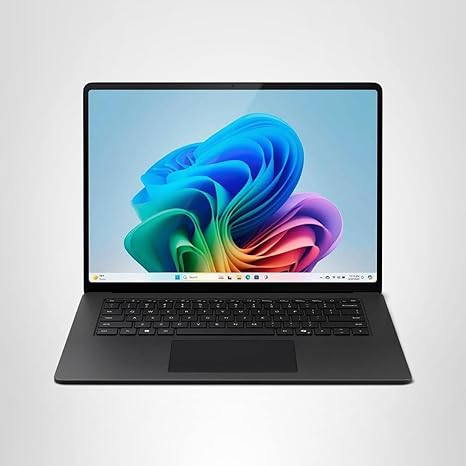
At a glance, this Surface Laptop keeps the familiar, clean design language Microsoft is known for. The fifteen-inch touchscreen sits in a slim aluminum chassis, finished in black, and it feels solid without being heavy. Inside, the Snapdragon X Elite is a twelve-core ARM-based processor with a dedicated neural processing unit designed for on-device AI tasks. There’s no discrete graphics card here, just the integrated Adreno GPU. The thirty-two gigabytes of RAM is fast but fully soldered, and the one Terra byte NVMe solid-state drive gives you plenty of space for work files, media, and apps, with the kind of quick boot and load times you expect from a modern premium laptop. The display is a fifteen-inch PixelSense touchscreen with a sharp high-resolution panel, a smooth one hundred twenty Hertz refresh rate, and strong brightness, making it comfortable for both work and media. Battery capacity sits in the mid-sixty watt-hour range, and total weight is roughly one point six six kilograms, which is reasonable for a fifteen-inch machine.
In day-to-day use, the Snapdragon X Elite is all about efficiency and responsiveness rather than brute force. For office work, this laptop feels fast and effortless. Dozens of browser tabs, large documents, spreadsheets, email, and video calls all run smoothly at the same time. Windows feels snappy, wake-from-sleep is instant, and there’s none of that hesitation you sometimes get on older ultrabooks. Media consumption is another strong point. The display is sharp, colors look natural, and the high refresh rate makes scrolling and animations feel fluid. The speakers are clear and loud enough for casual listening, with decent stereo separation for a thin chassis.
For creative workloads, things get a bit more nuanced. Photo editing and light video work run well, especially in apps that are optimized for ARM or that can take advantage of the neural processing unit. AI-assisted features like background removal, noise reduction, and image enhancement feel quick and happen locally, which is one of the selling points of this platform. Heavier video timelines and long exports are possible, but this isn’t a workstation replacement. If your work involves constant heavy rendering or complex effects, you’ll notice the limits of an integrated GPU fairly quickly.
Gaming is where expectations need to be realistic. This Surface Laptop is not built for modern AAA gaming, and that’s important to say clearly. Published real-world benchmark data for demanding titles on this exact configuration is extremely limited, largely because many big games are not optimized for ARM-based Windows yet. Where data does exist, it shows that recent AAA titles either don’t run at all or run at low settings with inconsistent frame rates that fall well below sixty frames per second. Competitive shooters and graphically intense games are simply not this laptop’s strength. The one hundred twenty Hertz display is great for everyday smoothness, but in gaming terms, the hardware underneath can’t consistently feed that refresh rate, so this is not a machine for high-FPS or competitive play.
Thermally, the Surface Laptop behaves the way you’d hope an efficiency-focused design would. During light work, it stays cool and silent. Fans are either completely off or so quiet you forget they’re there. Under sustained loads like long exports or heavy multitasking, the chassis warms up but never becomes uncomfortable on the keyboard deck. Fan noise does increase, but it’s a soft, controlled sound rather than a high-pitched whine. There’s no dramatic performance drop over time in everyday tasks, which speaks to stable thermal management, even if absolute performance is capped by design.
Battery life is one of the standout reasons to consider this laptop. With light to moderate office work, web browsing, and streaming, you can realistically expect somewhere in the mid-teens to around eighteen hours on a single charge, depending on brightness and workload. That means a full workday, and then some, without hunting for a charger. Heavier tasks will bring that number down, but it still outlasts most x86-based fifteen-inch laptops. Charging is straightforward and reasonably quick, and the charger itself isn’t overly bulky, which helps for travel.
The keyboard and trackpad are classic Surface, and that’s a compliment. Key travel is comfortable, feedback is crisp, and long typing sessions don’t feel fatiguing. The layout is sensible, with well-sized arrow keys and no awkward key placements. The trackpad is large, precise, and reliable with gestures, making it easy to work without a mouse. Biometric sign-in is quick, and the touchscreen adds flexibility for scrolling, note-taking, and casual interaction, even if most people will still rely on keyboard and trackpad most of the time.
Port selection is practical but not expansive. You get two USB-C ports with USB4 support, a full-size USB-A port, a headphone jack, and Microsoft’s Surface Connect for charging and docking. There’s no built-in SD card reader or HDMI port, so creators and multi-monitor users will likely want a dock. Wireless connectivity is modern and stable, with fast Wi-Fi and reliable Bluetooth for accessories. RAM is not upgradable, and while storage can be serviced, this is not a laptop designed for frequent internal upgrades, so choosing the right configuration upfront matters.
About halfway through, if you’re finding this breakdown useful, don’t forget to like the video, subscribe to Reviews inside tv, and hit the bell so you don’t miss future laptop reviews.
Living with this Surface Laptop highlights both its strengths and its compromises. On the plus side, it’s quiet, cool, extremely efficient, well built, and genuinely pleasant to use all day. The display is sharp and smooth, the keyboard is excellent, and battery life is a real advantage. On the downside, software compatibility on ARM can still be hit or miss, especially for niche or older apps, and gaming performance is clearly not a priority. Those are objective limitations, not flaws in execution.
When it comes to value for money, this configuration sits firmly in premium territory. You’re paying for build quality, battery life, and a forward-looking platform centered around AI and efficiency. Compared to traditional Intel or AMD ultrabooks at similar prices, this Surface often wins on battery life and noise, but can lose on raw compatibility and graphics performance. Against other ARM-based laptops, it stands out for its polished hardware and Windows integration, even if the ecosystem is still maturing.
Build quality is excellent. The aluminum chassis feels rigid, the hinge is smooth and stable, and nothing creaks or flexes in normal use. Long-term reliability data for this exact generation is still limited, but based on Microsoft’s recent Surface designs, there’s nothing here that raises red flags. Support and warranty are standard for the brand, with a generally solid reputation for business and consumer coverage.
So where does that leave us in the end? The Microsoft Surface Laptop 2024 with Snapdragon X Elite is best suited for students, office professionals, writers, developers working in supported environments, and anyone who values silence, long battery life, and a premium Windows experience. It’s not for gamers or users who rely heavily on niche x86 software or powerful GPU acceleration. If you understand what it’s designed to do, it delivers exactly that, and does it very well.
Thanks for watching Reviews inside tv. If you want to check out this Surface Laptop for yourself, you’ll find the link in the comments box. Drop your questions below, or share your experience if you’re already using one. Until next time, stay curious, stay productive, and we’ll see you inside the next review.
Available to buy here:


