

Available to buy here:
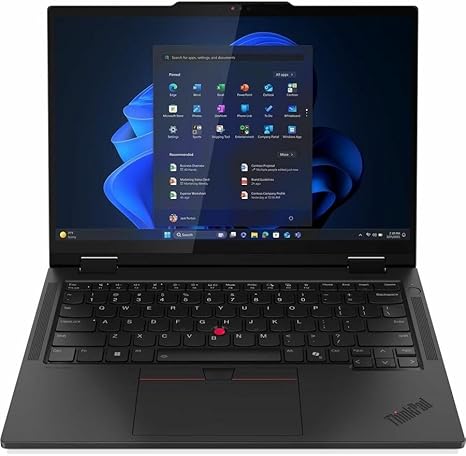
Welcome to “Reviews inside tv,” where we dive deep into tech so you can make informed decisions about your next purchase. Today, we’re looking at the T14s 2-in-1 G1, a powerful convertible laptop that’s designed for both work and play, bringing together performance and flexibility in a sleek package. But does it deliver on its promises? Let’s break it down.
The T14s 2-in-1 G1 comes equipped with a Core Ultra 5 processor, which leverages Intel’s hybrid architecture. This means you get a blend of performance and efficiency cores, ideal for multitasking, media creation, and handling demanding AI-powered applications. With a boost clock speed of 4.10 GHz, it’s a workhorse for everything from document editing to content creation. In real-world terms, this translates into smooth operation, whether you’re managing multiple tabs or running a video editing project in the background.
Now, when it comes to graphics, the T14s is built to handle everyday media consumption and light creative tasks, thanks to integrated graphics. While not a dedicated GPU, it should suffice for tasks like photo editing and occasional gaming at lower settings. For those looking for heavy-duty gaming or intensive 3D rendering, you might want to look at something with a dedicated GPU. Still, the integrated graphics perform well for most office and casual use cases.
Moving on to memory, this laptop is equipped with 16 GB of RAM, which is ideal for multitasking. Whether you’re running a few web browsers with tabs open or working with complex spreadsheets, you’ll find that 16 GB helps keep the system responsive. For creators, this amount of RAM also allows for smooth editing and rendering of photos and videos, even with larger file sizes. If you’re considering using the T14s for professional-level content creation, you may want to be mindful of its GPU limitations, but for everyday tasks, it more than holds its own.
Storage-wise, the T14s features a 512 GB PCIe SSD. PCIe SSDs are known for their high-speed performance, which translates into faster boot times, quicker load times for apps, and a snappier overall experience compared to traditional SATA SSDs. 512 GB is plenty for most users, providing ample space for documents, media files, and apps, though if you’re working with large video files, you may want to consider external storage.
The 14-inch display on the T14s is a standout feature. With a resolution of 1920 x 1200, it offers crisp visuals and an aspect ratio that provides more vertical space than traditional 1080p displays, which is great for productivity and media consumption. Colors pop, and the screen maintains sharp resolution, even from off angles, making it an excellent choice for watching movies or editing photos. If you’re a content creator who needs a highly accurate display, the color fidelity here is solid for general work, but professional photo or video editors might want to invest in a more color-precise display.
When it comes to battery life, you’re looking at a typical range of 6 to 8 hours depending on your usage. Light office tasks like word processing or web browsing should get you closer to the 8-hour mark, while heavier workloads like video calls or streaming will pull the battery down a bit faster. Charging is relatively quick, though the charger isn’t the smallest or most travel-friendly. It’s manageable for a day’s work, but you might want to keep the charger nearby for longer sessions.
The keyboard on this model is comfortable for extended typing sessions. The key travel is good, providing just enough feedback for comfortable typing. The layout is standard, with well-sized arrow keys and a functional number pad. If you’re used to larger laptops, the T14s’s compact size may take some getting used to, but overall, it offers a satisfying typing experience.
The trackpad is responsive, and while it’s not oversized, it’s more than enough for everyday tasks. Palm rejection works well, so accidental clicks are kept to a minimum. One handy feature is the fingerprint reader, making it easy to secure the laptop without having to type in a password every time.
In terms of connectivity, the T14s offers a solid set of ports, including USB-A, USB-C, HDMI, and an SD card reader. This gives you the flexibility to connect external drives, monitors, and peripherals without any issues. You also get Wi-Fi 6 for fast wireless speeds and Bluetooth for your accessories. The inclusion of Thunderbolt is a nice touch, allowing you to use the laptop with external docks and high-speed storage devices. However, the RAM is soldered, so upgrading down the line isn’t possible, which could limit the laptop’s future-proofing.
Now, thermals and fan noise are critical considerations for any portable laptop. The T14s remains relatively cool during light use, like web browsing or document editing. Under heavier loads, such as video rendering or gaming, you’ll notice some heat buildup on the underside and keyboard deck, though it doesn’t become uncomfortable to use in your lap. The fans can get a little noisy under load, but they’re not overwhelmingly loud. You won’t find yourself straining to hear your work calls or music, but the sound is noticeable when you’re pushing the laptop.
Let’s talk about its value. The T14s positions itself as a business-oriented 2-in-1 laptop that can also handle a bit of creative work. It’s priced competitively for its features, but when compared to similarly priced options, it holds its own in terms of performance and build quality. However, if you’re looking for a more powerful GPU or a higher resolution display for professional media creation, you might find the T14s a bit limiting.
When we talk build quality, the T14s is built solidly with a mix of plastic and aluminum, making it light enough for portability but sturdy enough for daily use. It’s not the most premium-feeling laptop in its class, but it’s durable and reliable, especially for business users who need something that will withstand the rigors of travel.
In terms of customer support, Lenovo is known for providing good service, including warranty options and access to tech support. If anything were to go wrong, you can expect solid assistance, though you might not get the same level of premium service that some higher-end brands offer.
To wrap it up, the T14s 2-in-1 G1 is a great choice for students, business professionals, and light content creators who need a versatile, reliable laptop. It offers a solid mix of performance, battery life, and portability, but if you’re a gamer or someone who needs extensive creative power, you may want to explore alternatives with more robust GPUs. At its price point, it strikes a good balance between value and features, but it’s not perfect for everyone.
Thanks for watching, and be sure to check the comments box for the link to grab this laptop if you’re interested. Have any questions or already own the T14s? Drop a comment below—I’d love to hear your thoughts. And, as always, don’t forget to like, subscribe, and hit that bell icon to stay updated on all things tech.
Available to buy here:


