
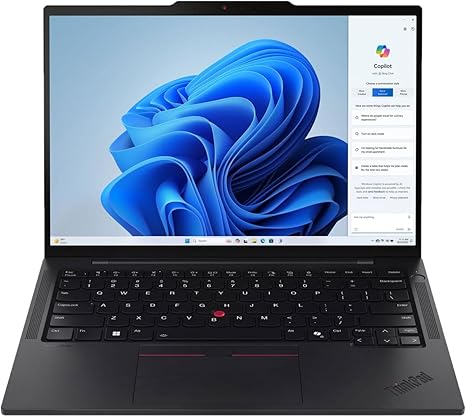

Available to buy here:
Welcome back to Reviews inside tv, where we break down the best tech to help you make informed decisions. Today, we’re taking a closer look at the Lenovo ThinkPad T14s Gen 5, a sleek business laptop that packs some serious performance into a compact, durable design. Whether you’re a student, an office worker, or someone who needs a reliable workhorse for day-to-day tasks, the ThinkPad T14s could be exactly what you’re looking for. Let’s see if this device truly stands up to its reputation.
The Lenovo ThinkPad T14s Gen 5 is equipped with Intel’s latest Core Ultra 5 processor, making it an excellent choice for those who need both power and efficiency. With 32 GB of RAM, this laptop is more than capable of handling heavy multitasking, running multiple apps, and smoothly dealing with large files. When you add in the 512 GB SSD, your system will boot up quickly, and apps and files will load almost instantly. It’s not just about speed, though—the ThinkPad T14s comes with a WUXGA (1920 x 1200) display, offering better resolution than standard Full HD. That means you get more screen real estate, which can be helpful for productivity tasks, presentations, or even just browsing multiple windows.
In terms of performance, the Intel Core Ultra 5 delivers solid power for office work, light content creation, and even moderate multitasking. Whether you’re hopping between apps for work or using this for more creative tasks like photo or video editing, the T14s won’t leave you hanging. And with that 32 GB of RAM, you’re looking at a machine that can handle complex workflows. For gamers, however, this laptop isn’t going to compete with gaming-specific machines, as it lacks a discrete GPU, so expect lower performance in graphically demanding games.
What really stands out with the ThinkPad T14s Gen 5 is its portability. At just 2.8 pounds and with a slim profile, this laptop is easy to carry around whether you’re heading to class, work, or traveling for business. It’s the kind of device you can take with you all day without feeling like you’re carrying around a brick. And when it comes to the build quality, Lenovo’s ThinkPad line is known for its toughness. The T14s is built to withstand the rigors of daily use with a chassis that feels solid and premium without being overly heavy. The keyboard is a standout too—designed for long typing sessions, the keys are responsive, with just the right amount of travel, and the layout is comfortable for heavy typists. The trackpad, while not the largest, is accurate and responsive, with good palm rejection.
Let’s talk about real-world use now. For productivity tasks like web browsing with multiple tabs open, word processing, and video calls, the ThinkPad T14s handles everything smoothly without stuttering. It’s perfect for business professionals or anyone needing a reliable laptop for work-related tasks. For media consumption, the WUXGA screen gives you decent color accuracy and sharpness, though the brightness might not reach the same heights as OLED displays. Still, for most everyday tasks, the display holds up well, offering clear visuals for watching videos, working on documents, or even reading through presentations.
When it comes to performance in creative workflows like photo editing or light video work, this laptop holds its own. It’s not going to match a high-end creator laptop with a dedicated GPU, but for everyday editing tasks, the combination of the Intel Core Ultra 5 and 32 GB RAM provides a smooth experience, with minimal lag during standard photo editing or video exporting.
Gaming, though, is where the T14s falls short. Without a discrete graphics card, it’s not designed for modern gaming. Casual games will run fine, but if you’re expecting to play graphically intense games like Cyberpunk 2077 or Call of Duty, you’ll need to lower the resolution and graphics settings. The integrated GPU simply can’t push the frames needed for a smooth gaming experience. However, this laptop wasn’t built with gamers in mind, so if gaming isn’t your priority, this won’t be a dealbreaker.
The keyboard and trackpad are highly comfortable for typing and navigation. The keyboard features the signature ThinkPad layout—well-spaced keys with decent travel and tactile feedback that makes long typing sessions feel less taxing. The trackpad is sufficiently large and responsive, with solid palm rejection, ensuring smooth navigation.
Battery life is another key area where the T14s impresses. Thanks to its power-efficient Intel Core Ultra processor, you can expect around 8 to 10 hours of battery life under light to moderate use—perfect for a full day of work or classes. Of course, the battery life will dip with heavier tasks like video editing or running demanding applications, but you should still be able to get several hours of usage before needing a charge. The charging speed is also decent, though not lightning fast, and the charger is compact enough to carry around without adding too much bulk.
Now, let’s talk about connectivity. The T14s includes a solid selection of ports for its slim size. You get two USB 3.2 Type-A ports, two Thunderbolt 4 USB-C ports, an HDMI 2.0 port, and a microSD card reader, along with an Ethernet jack and a headphone jack. This wide range of ports makes it easy to connect to external displays, docking stations, or peripherals. The Thunderbolt 4 support ensures that you’ll have fast data transfer and the ability to connect to multiple monitors or high-speed devices. On the wireless side, you get Wi-Fi 6 and Bluetooth 5.2, ensuring fast and stable connections for streaming, web browsing, or working in the cloud.
Thermals are generally good for the T14s. While the laptop does get warm under load, especially on the underside, it doesn’t overheat. The fan noise is noticeable when the system is pushed hard, but it’s not unbearable. If you’re doing intensive work like video editing or running a lot of apps, the fan can get a bit loud, but it’s a fair trade-off for keeping the laptop cool.
As for build quality, the T14s is top-notch. The body is made of magnesium and aluminum alloys, which gives it a premium feel without adding too much weight. It feels sturdy, and the hinges are firm, so you won’t experience any wobble or flimsy movement during use.
Now, let’s consider the price. At its current price point, the Lenovo ThinkPad T14s Gen 5 is offering excellent value, especially for professionals who need reliable performance and portability. It might not be the best choice for gamers or power users who need a GPU-heavy machine, but for students, office workers, and business professionals, it delivers exactly what you need: solid performance, excellent keyboard and trackpad, and a great display for productivity tasks. If you’re looking for a slightly more powerful machine for creative work, you might want to look at something like the Dell XPS 15 or Apple MacBook Pro, but at this price, the T14s holds its own.
In conclusion, the Lenovo ThinkPad T14s Gen 5 is a fantastic option for anyone who needs a business laptop that can handle daily tasks, moderate content creation, and provide all-day portability. While it might not be ideal for gamers or high-end content creators, its build quality, performance, and excellent keyboard make it a standout in the business laptop category. It’s reliable, efficient, and well-built, making it a great choice for professionals and students alike.
Thanks for watching, and don’t forget to hit the like button, subscribe, and turn on notifications so you don’t miss any of our future reviews. The link to grab the Lenovo ThinkPad T14s can be found in the comments box below. Let us know your thoughts or questions, and if you already own this laptop, we’d love to hear your experience. Take care, and see you next time on Reviews inside tv.
Available to buy here:


