

Available to buy here:
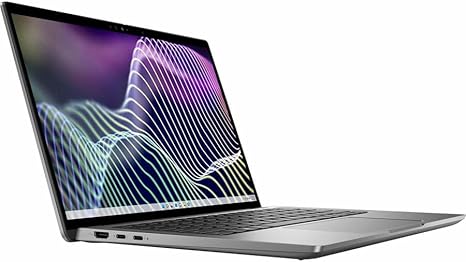
Welcome to “Reviews inside tv.” Today, we’re checking out the Dell Latitude 7000 7440, a 14-inch touchscreen convertible 2-in-1 notebook that packs some serious power and flexibility. With its sleek design and high-performance specs, this laptop is geared toward business professionals, students, and anyone who values productivity in a portable, premium package. But does it live up to the hype? Let’s take a closer look at what this device really offers.
This Latitude 7440 is powered by the Intel Core i7-1365U, part of Intel’s 13th generation chips. This deca-core processor (that’s 10 cores, in case you’re wondering) runs at a base clock speed of 1.30 GHz, but it can boost higher when needed. You’ll notice that the CPU handles daily office tasks, multitasking with several applications, and even more demanding workloads with ease. Whether you’re juggling spreadsheets, video calls, or light media editing, the performance stays consistently snappy.
Couple that with 16 GB of RAM, and this machine can handle a significant amount of multitasking without stuttering. You can have a dozen tabs open, play a video in the background, and still switch between applications smoothly. Whether you’re crunching numbers in Excel or writing reports, the ample memory means there’s no noticeable slow-down, even with heavy demands.
Storage-wise, the Latitude 7440 comes equipped with a 512 GB SSD. Now, this size is perfect for anyone who stores a decent amount of documents, presentations, media files, and software. The SSD also ensures you’re not stuck waiting for your system to load up files or boot. Everything feels instant, which makes the overall experience feel much faster compared to older hard drives or even slower SATA SSDs. You’ll really notice the difference when it comes to app startup times, file transfers, and overall system responsiveness.
Moving on to the display: the 14-inch screen, offering a resolution of 1920 x 1200 pixels, sits comfortably in the sweet spot between Full HD and higher-end resolutions. The touch functionality is smooth, and if you’re the type to jot down quick notes or navigate apps by tapping, you’ll appreciate the screen’s responsiveness. It’s bright enough to handle most indoor environments, though it’s not necessarily built for direct outdoor sunlight use. Still, for office work or streaming video, it does its job well, offering vibrant colors with good contrast. It’s a solid choice for watching movies or video calls, with the added bonus of being able to fold back into a tablet when you need to be more hands-on.
Now, let’s talk about real-world performance. For office and productivity tasks, this laptop is a powerhouse. Opening multiple browsers, working on documents, managing emails, and running video calls all happen seamlessly. You won’t notice any lag or delays, even with multiple apps running at once. If you’re into media consumption, the full HD display combined with the decent speakers make it a great option for binge-watching your favorite shows or movies. Don’t expect booming audio, but the quality is more than sufficient for casual listening.
For content creators, this machine is also capable of handling some light photo and video editing. While it’s not a dedicated creative powerhouse like the high-end MacBook Pro or gaming laptops, the CPU and RAM combo will handle basic editing tasks like cropping, color adjustments, and applying filters without breaking a sweat. Expect good performance, but for heavy exports or 4K video work, you might want to look at something with more GPU muscle.
In terms of gaming, this is where the Latitude 7440 shows its limits. It’s not a gaming laptop, and the integrated Intel Iris Xe GPU isn’t designed for high-end gaming. You’ll be able to play older or less demanding titles at low settings, but for anything graphically intense like Cyberpunk 2077 or Call of Duty, you’ll need to lower the resolution and settings to get smooth performance. If you’re a casual gamer or just want to play some light games, it’ll work fine. For serious gaming, though, this isn’t the right machine.
One of the standout features of this laptop is its thermals. Even under load, the Latitude 7440 remains impressively cool and quiet. The fan noise is mostly silent when performing regular tasks, and even when you push it a little harder, it doesn’t get annoyingly loud. The heat isn’t noticeable on the keyboard deck or underside either, which means you can comfortably use it in your lap without any discomfort.
Battery life is another area where this laptop shines. With a 51Whr battery, you can expect around 8 to 10 hours of light use, which includes web browsing, working on documents, and watching videos. For more demanding tasks like video editing or gaming, this drops, but you’re still looking at around 5 to 6 hours, which is solid for a laptop this powerful. Charging is fairly quick, so you won’t be tethered to the wall for long, and while the charger is not the smallest, it’s still compact enough to slip into your bag without taking up too much space.
When it comes to the keyboard, Dell has really nailed the typing experience. The keys offer a satisfying amount of travel, with good tactile feedback that makes long typing sessions comfortable. The layout is well thought out, with a full-size keyboard and a number pad, so it’s ideal for people who need to input numbers or do data entry. The trackpad is also a joy to use – smooth, precise, and responsive with no issues of palm rejection. It’s large enough for gestures and navigating, but not so large that it becomes intrusive. There’s also the bonus of the touchscreen if you prefer to tap and swipe directly on the display.
As for ports and connectivity, the Latitude 7440 includes everything you might need. You get two USB-A ports, two Thunderbolt 4 USB-C ports, HDMI, and a microSD card reader. It’s versatile enough for most peripherals, whether you’re connecting to external monitors, docking stations, or charging additional devices. The Wi-Fi 6 and Bluetooth 5.1 support ensure strong and stable connections, whether you’re on the move or at your desk.
Now, onto the build quality: the Latitude 7440 feels solid and premium. It has a magnesium alloy body, which keeps it both durable and lightweight. At just 3.1 pounds, it’s portable enough for everyday commuting or travel. The hinge is sturdy, offering a good range of motion when switching between laptop and tablet mode, and the overall feel is definitely premium. The screen can be rotated a full 360 degrees, making it an ideal choice for users who need flexibility.
In terms of reliability, Dell’s Latitude series has a good reputation for business laptops, and while there isn’t a lot of long-term user data yet for the 7440, it’s safe to expect that this will hold up well over time. Dell offers solid warranty and support options as well, so you’re covered should any issues arise.
So, who is this laptop best for? It’s ideal for professionals, students, or anyone who needs a reliable, high-performance machine for productivity tasks, media consumption, and light creative work. If you’re looking for a laptop that’s portable, has a great keyboard, offers solid battery life, and a premium build, the Latitude 7440 is an excellent choice.
However, if you’re a heavy gamer or you need something specifically for demanding video editing or 3D work, you might want to look for a machine with a dedicated GPU, as this one is limited in that area.
Overall, the Latitude 7440 hits all the right marks for a portable, flexible, and powerful 2-in-1 laptop. It’s not the cheapest in its class, but the premium build, impressive performance, and great user experience justify the price.
Thanks for watching! If you’re interested in picking up this laptop, check the link in the comments. Have questions or already own this model? Feel free to share your thoughts below. Catch you next time with more tech insights from “Reviews inside tv”!
Available to buy here:


