

Available to buy here:
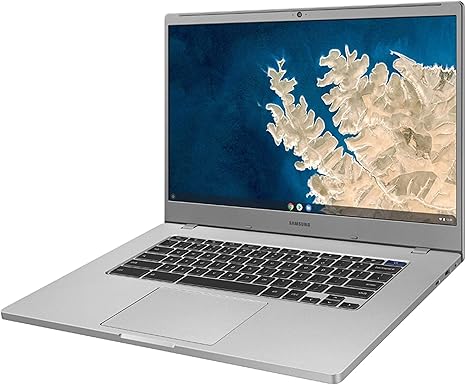
The Samsung XE350XBA-K05US Chromebook 4+ is a budget-friendly 15.6-inch laptop that targets users looking for an affordable and reliable device for everyday computing. Whether you’re a student, office worker, or someone who just needs a no-frills machine for web browsing, document editing, and media consumption, this Chromebook might be worth considering. Let’s break down the key features and see how it performs in the real world.
Under the hood, this Chromebook is powered by an Intel Celeron N4000 processor, a dual-core chip with a base clock speed of 1.1 GHz and a turbo boost up to 2.6 GHz. While this is an entry-level processor, it can handle light tasks like web browsing, word processing, and streaming videos with ease. However, you’ll likely notice slowdowns when trying to juggle multiple heavy applications or perform more demanding tasks like video editing or gaming. The Intel UHD Graphics 600 is integrated into the processor, which is sufficient for basic tasks but not for anything graphically intensive. Don’t expect to play high-end games or run professional graphic design software smoothly on this Chromebook.
In terms of memory, the 4GB of DDR4 RAM is soldered onto the motherboard, which means you can’t upgrade it later. This amount of RAM is okay for light multitasking, but you may run into issues with performance if you have multiple tabs open or run more memory-heavy applications. For most users, 4GB will be enough for everyday tasks, but it can feel a bit limiting if you’re a power user.
Storage is provided by a 128GB eMMC drive, which is essentially a slower version of solid-state storage. While it offers decent read and write speeds compared to traditional hard drives, it’s still a bottleneck for performance when loading large files or running software from storage. That said, the Chromebook 4+ is designed for cloud-based workflows, so the limited storage may not be a huge issue if you’re using Google’s suite of apps and rely on cloud storage like Google Drive. If you plan to store large amounts of data locally, though, you might run into space issues fairly quickly.
The 15.6-inch display is large, making it a solid choice for users who prefer more screen real estate, whether you’re working on documents, watching videos, or browsing the web. The resolution sits at Full HD (1920×1080), which is decent for a laptop at this price point. Colors are passable for casual viewing, but you won’t get the vivid accuracy you’d find on higher-end laptops with IPS or OLED displays. Brightness can be a bit on the lower side, so using it outdoors in bright conditions might be challenging.
As for battery life, the 2-cell lithium-ion battery is designed to last around 8 to 10 hours depending on usage, which is typical for Chromebooks in this price range. You can get through a full day of light web browsing and video streaming without needing to charge, but heavier tasks will drain the battery faster. Charging is standard and should take a few hours to reach full charge, but there’s no quick charging feature here.
In terms of design, the Chromebook 4+ is lightweight and fairly portable, weighing just under 4 pounds. While it’s not the thinnest device out there, it’s still light enough to carry around in a backpack without adding too much extra weight. The build quality is mostly plastic, and the overall feel is quite utilitarian. It’s not as premium as higher-end models, but for the price, the construction feels solid and functional.
The keyboard is quite comfortable for typing, with decent key travel and responsive feedback. It doesn’t have the most premium feel, but for everyday typing, it’s more than sufficient. The trackpad is a bit on the smaller side, but it’s responsive and gets the job done. While the Chromebook 4+ doesn’t offer any fancy extras like a backlit keyboard or touchscreen, it has the basics covered well enough for everyday use.
In terms of ports, the Chromebook comes with a USB-C port, two USB-A ports, a microSD card reader, and a headphone jack. There’s no HDMI or Ethernet, so if you need to connect to an external monitor or wired network, you’ll need adapters or rely on wireless solutions. For wireless connectivity, it supports Wi-Fi 5 and Bluetooth 4.0, which is fine for most users but may not be the fastest or most stable connection if you need top-tier performance in a professional setting.
Now, let’s talk about performance. For light tasks like browsing the web, checking email, watching videos, and editing documents, the Samsung XE350XBA-K05US Chromebook 4+ handles everything with ease. It’s not going to break any speed records, but it gets the job done for everyday use. Streaming video looks good on the Full HD display, and web browsing is generally smooth. However, as soon as you start multitasking with more than a few tabs open, you’ll feel the strain of the 4GB of RAM and the slower eMMC storage. If you need to do more intensive work, such as photo or video editing, this is not the laptop for you.
One area where the Chromebook 4+ does shine is in its cooling. Even under heavier workloads, the fans don’t get excessively loud, and the laptop stays relatively cool to the touch. This is especially important if you plan to use the laptop for extended periods, as a quiet and cool machine is more comfortable for long sessions.
When it comes to value for money, the Samsung XE350XBA-K05US Chromebook 4+ offers decent performance for its price. It’s not going to win any awards for cutting-edge specs, but if you’re looking for an affordable laptop for basic productivity, browsing, and media consumption, this Chromebook is a solid option. Competitors in this price range, such as the Lenovo Chromebook Duet or Acer Chromebook 15, offer similar performance, but the larger screen on the Samsung gives it an edge for those who prefer more screen space. It’s also a bit lighter than some other models in its category.
For long-term value, however, it’s important to note that the Chromebook’s limited RAM and storage might become an issue as software requirements continue to rise. If you’re just using this for basic tasks, though, it should serve you well for a few years.
In conclusion, the Samsung XE350XBA-K05US Chromebook 4+ is an excellent choice for students, casual users, or anyone who just needs a basic laptop for everyday tasks. It provides solid performance, decent battery life, and a comfortable user experience for a very affordable price. However, if you’re looking for something that can handle more demanding tasks, or you need more storage or memory, you might want to look elsewhere. It’s a great entry-level Chromebook, but it’s not designed for power users.
Thanks for watching! If you found this review helpful, make sure to hit that like button, subscribe, and ring the bell to stay updated on all our latest reviews. Feel free to drop any questions or thoughts in the comments below – we’d love to hear your experiences with this laptop if you already own one. Take care, and see you in the next review!
Available to buy here:


