Available to buy here:
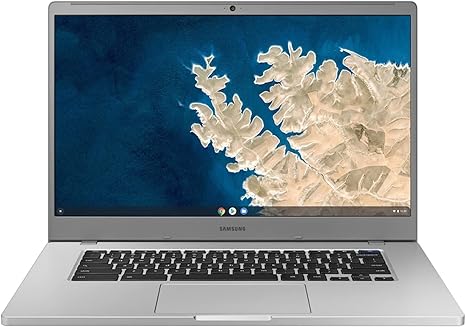
Welcome back to Reviews inside tv! Today, we’re looking at the Samsung Chromebook 4+—a device that packs a 15.6-inch display into a compact, lightweight form. But does it deliver the performance you need for everyday tasks? Let’s find out.
The Chromebook 4+ is geared toward those who need a solid, budget-friendly laptop for productivity, browsing, and media consumption, but with a focus on simplicity and speed. Let’s start by breaking down the key specs.
This model comes equipped with an Intel Celeron N4020 processor, a dual-core chip clocked at 1.1 GHz with turbo boost capabilities up to 2.8 GHz. Now, this isn’t a powerhouse for heavy lifting but perfect for light office work, web browsing, and streaming media. For casual users, this is more than enough, but don’t expect smooth video editing or demanding software to run here. Coupled with 4GB of RAM, the system can handle day-to-day tasks like word processing, spreadsheets, and browsing a handful of tabs without stuttering.
Storage is a bit tighter with 32GB of eMMC memory. While this is quite limited for storing large files or installing numerous apps, it should suffice for cloud-based applications and basic file storage. If you plan to store lots of media or applications locally, you’ll need to rely on external storage or cloud services. Thankfully, the Chromebook 4+ offers fast access to Google Drive, so that cloud-based workflow is integrated seamlessly.
The 15.6-inch display, boasting a full HD resolution of 1920×1080, offers a decent level of clarity. It’s an LCD panel, so you won’t get the deep contrast of OLED, but it’s still quite vibrant for a Chromebook. The colors are accurate enough for casual media consumption, and while the brightness may not rival premium laptops, it should be adequate for most indoor environments. Viewing angles are also reasonable, making it easy to share content with others.
When it comes to connectivity, the Chromebook 4+ is surprisingly equipped for a device of its price. It comes with Wi-Fi 5, offering speeds up to 867 Mbps—perfect for web browsing and streaming. Bluetooth 4.2 is included, which is great for connecting wireless accessories. There’s also a USB-C port, two USB-A ports, and an HDMI port, giving you flexibility when connecting to peripherals, external monitors, or even a projector. However, there’s no SD card slot, which might be a downside for photographers or video editors looking to transfer files quickly.
As for battery life, the Chromebook 4+ shines with up to 10.5 hours on a full charge. In real-world use, this means you can easily get through a full day of work or school, and still have enough power to stream movies in the evening. When it’s time to recharge, the 45W charger should get you back up to full power relatively quickly. For a machine like this, it’s a solid battery performance.
We can’t overlook the build quality here—Samsung’s made sure this laptop has military-grade durability. While the body is made of plastic, it feels sturdy, and the laptop should be able to handle a few bumps and drops. At 3.75 pounds, it’s not the lightest laptop in the category, but still lightweight enough for students or office workers to carry around in their bag without issue.
When it comes to everyday performance, this laptop shines for productivity tasks. Web browsing, email, document work, and even video calls are smooth, with very few issues. The keyboard is comfortable for typing with decent key travel and spacing. It’s not going to win any awards for a premium typing experience, but it’s good enough for long sessions of work or study. The trackpad is also responsive, but like many budget laptops, it’s a little on the smaller side.
However, there are some downsides to be aware of. First, the performance isn’t suited for heavy multitasking or demanding apps. The 4GB of RAM can be limiting, especially if you tend to have multiple tabs or apps open at once. Expect slowdowns if you push the laptop too hard, so it’s important to keep your workload light. The display, while good for general use, lacks the vibrancy and depth of higher-end models—meaning if you’re a creator or looking for more accuracy in color reproduction, this might not be the right choice.
In terms of noise, the fans remain mostly silent during normal use, which is a good thing for those who need a quiet workspace. However, under load, like when streaming high-definition videos or running multiple apps at once, the fan can get audible but still not intrusive. Thermals are well-controlled for light tasks, but the system may run warmer when under stress.
Now, let’s talk about the real-world experience. The Chromebook 4+ is incredibly simple to set up, especially for those already in the Google ecosystem. The OS is snappy, and there’s no bloatware slowing you down. While it’s not the most powerful device out there, it delivers exactly what it promises—reliable everyday computing. The only caveat is the limited storage, which might be an issue if you prefer to store large files locally or use apps that require a bit more space.
In terms of gaming, don’t expect this machine to be much of a performer. While you can certainly play lightweight games or stream from a cloud gaming service, this Chromebook isn’t designed for gaming. The Intel UHD Graphics 600 are fine for basic tasks and media, but they aren’t capable of running graphically demanding titles. Keep your expectations low if gaming is on your mind.
Now, for those considering other options at this price range, there are a few alternatives that might appeal to you. The Acer Chromebook 15 offers similar specs but with a more comfortable keyboard and slightly better build quality. The Lenovo Chromebook Flex 5, with its convertible design, could be a good option if you need a 2-in-1 laptop for versatile use cases. However, both of these alternatives tend to have a slightly higher price point.
For value, the Samsung Chromebook 4+ is priced right for its target market. If you’re a student, a casual user, or someone who needs a reliable, affordable laptop for work or media consumption, this one hits the mark. It doesn’t offer top-tier performance, but it does what it’s meant to do reliably and without much fuss.
In conclusion, the Samsung Chromebook 4+ is a solid option for those looking for an affordable and durable laptop for basic productivity and media use. It’s not for power users or gamers, but for everyday tasks, it performs well. If you’re in the market for a simple, no-frills Chromebook that gets the job done, this one’s a great choice. If you need more power or features, there are better options out there, but for the price, it’s hard to beat.
Thanks for watching! The link to grab your own Samsung Chromebook 4+ is in the comments box below. Feel free to drop a comment if you’ve used this model or if you have any questions about it. See you in the next review!
Available to buy here: