

Available to buy here:
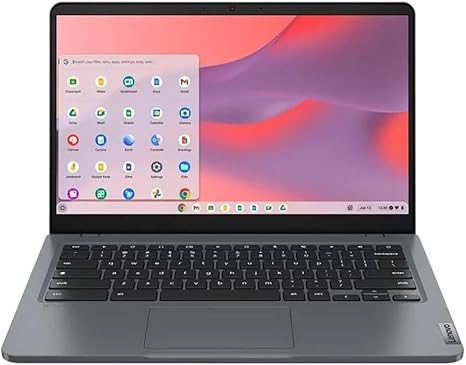
Welcome to Reviews inside tv, where we explore all the tech you need to know. Today, we’re checking out the Lenovo 14e Chromebook Gen 3. This 14-inch touchscreen notebook is designed with an Intel N100 quad-core processor and packs some impressive features for its price range, making it a solid choice for students, casual users, or anyone looking for a simple, reliable laptop to tackle everyday tasks.
The Lenovo 14e Chromebook Gen 3 comes with a 14-inch Full HD display. That’s 1920 by 1080 pixels, which is great for streaming videos, browsing, and working with documents. While this isn’t the most cutting-edge screen technology, it delivers vibrant colors and sharp clarity that’s more than enough for typical day-to-day use. If you’re watching movies or streaming shows, you’ll appreciate the vivid picture quality and decent brightness, making it perfect for enjoying your favorite content.
Now, let’s talk about the performance under the hood. This model is powered by the Intel N100 processor, which is a quad-core chip. The N100 is a more energy-efficient choice, built for basic tasks like web browsing, office work, and casual media consumption. Don’t expect it to handle demanding software or multitask heavy applications, but for light productivity—think documents, spreadsheets, and light browsing—it should perform quite well. Coupled with 4 GB of RAM, this Chromebook can manage multiple tabs and basic programs without much lag. However, for power users or those who want to push this laptop to the limit, the 4 GB RAM may feel a bit restrictive. It’s enough for most general tasks, but I wouldn’t recommend this for heavy multitasking or memory-intensive tasks like photo or video editing.
The laptop has a modest 32 GB of flash storage, which is where things get a bit tight. Chrome OS, which powers this Chromebook, is pretty lightweight, but 32 GB is on the lower end when it comes to storage. You’ll need to rely on cloud storage or external drives if you have a lot of files or apps. The benefit is that it keeps the price lower and makes the laptop faster, but you’ll need to be mindful of your storage capacity.
Battery life on the Lenovo 14e Chromebook Gen 3 is one of its standout features. With a battery life of up to 14 hours, you’re looking at a full day of usage on a single charge. Whether you’re working through emails, attending virtual meetings, or watching a few episodes of your favorite show, you won’t have to worry about constantly plugging in. The large battery is especially useful for students or anyone on the go, as you can use it for extended periods without needing to recharge.
On the design front, the Lenovo 14e Chromebook is built for portability. Weighing in at just under 3 pounds, it’s light enough to carry around all day without feeling like a burden. It’s compact too, so slipping it into a backpack or carrying it with one hand is a breeze. The Storm Gray finish gives it a clean, professional look, though it’s definitely a no-frills design. If you’re looking for something flashy or premium, this may not be it, but for a budget Chromebook, it’s sturdy and functional.
Now, when it comes to the keyboard and trackpad, they both feel pretty comfortable for light typing sessions. The keyboard has decent key travel, though it’s not the most tactile. It’s a solid experience for typing out essays, emails, or taking notes. The trackpad is responsive and accurate, although it can feel a little small. If you’re used to larger trackpads, you might find this one a bit cramped, but it gets the job done.
Ports on this Chromebook are fairly basic. You get two USB-A ports, a USB-C port, and an HDMI output. There’s no SD card reader or Ethernet port, which may be a drawback for some, but it’s a typical configuration for a budget Chromebook. The USB-C port does provide some flexibility for charging and connecting peripherals, which is nice. You also get Wi-Fi 6, so wireless performance is solid for browsing, streaming, and video calls.
Let’s dive into how this Chromebook actually handles real-world use. For office work, it’s fast and responsive enough for light tasks like email, spreadsheets, and document editing. Opening multiple tabs in Chrome is manageable, but I wouldn’t push it too far. The 4 GB of RAM and the Intel N100 processor work well for basic office productivity but do show their limits when you start running too many demanding apps simultaneously.
For media consumption, this Chromebook handles 1080p video quite well. The 14-inch screen provides enough detail and color accuracy for casual viewing. If you’re watching YouTube, Netflix, or other streaming services, the display will provide a satisfying experience, but keep in mind that it’s not the brightest screen out there. It’s good for indoor use, but it might struggle in direct sunlight.
When it comes to gaming, you won’t be able to run demanding titles on this Chromebook. It’s not designed for gaming, and the Intel N100 integrated graphics won’t get you far with AAA titles. You can play casual games or browser-based games, but don’t expect smooth gameplay on anything graphically intense.
One of the areas where this Chromebook excels is its battery life. You’ll easily get 12–14 hours of continuous use, depending on your activities. This makes it a great option for students, business professionals, or anyone who needs an affordable laptop that can last through a full day of work or study.
For comfort during long sessions, the keyboard is adequate for typing, but long typing sessions may cause a bit of fatigue since the key travel isn’t as deep as you might find on higher-end models. The fan noise is minimal; in fact, it’s nearly silent during light work. Under heavier use, like streaming or running multiple apps, you’ll hear a slight hum, but it doesn’t get obnoxiously loud.
As for build quality, the Lenovo 14e Chromebook feels sturdy and reliable but doesn’t have the premium build of more expensive laptops. It’s made of plastic, which helps keep the weight down but doesn’t scream high-end. The screen is protected with a fairly durable bezel, and the hinges hold up well, even after multiple uses. It’s a laptop that will hold up over time with general use but might not survive rough treatment as well as something built with more premium materials.
In terms of value for money, this Chromebook is a solid pick for anyone looking for an affordable, reliable laptop for basic tasks. For the price, you’re getting a good display, solid battery life, and enough performance for everyday activities. If you’re after a Chromebook for light office work, media consumption, or web browsing, it’s a great option. However, if you need more power for heavy multitasking, gaming, or content creation, you might want to look elsewhere.
Comparing it to other models in this price range, the Lenovo 14e Chromebook Gen 3 holds its own, especially in terms of battery life. You’ll find similar specs in other budget Chromebooks, but this one shines for its long battery life and ease of use. If you’re after a more premium experience, you might look at something like the Acer Chromebook Spin 13, which offers a higher-resolution display and more powerful processors, but it does come with a higher price tag.
To wrap things up, the Lenovo 14e Chromebook Gen 3 is a great choice for students, casual users, or anyone who needs a simple, budget-friendly laptop for basic tasks. It delivers solid performance for everyday use, offers excellent battery life, and is easy to carry around. However, if you’re looking for more performance or features like a better display or a faster processor, you might want to check out other options. If this laptop sounds like it could be your next daily driver, check the link in the comments box.
Thanks for watching! Don’t forget to like, subscribe, and hit that bell icon to stay updated on all our reviews. Drop a comment below if you’ve already used this Chromebook or if you have any questions. Until next time, happy tech hunting!
Available to buy here:


