Available to buy here:
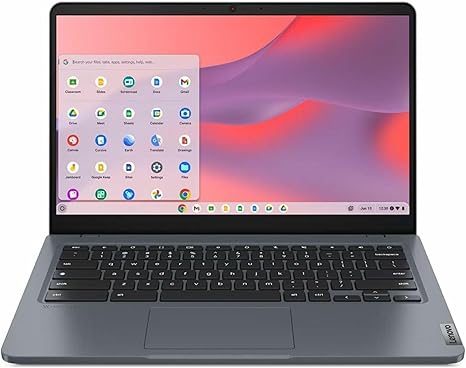
Welcome to “Reviews inside tv”! Today, we’re taking a closer look at the Lenovo 14e Chromebook Gen 3, a sleek, compact device designed to tackle everyday tasks with ease, whether for students, professionals, or casual users. With a 14-inch touchscreen, Intel’s N200 quad-core processor, and 8GB of memory, it promises to offer solid performance in an ultra-portable package. But does it deliver on that promise? Let’s find out.
At the heart of the Lenovo 14e Chromebook Gen 3, we have an Intel N200 quad-core processor, a lower-end chip that’s designed for efficient multitasking and web-based tasks. You won’t be editing 4K video or running AAA games on this device, but for everyday use—like web browsing, document editing, and streaming—it should handle things with ease. Coupled with 8GB of RAM, this Chromebook can run multiple browser tabs and office applications simultaneously without feeling sluggish. While 8GB is plenty for light multitasking, users who frequently run resource-heavy apps or need to juggle more demanding workflows might wish for more memory. The 128GB flash storage should be enough for cloud-based workflows and documents but doesn’t leave much room for large files locally. Still, being a Chromebook, it’s optimized for cloud storage, so that’s less of a concern for many.
The 14-inch Full HD touchscreen display is another highlight of this Chromebook. Offering a resolution of 1920 x 1080, the display provides vibrant colors and crisp details. While it may not be as bright as higher-end screens, it offers wide viewing angles, making it a solid option for video calls or streaming media. The touch functionality is responsive, and the screen’s matte finish helps reduce glare, which is especially useful if you’re working in a well-lit room or on the go. The color accuracy here won’t match a high-end laptop or a professional-grade display, but for daily tasks and casual media consumption, it’s more than sufficient.
Now, let’s talk about real-world performance. For office productivity, this Chromebook handles web browsing with multiple tabs open, writing documents, and spreadsheet work without much trouble. Streaming movies or YouTube videos is equally smooth, thanks to the solid display and decent speaker quality. Whether you’re working from home or doing schoolwork, the Lenovo 14e Chromebook Gen 3 won’t let you down. In creative work, like photo editing or light video editing, it’s not the most powerful device, but for cloud-based tasks or basic editing, it gets the job done. The 8GB of RAM ensures you won’t encounter frustrating lag during simple tasks.
For gaming, this Chromebook isn’t designed to handle anything graphically demanding. You’ll be limited to cloud gaming services like Google Stadia or browser-based games. You can forget about playing AAA titles like Cyberpunk 2077 or even older games at high settings. If gaming is a priority, you might want to look elsewhere, but for casual gamers or those using cloud services, it’ll be fine.
As for thermals and noise, the Lenovo 14e Chromebook Gen 3 is quite well-behaved. Under light use, like browsing or streaming, the fan stays silent, and the laptop’s surface doesn’t get noticeably warm. If you push it with several applications running or use it for extended periods, you may feel a slight warmth on the keyboard deck, but it won’t get uncomfortable. The fans are quiet even during more intense sessions, so it’s a solid choice for anyone sensitive to fan noise.
Battery life is one of the key strengths of this Chromebook. With a battery capacity that’s likely in the 40-50 watt-hour range, you can expect it to last a solid 8 to 10 hours under normal use—whether you’re working on documents, attending video calls, or streaming content. It’s a good option for students or professionals who need to work through the day without being tied to a power outlet. The charging speed is fairly typical, and while the charger isn’t the most compact, it’s still portable enough for travel.
The keyboard is a standard layout, with good key travel and feedback. It’s not as comfortable for long typing sessions as some higher-end laptops, but for short to moderate typing tasks, it should serve most users well. The trackpad is responsive, offering smooth navigation and good palm rejection. The inputs, such as the power button and function keys, are well-placed, and there’s no number pad, which is typical for a compact laptop like this.
Connectivity-wise, you get a decent array of ports for such a thin laptop. There’s a USB-A port, two USB-C ports, and a microSD card reader, which will handle most peripheral needs, like external storage or connecting to monitors. The USB-C ports support power delivery and data transfer, making them versatile. There’s no HDMI output, but with USB-C supporting video out, you can easily connect to an external monitor if needed. The Wi-Fi and Bluetooth performance are standard, delivering stable connections for web browsing and media streaming.
When it comes to value for money, the Lenovo 14e Chromebook Gen 3 is positioned as an affordable, portable device for those who need a reliable workhorse for everyday tasks. At its price point, it competes with other budget Chromebooks like the HP Chromebook 14 and Acer Chromebook Spin, which may offer slightly different designs or features, but the Lenovo holds its ground with a solid touchscreen and a competent processor.
Now, let’s quickly compare this Chromebook with some competitors. The HP Chromebook 14 offers a similar experience, but it often comes with slightly lower build quality, while the Acer Chromebook Spin 13 gives you a convertible design with a better display but is generally priced higher. The Lenovo 14e Chromebook Gen 3 shines in its simplicity and ease of use for basic tasks, but if you need something a bit more versatile or performance-oriented, you might want to explore higher-end models.
As far as build quality goes, the Lenovo 14e Chromebook Gen 3 uses plastic for its body, which keeps the weight light and the cost low. It feels sturdy enough for everyday use, though it doesn’t have the premium feel of metal laptops. The hinge quality is solid, and the device doesn’t creak under pressure, so overall, it’s a durable option for its class.
For customer support, Lenovo offers a standard warranty with one year of coverage, and while it’s not known for being exceptional, it provides enough peace of mind for most users.
In conclusion, the Lenovo 14e Chromebook Gen 3 is an excellent option for those who need an affordable, reliable Chromebook for everyday tasks. It’s well-suited for students, office workers, and casual users who need a portable, all-day device that handles web browsing, document work, and media consumption. If you need something for more intensive workloads or gaming, you’ll need to look at a more powerful machine. But for its price, the Lenovo 14e Chromebook Gen 3 is a solid choice for anyone looking for a no-nonsense laptop that gets the basics right.
Thanks for watching! Be sure to check the comments box for the link to grab the Lenovo 14e Chromebook Gen 3 if you’re interested. And if you already own one, let us know your experience in the comments below. Don’t forget to like, subscribe, and hit that bell icon so you never miss a review from Reviews inside tv. Until next time, keep your tech choices smart and your days efficient!
Available to buy here: