

Available to buy here:
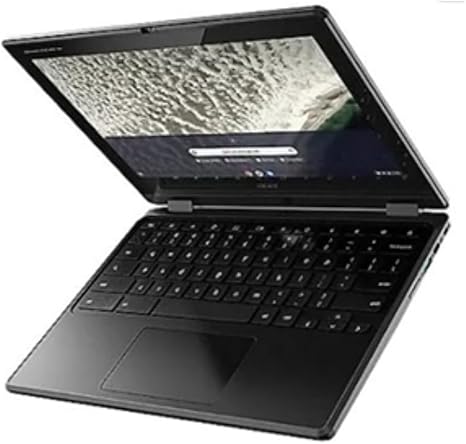
Welcome to Reviews inside tv, where we give you the real scoop on the latest tech. Today, we’re taking a close look at the Acer Chromebook Spin 511 R756TN. This 2-in-1 convertible Chromebook is designed with a focus on portability and ease of use. With its 11.6-inch touchscreen display, Intel N100 quad-core processor, and a sleek black design, it’s aimed at users who need a reliable, compact laptop for day-to-day tasks.
The Acer Chromebook Spin 511 is powered by an Intel N100 quad-core processor, which is part of Intel’s entry-level chip lineup. It’s not built for heavy-duty gaming or resource-intensive creative work, but for everyday productivity like web browsing, document editing, and streaming, this CPU gets the job done. While it’s not the fastest chip on the market, its quad-core setup means it can handle multiple browser tabs or lightweight apps without too much lag. The 4 GB of RAM, although on the lower end, is adequate for basic tasks. You might notice a slowdown if you’re running too many apps at once, but for typical web-based work like emails, word processing, or light media consumption, it performs smoothly.
Storage is handled by a combination of 32 GB SSD and 32 GB flash memory, which should be enough for essential files, but it will fill up quickly if you like to store lots of local data. Since it’s a Chromebook, most of your work will likely be cloud-based, so this won’t be a dealbreaker for many. Just keep in mind that if you’re someone who needs a lot of offline storage, you may need to rely on cloud storage or external drives.
Now, let’s talk about the display. The 11.6-inch screen has a 1366 x 768 resolution, which isn’t high-definition by today’s standards, but it’s more than enough for basic tasks. Whether you’re browsing the web, watching a YouTube video, or attending a Zoom call, the display provides decent clarity. The touch functionality adds convenience for navigating around, though the resolution might leave you wanting more if you’re used to crisper, high-res screens.
Battery life is one of this Chromebook’s standout features. With up to 12 hours of use on a single charge, you can take it through an entire workday without worrying about finding an outlet. Whether you’re working from a coffee shop or using it on the go, the long battery life means you can stay productive without needing to plug in.
In terms of design, the Chromebook Spin 511 is compact and lightweight. At 11.6 inches, it’s easy to carry around, making it a great option for students or professionals who need a laptop that won’t weigh them down. It also features a 360-degree hinge, which lets you flip the screen around for use in tablet mode. This makes it versatile for presentations, casual use, or media consumption. The construction feels solid for a budget laptop, with a simple matte black finish that’s easy to keep clean.
Now, let’s see how this laptop actually performs in the real world. For office and productivity work, the Acer Chromebook Spin 511 is more than capable. You can easily handle tasks like web browsing, working with Google Docs, and running web-based apps. It won’t run heavy programs like Photoshop or video editing software, but for online tasks and word processing, it’s smooth. As for media consumption, it works fine for streaming videos on platforms like Netflix or YouTube, though the lower resolution display won’t give you the sharpest picture. Still, it’s good enough for casual viewing.
For content creators, this laptop isn’t really built for anything too demanding. Its limited RAM and storage, along with the relatively low-powered Intel N100 CPU, make it unsuitable for video editing, graphic design, or any intensive creative work. However, for light photo editing or simple design tasks, it can manage if you’re using web-based tools.
If you’re a gamer, don’t expect this Chromebook to handle anything beyond basic, browser-based games or older titles that don’t demand a lot of power. It doesn’t have a dedicated GPU, so its gaming capabilities are quite limited. But if you enjoy some casual gaming or cloud-based gaming services like Google Stadia or Nvidia GeForce Now, it’ll work just fine.
As far as setup goes, it’s a Chromebook, so it’s a breeze. Booting up is almost instant, and the system feels responsive when waking from sleep. The trackpad is accurate, and the keyboard, while a bit cramped, is comfortable for short typing sessions. Longer typing might feel a bit tedious, but it’s still usable for basic work. The fan noise is minimal, and you likely won’t hear much unless you’re running multiple apps or working with heavy web content.
In terms of thermals, the Acer Chromebook Spin 511 doesn’t get uncomfortably hot, even under light loads. The cooling system keeps things relatively quiet, and there’s no noticeable throttling during normal use. You’ll want to keep it on a flat surface if you’re doing more demanding work, though, to make sure the cooling can work efficiently.
Let’s talk battery life again, because this is one of the most impressive aspects of the Spin 511. You can easily get around 10 to 12 hours of battery life on a full charge, depending on your usage. If you’re mostly browsing the web, watching videos, and handling documents, you’ll likely get closer to the 12-hour mark. The laptop charges quickly, too, so even if you do need to plug in, you won’t be waiting too long for a boost.
Now, the ports and connectivity options are a bit limited for a modern laptop. You get a couple of USB-A ports, a USB-C port, a microSD card reader, and a headphone jack. There’s no HDMI port, and you’ll need to use USB-C for any external display connections. It’s a bit light on options, but this is to be expected with a budget convertible laptop. As for Wi-Fi, it supports the latest Wi-Fi standards, so you’ll have a stable and fast connection as long as you’re on a compatible network.
In terms of build quality, it feels solid enough for everyday use. The plastic construction is lightweight but doesn’t feel flimsy. The hinge mechanism for the 360-degree flip is sturdy, and the overall durability should hold up well over time with basic care.
So, what’s the verdict? The Acer Chromebook Spin 511 R756TN is a solid choice for anyone looking for a budget-friendly, ultra-portable device for basic productivity, streaming, and web-based tasks. It’s perfect for students or professionals who don’t need a powerhouse but still want the versatility of a convertible laptop. If you’re a creator or gamer looking for something with more power, though, this won’t be the laptop for you.
For the price, the performance is solid, but it won’t compete with higher-end Chromebooks or laptops in the same range that offer better displays or more powerful processors. Still, it offers excellent battery life, a decent touchscreen, and the flexibility of a 2-in-1 design at an affordable price point.
If you’ve already tried out the Acer Chromebook Spin 511, drop a comment below and share your thoughts! We’d love to hear about your experiences. Thanks for watching, and don’t forget to check the comments box for the link to grab one of these for yourself. See you next time!
Available to buy here:


