Available to buy here:
Welcome back to Reviews inside tv, where we bring you in-depth looks at the latest laptops to help you make smarter buying decisions. Today, we’ve got the Dell Latitude 7000 7430 14″ Notebook. This machine is geared toward business users, students, or anyone looking for a solid workhorse that can handle the demands of day-to-day productivity while offering a bit of flair in both performance and build quality. Let’s take a closer look and see if this laptop lives up to the hype.
The Dell Latitude 7000 7430 comes packed with an Intel Core i5 12th Gen processor, specifically the i5-1235U. This 10-core CPU operates at a base clock of 1.30 GHz, giving you a solid balance of performance for office work, web browsing, and media consumption. The extra cores are a definite advantage for multitasking—running multiple browser tabs or juggling a few different applications won’t slow you down. That said, it’s not the type of chip that will handle resource-intensive tasks like heavy video editing or gaming, but for most professional and educational needs, it’s more than enough.
When it comes to memory, the Latitude 7430 features 8 GB of RAM, which is the sweet spot for most users. It’s fast enough to handle typical office applications, but if you’re someone who loves having several apps open at once or works with large spreadsheets, 8 GB may feel a bit limiting in the long term. The RAM is paired with a 256 GB SSD, offering snappy storage speeds. SSDs, especially NVMe ones, dramatically improve boot times and loading speeds compared to traditional HDDs, so expect quick wake-from-sleep performance and instant app launches. With this configuration, the system feels fluid and responsive for everyday tasks.
As for the display, the Latitude 7430 is equipped with a 14-inch Full HD (1920 x 1080) screen. This resolution offers good pixel density for a 14-inch form factor, and while it’s not as sharp as a 4K display, it’s perfectly suitable for most tasks. The colors are decent for everyday use, but this isn’t an OLED or high-end IPS panel, so if you’re a creator or designer looking for vibrant color accuracy or deep blacks, you might want to look elsewhere. For business meetings, streaming movies, and casual browsing, it holds up well. The matte finish also helps reduce glare, making it a good option for use in bright environments.
Battery life is always a big talking point with ultrabooks like this one, and with the Latitude 7430, you get around 6 to 8 hours of real-world usage, depending on the workload. This should cover a full workday for light to moderate use, including browsing, emails, and media consumption. If you’re running more demanding applications or have the screen brightness cranked up, you may see that number dip a little, but overall, the battery holds up reasonably well. Charging is quick, and since the battery isn’t overly large, you won’t have to wait long to get back to work.
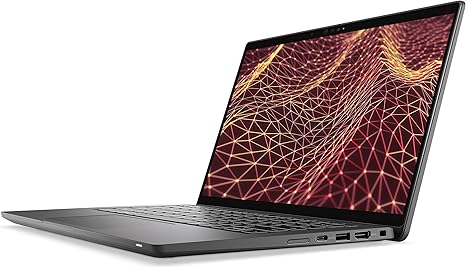
The build quality of the Latitude 7430 is a standout feature. Dell has gone for a carbon fiber finish that’s both durable and lightweight. It’s strong enough to withstand the rigors of daily use without feeling bulky or heavy. The 14-inch size strikes a good balance between portability and screen real estate. Weighing in at around 3 pounds, it’s easy to carry around in a bag all day without it weighing you down.
Now, let’s talk about the keyboard and trackpad. The keyboard on this model is comfortable, with decent key travel that makes typing for long periods a relatively pleasant experience. The layout is standard, with a full-sized set of keys, but there’s no number pad here, which is typical for a 14-inch laptop. The trackpad is responsive, though it’s a bit on the smaller side. It supports multi-touch gestures without any issues, and palm rejection works well, so accidental input while typing won’t be a problem. There’s no touch screen, but that’s not a major concern given the target audience of this laptop.
When it comes to ports and connectivity, the Latitude 7430 doesn’t disappoint. You get two USB-A ports, two USB-C ports (including Thunderbolt 4 support), an HDMI 2.0 port, and an SD card reader. That makes it easy to hook up to external monitors or docks, and the inclusion of Thunderbolt 4 adds significant future-proofing if you plan to use fast storage devices or external GPUs. Wi-Fi 6 and Bluetooth 5.2 are also on board, ensuring stable wireless performance for video calls, streaming, and file transfers.
In terms of real-world performance, the Latitude 7430 is well-suited for office work, media consumption, and some light content creation. Multitasking is smooth, and applications launch quickly thanks to the fast SSD. The fan noise is minimal, and thermal management is solid. You won’t hear the fans ramping up unless you push the laptop with something demanding, but it’s not likely to become an issue during regular work or streaming sessions. The keyboard deck and underside stay comfortably cool, even during longer sessions.
If you’re wondering about gaming, this laptop isn’t really designed for it. You could run some light titles at low settings, but it’s definitely not a gaming machine. The integrated graphics won’t be handling the latest AAA games very well. However, for casual gaming or older titles, it could manage, but expect to lower your settings for smooth play.
As for upgrades, the Latitude 7430’s RAM is soldered, so you won’t be able to expand beyond the 8 GB of onboard memory. The SSD, on the other hand, is easily replaceable if you want more storage in the future.
So, what about the competition? The Latitude 7430 is a solid choice for business professionals, students, or anyone needing a reliable, portable workhorse. But it does face stiff competition from other ultrabooks in this price range. Machines like the HP Elite Dragonfly or Lenovo ThinkPad X1 Carbon may offer better displays and more powerful configurations, but the Latitude 7430 holds its own with its carbon fiber build and balanced performance.
In terms of value for money, the Dell Latitude 7430 is a solid pick for anyone needing a laptop that can handle basic office tasks, browsing, and light media consumption, all while being easy to carry around and offering solid build quality. Its price is justified for the performance it offers, but it does lack a few bells and whistles like a higher-end display or more powerful CPU options.
In conclusion, the Dell Latitude 7430 is an excellent option for users who need a solid and reliable ultrabook without all the frills. If you’re a student, office worker, or frequent traveler who prioritizes portability, build quality, and performance for everyday tasks, this laptop is a great choice. However, if you need more power for content creation or gaming, you might want to explore higher-end options.
If you found this review helpful, make sure to hit that like button, subscribe, and turn on the bell icon so you don’t miss any of our upcoming reviews. Got any questions or already own this laptop? Drop your thoughts in the comments below—we’d love to hear from you.
Thanks for watching, and we’ll see you in the next one. Keep it portable, and keep it real with Reviews inside tv!
Available to buy here: