

Available to buy here:
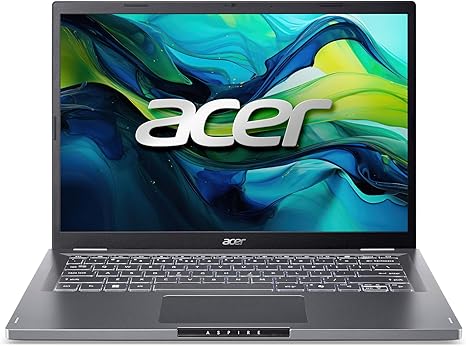
Welcome back to Reviews inside tv! Today, we’re taking a look at the Acer Aspire 14, a sleek, lightweight laptop that packs in some impressive specs, perfect for everything from daily office tasks to more demanding creative workflows. But, does it deliver? Let’s break it down.
At the heart of the Aspire 14 is an Intel Core i5-1200U processor paired with Intel integrated graphics, making it a solid choice for everyday productivity, light multimedia creation, and some casual gaming. You’ve got 16GB of LPDDR5 RAM, which means multitasking is a breeze—whether you’re juggling tabs, documents, or streaming your favorite shows. The 512GB PCIe Gen4 SSD provides fast storage for your files, with boot times and load times noticeably snappier than older SATA-based SSDs. In short, this laptop should feel responsive and fluid for most tasks, but we’ll dive into how it performs in real-world situations shortly.
The display is a 14-inch WUXGA panel with a 1920 x 1200 resolution, offering a bit more vertical space than the usual Full HD screens you find on similar laptops. It’s an IPS panel, so expect solid viewing angles and vibrant colors, with Acer’s BluelightShield to help protect your eyes during long work sessions. This is especially helpful for anyone who spends hours in front of their screen, whether for work, study, or watching content. The 16:10 aspect ratio might take some getting used to, but it’s perfect for productivity, offering a bit more space for documents and spreadsheets. While it isn’t an OLED or mini-LED display, it strikes a good balance between quality and battery efficiency.
Speaking of battery, the Aspire 14 comes with a decent battery capacity that can last up to 8 hours with regular office tasks and media consumption, though heavy use like video editing or gaming will drain it faster. It’s not the longest-lasting laptop on the market, but for day-to-day tasks, you shouldn’t need to worry about constant charging. Plus, it charges relatively fast, thanks to its USB Type-C port supporting Power Delivery.
Now, let’s talk about comfort. The keyboard is backlit, which is always a nice touch for late-night work, and the keys offer a satisfying amount of travel. The trackpad is responsive with solid palm rejection, and the overall typing experience feels pretty comfortable for long sessions. The layout is clean, with the power button integrated into the keyboard, keeping the design streamlined. But one thing to note: the trackpad could feel a bit cramped if you’re used to larger ones.
The Aspire 14 has a great selection of ports, too. With Thunderbolt 4, HDMI 2.1, USB-A, and a headphone jack, you’re set for connecting external monitors, accessories, or even charging other devices. The Wi-Fi 6E support is a bonus for fast, stable internet, and Bluetooth 5.3 ensures reliable wireless connections. However, it’s worth mentioning that the RAM is soldered on, so you won’t be able to upgrade it later, which might be a consideration for those looking for future-proofing.
When it comes to thermals and noise, the Aspire 14 does a decent job, but under load, it can get a bit warm. It’s not the quietest laptop in its class, but the fans do a reasonable job of keeping things cool without becoming too intrusive. During longer tasks like video rendering or light gaming, the performance remains stable, though you might notice a slight dip in frames per second or processing power if you push it too hard for extended periods.
For everyday use, the Acer Aspire 14 really shines. It handles web browsing, document work, and streaming with ease. Watching videos or shows looks crisp and clear on the 14-inch display, and the speakers offer a good balance of clarity and volume. For content creators, it’s more than capable of handling photo editing, light video work, and music production, though it’s not built for heavy-duty rendering or 4K video work.
In terms of gaming, this isn’t a powerhouse, but for lighter, less graphically demanding games, it holds its own. With titles like Fortnite or League of Legends, you can expect playable frame rates at medium settings. But for more demanding titles like Cyberpunk 2077 or Call of Duty, you’ll need to lower the settings significantly to maintain smooth gameplay.
Now, let’s touch on the build quality. The Aspire 14 features an aluminum design that feels sturdy and premium, without being too heavy. It’s lightweight and slim enough to slip into a backpack, making it a solid choice for students, office workers, or anyone who needs portability without sacrificing performance. It feels like a solid, everyday laptop that can take a little wear and tear without any issues.
When it comes to value for money, the Acer Aspire 14 is a well-rounded option at its price point. It offers a great balance of performance, display quality, and build, making it suitable for students, professionals, and casual creators. However, if you’re after something for heavy gaming or intensive creative tasks, you might want to look at other options in the same price range.
To sum it up, the Acer Aspire 14 is a great all-rounder that ticks a lot of boxes for most users. It’s a reliable choice for anyone looking for a solid workhorse that can handle day-to-day tasks, multimedia consumption, and light content creation. Its sleek design, solid specs, and long battery life make it a smart option for students, office workers, or those constantly on the go.
If you’re a casual user or someone who doesn’t require extreme gaming or video editing performance, the Aspire 14 offers good value. However, if you’re a power user looking for a high-end gaming laptop or a workstation for 4K video editing, you’ll likely need to invest a bit more.
Thanks for watching! If you found this review helpful, make sure to like, subscribe, and hit the bell icon so you don’t miss any of our future reviews. And if you’ve used the Acer Aspire 14, let us know your thoughts in the comments below. The link to get the laptop is in the comments box. Until next time, keep on reviewing!
Available to buy here:


