

Available to buy here:
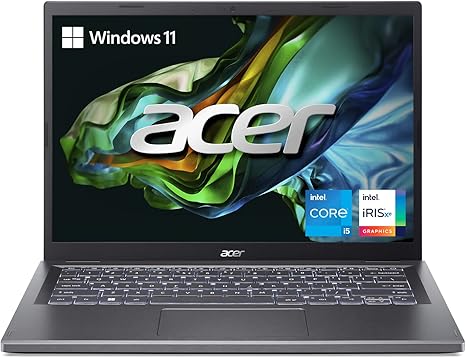
The Acer Aspire 5 is a slim, sleek, and practical option for anyone looking for a reliable laptop to handle daily tasks with ease. Featuring the 13th Gen Intel Core i5-1335U processor, it promises solid multitasking performance, capable of handling web browsing, office applications, and light media work without breaking a sweat. This laptop is designed for productivity, with the Intel Iris Xe integrated graphics offering decent performance for non-intensive creative tasks and light gaming. If you’re working with everyday tasks or editing some photos, the Iris Xe should be more than enough.
The 14-inch WUXGA display is a standout feature, offering a resolution of 1920 x 1200 pixels, which is slightly higher than standard 1080p and provides more screen real estate. This makes it easier to work with multiple windows open, giving you a more spacious, comfortable working environment. The IPS panel ensures vibrant colors and wide viewing angles, so you won’t have to worry about color shift when sharing your screen. Its 16:10 aspect ratio is perfect for productivity, giving you extra vertical space compared to typical 16:9 displays. Whether you’re tackling a big spreadsheet or watching your favorite movie, the sharpness and brightness of the display hold up well.
In terms of memory and storage, the Aspire 5 comes equipped with 8GB of LPDDR5 RAM, a fast and efficient option for multitasking. While 8GB is enough for most people, if you’re doing more demanding work like photo editing or handling larger data sets, you might feel the need for 16GB. The 512GB PCIe Gen 4 SSD is fast, offering quick load times and rapid access to your files, making day-to-day operations like booting up Windows 11 and launching apps a breeze. However, if you store a lot of large files like videos, you may want to consider external storage options.
Battery life is always a big question with slim laptops, and the Aspire 5 doesn’t disappoint. With its 50Wh battery, it can handle typical office use or streaming for around 7 to 8 hours on a single charge. For a laptop this thin, that’s pretty good. The 65W USB-C charger is compact and travel-friendly, so you don’t have to carry around a bulky adapter. When you’re low on power, the fast charging feature ensures that you can top up quickly, which is ideal if you’re rushing between meetings or classes.
The build quality is solid, with an aluminum top cover that provides a premium feel. At just 0.70 inches thick and weighing in at 3.46 pounds, it strikes a nice balance between portability and sturdiness. It’s easy to carry around in a backpack, making it a good option for students or professionals who need something lightweight for on-the-go productivity. Despite being thin, Acer’s TwinAir Cooling system helps prevent overheating, ensuring that the laptop stays relatively cool even during extended sessions of work or media consumption. The fan noise is kept to a minimum, but it does get a bit noticeable under heavy load, such as when you’re exporting large files or gaming.
Speaking of gaming, while this laptop isn’t marketed as a gaming machine, it can handle light gaming. With the Iris Xe graphics, you can expect to run older titles or less demanding games at medium settings. Games like Fortnite or League of Legends will run smoothly at 1080p with medium settings, but you shouldn’t expect to play graphically intense titles like Cyberpunk 2077 without compromising on settings. For casual gamers, it can still offer an enjoyable experience, though more demanding gamers may want to look elsewhere.
The keyboard and trackpad are designed for comfort, with the keyboard offering decent key travel and feedback for typing long documents or emails. The backlighting helps in dim environments, and the ergonomic hinge design tilts the keyboard slightly for a more comfortable typing angle. The trackpad is large and responsive, with accurate palm rejection. It’s an overall solid typing and navigation experience, though those who prefer a more tactile, mechanical feel might find it a bit soft.
When it comes to connectivity, the Aspire 5 is well-equipped. You get a USB Type-C port that supports USB4 and Thunderbolt 4, which means faster data transfers and the ability to connect to high-speed peripherals or external monitors. The two USB 3.2 Gen 1 ports come in handy for regular accessories like a mouse or flash drive. It also includes HDMI 2.1, so you can easily hook up to an external display, along with a headphone jack and a Kensington lock slot. It’s clear that Acer has thought about the needs of professionals, with plenty of options to connect and expand.
For those who rely on video calls or streaming, the 1080p FHD webcam is a pleasant surprise, especially with Acer’s TNR (Temporal Noise Reduction) technology, which helps provide clearer images in low-light environments. The AI-enhanced Acer PurifiedVoice and PurifiedView features further improve the overall video conferencing experience, making it easier to look professional during Zoom calls. The built-in microphones do a good job of filtering out background noise, ensuring that your voice comes through clear and crisp.
In terms of value, the Acer Aspire 5 offers a strong package at its price point. While it may not have the power for demanding tasks like high-end gaming or intensive video editing, it is more than capable for office work, light content creation, media consumption, and casual gaming. Its display, build quality, and connectivity options give it a competitive edge in the budget laptop category.
When compared to other laptops in the same price range, like the HP Pavilion 14 or the Lenovo IdeaPad 5, the Aspire 5 stands out due to its high-quality display, Thunderbolt 4 support, and solid overall performance. The only downside is that for more demanding workloads, the 8GB of RAM might feel a bit limiting. Upgrading to 16GB would make a noticeable difference for anyone working with large files or using memory-heavy apps.
In conclusion, the Acer Aspire 5 is a well-rounded, affordable option for students, professionals, or casual users who need a laptop that can handle everyday tasks, media consumption, and light gaming. It’s sleek, portable, and offers good value for the money, especially for those who prioritize battery life, display quality, and connectivity. However, if you’re looking for a machine with higher-end specs for heavy-duty tasks, you may want to explore other options.
Thanks for watching! If you found this review helpful, be sure to hit like, subscribe, and ring that bell so you don’t miss out on any more honest reviews from “Reviews inside tv.” If you have any questions or thoughts on the Acer Aspire 5, drop them in the comments below—I’d love to hear what you think! Until next time, take care and stay tech-savvy!
Available to buy here:


