
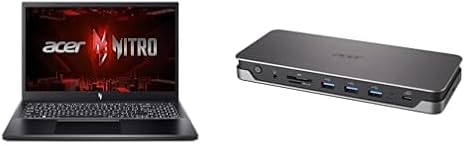

Available to buy here:
Welcome to “Reviews inside tv”! Today, we’re checking out the Acer Nitro V, a gaming laptop that promises to take your performance and creative projects to the next level. Whether you’re gaming, editing, or just handling everyday tasks, the Nitro V 15 looks like it could be a solid option. But does it live up to the hype? Let’s dive in.
This model comes with a 13th Gen Intel Core i5-13420H processor and the powerful NVIDIA GeForce RTX 4050 GPU. So, right off the bat, you’re looking at a solid foundation for both gaming and creative work. The i5-13420H features four performance cores and eight efficient cores, bringing a smooth balance of power for multitasking, gaming, and creative workloads. Coupled with 8GB of DDR5 RAM, the laptop should handle most tasks without breaking a sweat—though if you’re into heavy multitasking or more intensive applications, bumping up to 16GB would certainly help.
Storage comes in the form of a 512GB Gen 4 SSD, offering fast read and write speeds—perfect for quick game loads and fast file transfers. The SSD is NVMe, meaning you’re getting significantly faster speeds compared to SATA SSDs, which translates into quicker boot-ups and snappier performance across the board.
The 15.6-inch Full HD IPS display here is a key highlight, sporting a 144Hz refresh rate. Whether you’re gaming or just scrolling through your favorite content, that refresh rate will make everything feel smoother, especially in fast-paced games. The display covers a solid 82.64% of the screen-to-body ratio, offering plenty of screen real estate for work or play. Color accuracy is on point, but keep in mind that this isn’t an OLED or mini-LED display, so if you’re a creator looking for ultra-vibrant colors or high contrast, this might not be your ideal match.
Now, moving on to the performance. For office and productivity tasks, the Nitro V 15 holds up just fine. Web browsing with multiple tabs, word processing, and video calls work seamlessly. It’s a solid workhorse, even if you’re juggling spreadsheets or hopping between apps. For media consumption, the speakers are decent, though not exceptional. The screen’s brightness should be enough for most indoor environments, but it might struggle a bit in direct sunlight.
When it comes to content creation, this laptop shines with photo and video editing, thanks to the fast SSD and strong CPU-GPU combo. Export times are faster than you might expect, and even though it’s not the highest-end machine for 4K editing, it handles 1080p work very well. If you’re gaming, the RTX 4050 brings a solid experience in AAA titles, but don’t expect to max out the settings in the most graphically demanding games. For titles like Cyberpunk 2077, you’ll be looking at medium settings with decent frame rates—expect around 50–60 FPS at 1080p on high settings. For competitive titles like Call of Duty: Warzone, you should comfortably hit 120 FPS at medium settings.
In terms of thermals, the Nitro V does a respectable job at keeping temperatures in check during everyday tasks. Under load, the fans do kick in, but they’re not overly loud. Gaming or video exporting will make the fans work harder, and while it doesn’t have aggressive thermal throttling, you might notice a bit of performance drop after prolonged gaming sessions. This isn’t unusual for gaming laptops at this price range, but it’s worth keeping in mind if you’re planning on long gaming marathons or intensive creative sessions.
Battery life is one area where the Nitro V performs decently, though not exceptional. With a 50Wh battery, you can expect around 5 to 7 hours of light use—office work or media streaming. Under heavier loads, that’ll drop significantly. It’s not the longest-lasting battery out there, but it’s definitely serviceable for daily tasks, and it charges relatively quickly thanks to the 85W PD USB-C charging.
As for portability, the Nitro V weighs around 5 pounds, which is on the heavier side for a 15-inch laptop, so it may not be the most travel-friendly option if you’re on the go. Still, it’s manageable if you’re not carrying it everywhere all day.
The keyboard feels solid for typing, with decent key travel and a responsive feel. It’s comfortable for long sessions, but like many gaming laptops, it does have a slightly cramped layout. The trackpad is responsive, though not as large as some users may prefer. It’s fine for general use, but serious multitaskers might prefer an external mouse.
Connectivity-wise, the Nitro V 15 has a lot to offer. You get two USB-A 3.1 ports, one USB-C 3.1 port, an HDMI port, and a full-size SD card reader—making it great for connecting to monitors, external drives, or other peripherals. It also comes with a Gigabit Ethernet port, which is great for stable online gaming sessions, and the Wi-Fi 6 support ensures fast and reliable internet connections.
Now, let’s talk about the build quality. The chassis feels solid enough, though it’s made of plastic, which gives it a less premium feel than metal-bodied laptops. Still, it’s rigid and doesn’t feel cheap. The hinge feels sturdy, and the screen is firm when adjusted.
So, what are the pros and cons of the Acer Nitro V 15? On the plus side, it offers great performance for its price, especially when it comes to gaming and content creation. The screen is nice for media consumption, and you get a variety of ports and good connectivity options. Battery life and thermals could be better, but for the most part, this laptop strikes a solid balance of power and portability.
On the downside, the weight is a bit of an issue for those who need something ultra-portable, and the battery life could certainly be longer, especially for those who need a laptop that lasts all day. The display is good, but if you’re a creator needing perfect color accuracy, you might want to look elsewhere.
In terms of value for money, the Acer Nitro V is competitive. If you’re a gamer or creator on a budget looking for a solid performance machine without breaking the bank, this laptop is a strong option. It doesn’t offer the absolute best in any one category, but it covers the essentials well, making it a good choice for anyone who needs a reliable all-rounder. Compared to others in the same price range, it holds its own, though you might find a few rivals offering better battery life or lighter designs.
When comparing this to other laptops in the market, the Acer Nitro V stacks up well against options like the ASUS TUF A15 or the Lenovo Legion 5, offering similar performance at a competitive price. While those alternatives might edge out in battery life or cooling efficiency, the Nitro V remains a strong contender in the gaming and creator laptop space.
All in all, if you’re after a gaming laptop with solid performance and a decent price tag, the Acer Nitro V could be just what you need. It’s not perfect, but it delivers on its promises and serves a wide range of users well.
Thanks for watching! The link to get your hands on the Acer Nitro V can be found in the comments box below. If you’ve already used this laptop, or if you have any questions, feel free to share your thoughts in the comments. Don’t forget to like, subscribe, and hit that bell icon so you don’t miss out on any of our future reviews. Until next time, happy gaming!
Available to buy here:


